Table of Contents
A combination chart places different series types on the same axes. Columns are useful for individual period values, a line can emphasize a target or trend, and an area can provide background context. The series should represent comparable units and share a meaningful horizontal scale.
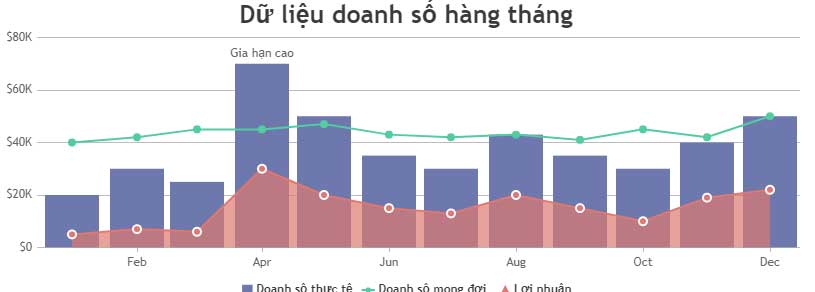
Complete CanvasJS combination-chart example
This demonstration compares monthly order counts. The area shows the previous year, columns show the current year, and the line shows a target. All three series use the same unit, so a shared vertical axis is appropriate.
<!doctype html>
<html lang="en">
<head>
  <meta charset="utf-8">
  <meta name="viewport"
        content="width=device-width, initial-scale=1">
  <title>Column, line, and area chart</title>
  <script src="https://cdn.canvasjs.com/canvasjs.min.js"></script>
</head>
<body>
  <div id="chartContainer"
       style="height: 380px; width: 100%;"></div>

  <script>
    window.addEventListener("DOMContentLoaded", function () {
      const chart = new CanvasJS.Chart("chartContainer", {
        animationEnabled: true,
        exportEnabled: true,
        title: {
          text: "Monthly orders"
        },
        axisX: {
          title: "Month"
        },
        axisY: {
          title: "Orders",
          includeZero: true
        },
        toolTip: {
          shared: true
        },
        legend: {
          cursor: "pointer"
        },
        data: [
          {
            type: "area",
            name: "Previous year",
            showInLegend: true,
            color: "#bfdbfe",
            fillOpacity: 0.45,
            markerSize: 0,
            dataPoints: [
              { label: "Jan", y: 82 },
              { label: "Feb", y: 88 },
              { label: "Mar", y: 91 },
              { label: "Apr", y: 96 },
              { label: "May", y: 101 },
              { label: "Jun", y: 105 }
            ]
          },
          {
            type: "column",
            name: "Current year",
            showInLegend: true,
            color: "#2563eb",
            dataPoints: [
              { label: "Jan", y: 90 },
              { label: "Feb", y: 94 },
              { label: "Mar", y: 103 },
              { label: "Apr", y: 99 },
              { label: "May", y: 112 },
              { label: "Jun", y: 118 }
            ]
          },
          {
            type: "line",
            name: "Target",
            showInLegend: true,
            color: "#dc2626",
            lineThickness: 3,
            markerType: "circle",
            markerSize: 7,
            dataPoints: [
              { label: "Jan", y: 95 },
              { label: "Feb", y: 98 },
              { label: "Mar", y: 101 },
              { label: "Apr", y: 104 },
              { label: "May", y: 108 },
              { label: "Jun", y: 112 }
            ]
          }
        ]
      });

      chart.render();
    });
  </script>
</body>
</html>
How CanvasJS combines chart types
Each object in the chart's data array is a separate series. Set its type to area, column, or line, then supply its own dataPoints.
CanvasJS renders the series in array order. The example draws the area first so it sits behind the columns and line. If the area is listed last, its fill may cover important details from earlier series.
Keep x-axis values aligned
Every series should use the same month labels or the same date values. If one series skips a period or uses a different order, points may no longer compare correctly. For production data, create one ordered list of periods and map each series to it.
Use actual Date objects when the spacing between dates matters. Category labels are appropriate when each period should occupy an equal slot.
Useful customization options
showInLegend: trueadds a series to the legend; it does not create annotations.namesupplies the default legend and tooltip label.legendTextcan override the text shown in the legend.colorsets a series color.fillOpacitycontrols the area transparency.indexLabeldisplays text at data points. Use it selectively to avoid clutter.toolTip.shared: truegroups series values for the same period.
When not to use a combination chart
Do not combine series merely because the library allows it. If the measures use unrelated units or very different scales, one series can appear artificially flat. A secondary axis can help in some cases, but it also increases the risk of a misleading visual comparison. Separate charts are often clearer.
Use a consistent legend, axis labels, units, and color contrast. Provide the underlying values in a table when readers need exact figures, and explain whether targets or historical values were adjusted.
Troubleshooting
- If one series is hidden, change the array order or reduce the area's opacity.
- If points do not align, compare the labels or dates across every series.
- If the chart is blank, check the library load, container ID, height, and browser console.
- If exported data is sensitive, confirm that an image export is appropriate before enabling
exportEnabled.
CanvasJS is a third-party library, so review its current license before production use. The official column, line, and area example shows the current combination-chart API.
For alternatives, compare these data-visualization tools. These code-sample websites can help you test and share smaller JavaScript experiments.
Related Articles
 How to Create a Chart Combining Columns and Lines in Excel5 minutes read
 JavaScript Code to Create a Combined Area and Line Chart3 minutes read
 Javascript Code to Create OHLC and Line Chart Combo Chart Template2 minutes read
 Javascript Code to Generate Dynamic Line Graphs/Charts2 minutes read
 JavaScript Code to Create Bubble Charts and Graphs2 minutes read
 JavaScript Code to Create a Scatter Plot/point Chart4 minutes read
Reader Comments 0
Sign in with email or Google to join the discussion.