Table of Contents
A scatter plot displays the relationship between numeric x and y values. When a chart contains several data series, different marker shapes help readers distinguish them without relying on color alone. In CanvasJS, set markerType on each series or on an individual data point.
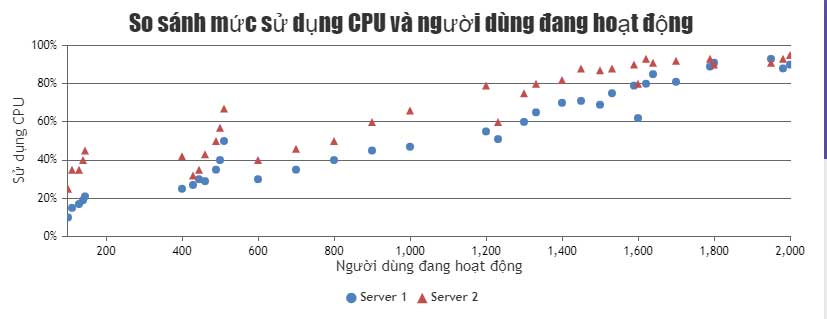
Complete CanvasJS scatter plot example
The following HTML creates two scatter series. Group A uses circles and Group B uses triangles. The values are simple demonstration data, so replace them with the measurements required by your project.
<!doctype html>
<html lang="en">
<head>
  <meta charset="utf-8">
  <meta name="viewport"
        content="width=device-width, initial-scale=1">
  <title>Scatter plot with custom markers</title>
  <script src="https://cdn.canvasjs.com/canvasjs.min.js"></script>
</head>
<body>
  <div id="chartContainer"
       style="height: 360px; width: 100%;"></div>

  <script>
    window.addEventListener("DOMContentLoaded", function () {
      const chart = new CanvasJS.Chart("chartContainer", {
        animationEnabled: true,
        title: {
          text: "Sample measurements"
        },
        axisX: {
          title: "X value"
        },
        axisY: {
          title: "Y value"
        },
        toolTip: {
          shared: false
        },
        data: [
          {
            type: "scatter",
            name: "Group A",
            showInLegend: true,
            markerType: "circle",
            markerSize: 10,
            markerColor: "#2563eb",
            dataPoints: [
              { x: 1, y: 4 },
              { x: 2, y: 5 },
              { x: 3, y: 7 },
              { x: 4, y: 8 }
            ]
          },
          {
            type: "scatter",
            name: "Group B",
            showInLegend: true,
            markerType: "triangle",
            markerSize: 12,
            markerColor: "#dc2626",
            dataPoints: [
              { x: 1, y: 7 },
              { x: 2, y: 8 },
              { x: 3, y: 6 },
              { x: 4, y: 10 }
            ]
          }
        ]
      });

      chart.render();
    });
  </script>
</body>
</html>
How the custom markers work
Each object in the data array represents one series. Both series use type: "scatter", but their marker settings differ:
markerTypeselects the shape. CanvasJS supports values includingcircle,square,triangle,cross, andnone.markerSizesets the marker size as a number.markerColorsets the fill color.markerBorderColorandmarkerBorderThicknesscan add an outline.showInLegenddisplays the series in the legend, andnamesupplies its label.
The legend normally uses the series marker. If you need a different legend symbol, CanvasJS also provides legendMarkerType.
Override one data point
A setting on a data point can override the series-level marker for that point. This is useful for highlighting an outlier or selected value:
dataPoints: [
  { x: 1, y: 4 },
  {
    x: 2,
    y: 9,
    markerType: "square",
    markerColor: "#16a34a",
    markerSize: 14
  },
  { x: 3, y: 7 }
]
Use an individual override only when the different symbol has a clear meaning. Explain that meaning in a legend, label, or nearby text.
Make the scatter plot easier to read
- Give both axes descriptive titles and include units when applicable.
- Use series names that explain the groups rather than labels such as “Series 1.”
- Combine shape and color so the chart remains understandable for readers who cannot distinguish certain colors.
- Avoid oversized markers that overlap nearby points.
- For thousands of points, consider smaller markers or
markerType: "none"because dense symbols can reduce clarity and rendering performance. - Provide a table or text summary when readers need exact values or when accessibility requirements call for a non-visual alternative.
Run and troubleshoot the code
Save the example as an .html file and open it in a browser. If the chart area is blank, check the browser console, confirm that the CanvasJS script loaded, verify that chartContainer matches the div ID, and ensure that the container has a nonzero height.
CanvasJS is a third-party chart library, so review its current licensing and deployment instructions before using it in a production site. The marker options are documented in the CanvasJS custom-marker scatter chart example.
For other presentation approaches, compare these data-visualization tools. You can also use these code-sample websites for programmers to test small front-end examples.
Related Articles
 JavaScript Code to Create a Scatter Plot/point Chart4 minutes read
 Javascript: Complete Guide: Javascript Code That Generates Box and2 minutes read
 JavaScript Code to Create a Combined Area and Line Chart3 minutes read
 Javascript: Complete Guide2 minutes read
 Javascript Code to Create Bubble Chart with Custom Marker2 minutes read
 Javascript Code to Generate Dynamic Line Graphs/Charts2 minutes read
Reader Comments 0
Sign in with email or Google to join the discussion.