Table of Contents
Overview
This guide explains how to change Facebook fanpage name on a computer or phone in clear, practical terms. It covers the key concepts, recommended steps, common limitations, and useful checks so you can make a better-informed decision.
Facebook fanpage is a fertile land that the online business community is currently exploiting thoroughly. This is where we can promote our information and products to other users in the most widespread and fastest way. But to be effective, your Facebook fanpage name must first attract users. However, when creating a fanpage, we often accidentally ignore this and just name it as we like. But don't worry, changing the name of a Facebook fanpage is as simple as changing a personal Facebook name, but has the advantage of not being limited to the number of times you can change the name. If you don't know how to change the name of a Facebook Fanpage, see This guide by this guide!
Rename Facebook Fanpage on computer via browser
First, access Facebook and go to the page management section or quickly access via the link: Facebook. com/pages
Select the Fanpage you want to rename
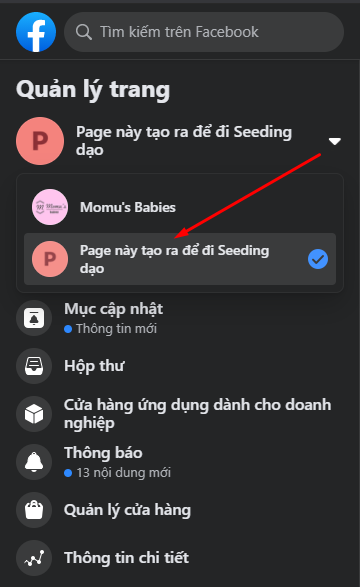
Go to the page information editing section in the Fanpage management column on the left corner of the screen.

Rename Facebook Fanpage and other information according to suggested items

After changing the name, click Request Change to confirm the Fanpage name change.

How to change Facebook Fanpage name on phone
Similar to the operations through the web browser on the computer, to change the name of the Facebook Fanpage on the phone, we first need to go to the Facebook application > select the Fanpage to rename.

At the main interface of Fanpage, select the Edit page button with the pen icon
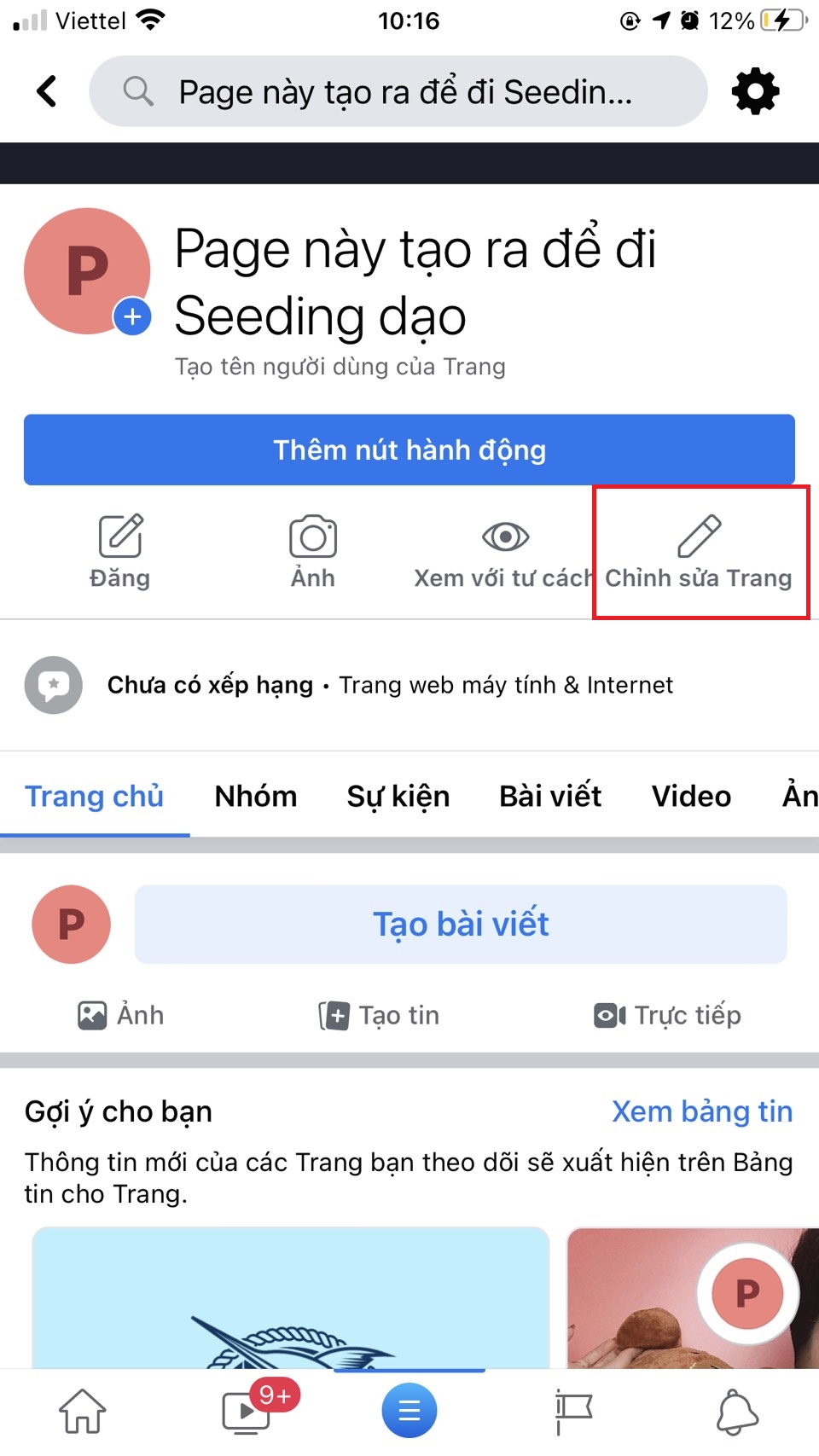
Then, fill in the new Fanpage name as desired and click confirm OK

Above is a complete guide on how to change the name of Fanpage on both phone and computer. Having an attractive Fanpage name can help you attract more customers and users. Hopefully the above information can help you a lot in doing business or developing your Fanpage.
Key Takeaways
Use the guidance above as a practical reference for change Facebook fanpage name. Check compatibility, follow the steps carefully, and verify important details with official documentation when software, security, accounts, health, or purchases are involved.
FAQ
How do I change Facebook fanpage name on a computer or phone?
Follow the steps in this guide in order, confirm each setting before continuing, and save, restart, or reconnect the device when the instructions require it.
What should I check before I begin?
Confirm the correct device, account access, software version, compatibility, and a current backup whenever the process could affect files, settings, or security.
What should I do if the process does not work?
Repeat the steps carefully, check for model or version differences, install available updates, and consult the manufacturer's official support documentation.
Related Articles
 How to Change the Facebook Fanpage Page Name5 minutes read
 How to Change the Name of the Fanpage Facebook Page4 minutes read
 How to Change Facebook Fanpage Catalog: Create Facebook Fanpage5 minutes read
 How to Change Your Facebook or Fanpage Name on Your Phone or Computer5 minutes read
 Instructions on How to Create Facebook Fanpage for Online Sales7 minutes read
 Instructions on How to Check in for Facebook Fanpage4 minutes read
Reader Comments 0
Sign in with email or Google to join the discussion.