Table of Contents
This practical guide explains how to view YouTube shorts in landscape mode. Follow the steps in order, review the requirements first, and use the troubleshooting notes when a setting or option does not work as expected.
How to enable YouTube Shorts landscape mode
Note that this feature is currently only available on select Pixel devices and requires the latest version of YouTube to update the feature.
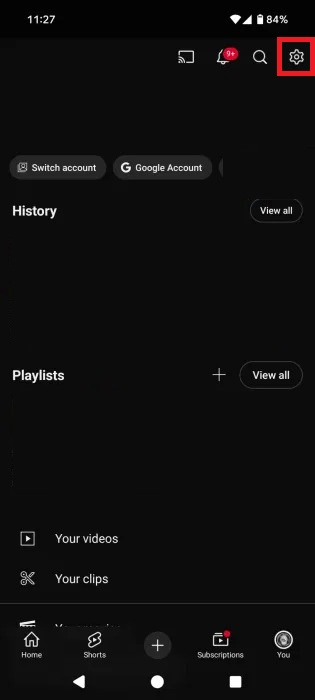
Just go to YouTube on your phone and tap on the You tab. Then tap the gear icon to access YouTube Settings .
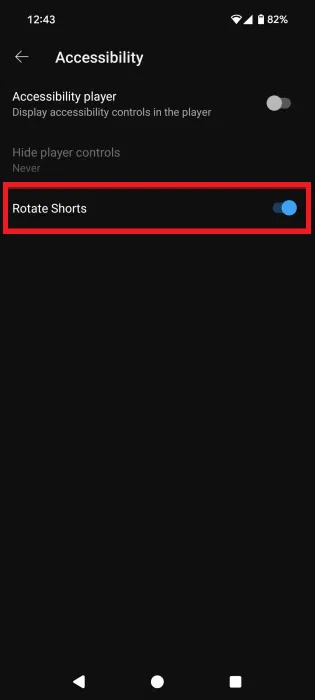
Scroll down below, we select Accessibility . Continue to turn on Rotate Shorts mode.
So when you open any YouTube Shorts video and as soon as you switch to landscape mode, the video will continue playing. When viewing YouTube Shorts in landscape mode, there are a few things to keep in mind:
- YouTube Shorts videos appear in the center and black vertical lines on the left and right.
- The search bar is at the bottom with the video name, channel name, and description at the top. The options to like, dislike, comment, share, and the video are available on the right side of the screen.
FAQ
How to enable YouTube Shorts landscape mode?
Note that this feature is currently only available on select Pixel devices and requires the latest version of YouTube to update the feature.
What does this guide cover?
This guide explains view YouTube shorts in landscape mode, including the main steps, important details, and practical considerations.
Who is this guide for?
It is designed for readers who want a clear, practical overview and a reliable process they can follow without unnecessary complexity.
Related Articles
 How to Block YouTube Shorts3 minutes read
 What Is YouTube Shorts? Can You Become a Rival of TikTok?3 minutes read
 How to Download YouTube Shorts5 minutes read
 How to Add YouTube Shorts Video Effects3 minutes read
 How to Hide YouTube Shorts Videos on Computer3 minutes read
 YouTube Shorts Adds TikTok-style Artificial Voices3 minutes read
Reader Comments 0
Sign in with email or Google to join the discussion.