Table of Contents
This practical guide explains how to view email and calendar at the same time in outlook. Follow the steps in order, review the requirements first, and use the troubleshooting notes when a setting or option does not work as expected.
How to view email and calendar at the same time in Outlook
With the new Outlook version, users select the My Day icon in the top corner of the interface as shown below to display the calendar interface on Outlook while you are still reading the email content.
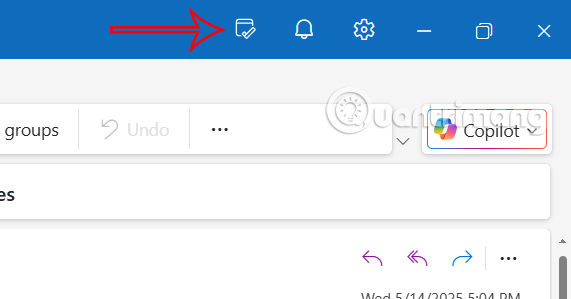
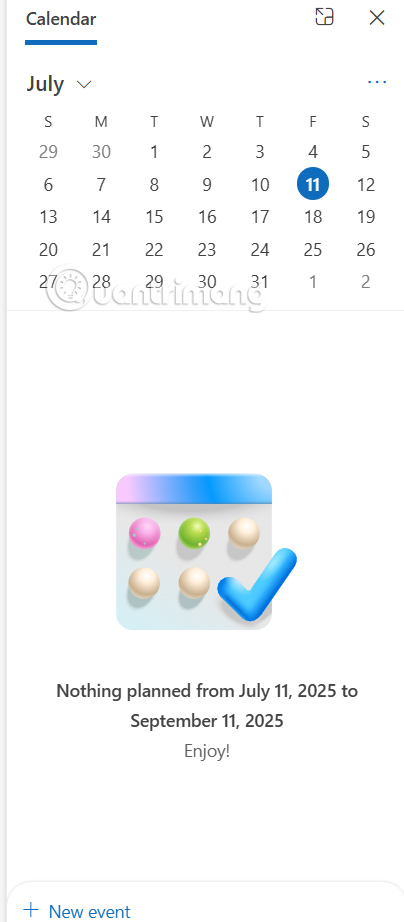
You can then add events right on the calendar interface on Outlook to save when needed.
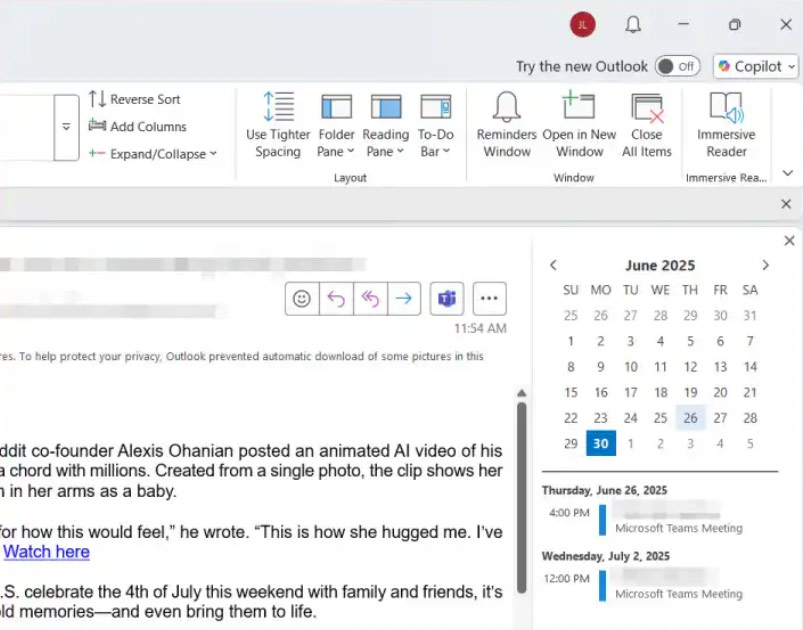
In the case of using classic Outlook, we select the View tab, select To Do Bar then select Calendar to view the calendar, as well as the events added in the calendar on Outlook. Or you can also create more events in this calendar.
FAQ
How to view email and calendar at the same time in Outlook?
With the new Outlook version, users select the My Day icon in the top corner of the interface as shown below to display the calendar interface on Outlook while you are still reading the email content.
What does this guide cover?
This guide explains view email and calendar at the same time in outlook, including the main steps, important details, and practical considerations.
Who is this guide for?
It is designed for readers who want a clear, practical overview and a reliable process they can follow without unnecessary complexity.
Related Articles
 Share Outlook Calendar: How to Share Your Calendar in Outlook3 minutes read
 Instructions on How to Use Outlook 2013 for New People14 minutes read
 How to Print Emails on Outlook3 minutes read
 Top Vietnamese Calendar Application, See the Best Sound Schedule8 minutes read
 How to Block an Email Address on Outlook3 minutes read
 How to Set up Email, Calendar, Outlook Contacts on iPhone or iPad4 minutes read
Reader Comments 0
Sign in with email or Google to join the discussion.