Table of Contents
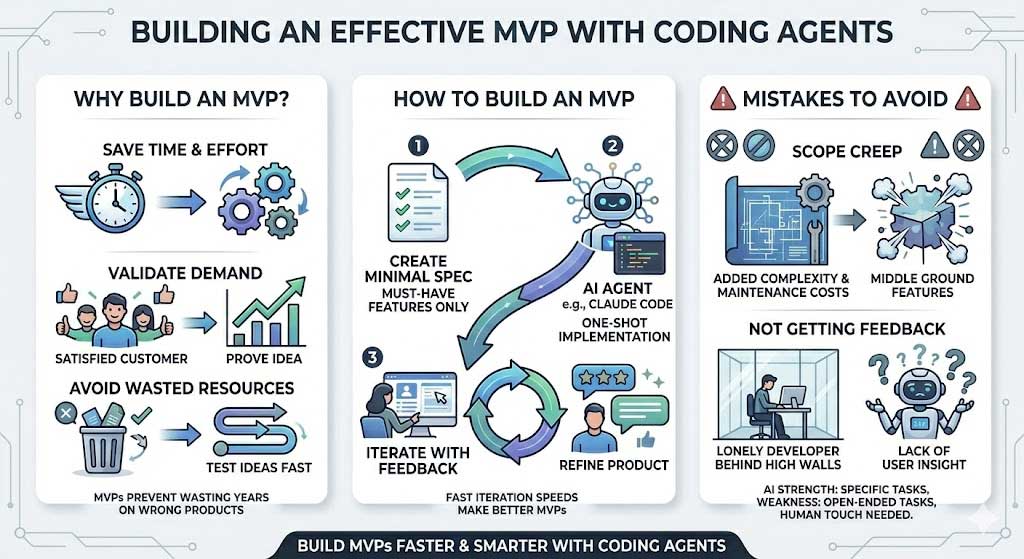
Use Claude Code to build the smallest working product that can test a specific customer need. Start with one user journey, define what success looks like, and implement it in small, verifiable steps. Faster code generation helps only if the product tests the right idea.
An MVP—a minimum viable product—is more than a collection of screens. A user should be able to complete the core task and get a useful result. A mockup can test interest or usability, but it does not demonstrate that an unfinished service works.
1. Write the hypothesis before the feature list
State who the product is for, what problem it addresses and what evidence would justify more investment. For example: “Freelance tutors need a simpler way to track unpaid lessons. We want to see whether they can enter a lesson and find outstanding payments without a spreadsheet.”
For that example, the initial scope could be adding lessons, marking payments and viewing an outstanding balance. Automated reminders, payment processing and a mobile app can wait unless they are essential to the hypothesis.
Define the observation in advance: can a test user complete the task, where do they struggle, and would they use the tool again? A working build alone does not prove demand.
2. Give Claude Code a bounded product brief
Include the intended user, required workflow, input data, expected output, constraints and explicit exclusions. If you are extending an existing project, ask Claude to inspect it before choosing libraries or changing architecture.
Inspect this repository and its setup instructions. Plan an MVP for a freelance tutor to add a lesson, mark it paid and view unpaid lessons. Use the existing stack and synthetic data initially. Do not add payment processing, email sending or unrelated features. Identify the files to change, important assumptions and checks for each step. Do not implement until the plan is clear.
Use Plan Mode when the approach needs investigation. Claude Code's best-practice guidance recommends separating exploration, planning and implementation for larger changes and giving the agent a way to verify its work.
For setup details, see how to use Claude Code. Before editing, keep a recoverable project copy or version-control checkpoint. Give the tool access to the project it needs, not unrelated personal files or production credentials.
3. Build one complete user journey
Ask for a small vertical slice: interface, data handling and visible result for one task. Review that working slice before adding the next one. This exposes incorrect assumptions earlier than generating every screen in one pass.
For the tutor example, a useful sequence is:
- Display a lesson list using clearly labeled sample data.
- Add a lesson and show validation errors for missing or invalid fields.
- Save and reload the lesson using the chosen storage method.
- Mark a lesson paid and update the outstanding total.
- Handle empty lists and failed saves without misleading success messages.
Implement only adding and listing lessons from the agreed plan. Keep sample records separate from real data. Verify that a valid lesson remains after reload, an invalid amount is rejected and a failed save shows an error. Run the available checks and report what you tested, what passed and what remains untested.
Read the proposed changes and try the workflow yourself. A generated summary is not proof that a button works or that data survives a restart.
4. Keep essential safeguards in the minimum scope
“Minimum” can reduce features, but it should not remove the controls needed for the chosen test. A local prototype with synthetic data has different requirements from a public app storing customer records.
- Data access: if multiple users have accounts, verify that one cannot read or change another's records.
- Secrets: keep credentials out of client-side code and source control; use the deployment platform's supported secret configuration.
- Data integrity: validate input, handle failed operations and avoid duplicate records when users retry.
- Recovery: preserve a working version and a backup or reset plan for test data.
- External actions: use test services before enabling real payments, messages or customer-facing automation.
Ask Claude for the specific evidence behind each check. If a tool, environment or credential is missing, the result should say so instead of claiming the check passed. Have a qualified developer review consequential authentication, payment or data-handling code before exposing it to real users.
5. Test with users and turn observations into changes
Give a potential user a concrete task and observe without explaining each click. Record where they hesitate, what they expect and whether they obtain the intended result. Feedback from one session is useful evidence, not definitive market validation.
Translate observations into bounded requests. “The form is confusing” is less actionable than “Users cannot tell whether payment status was saved; show the saved state and keep it after reload.” Include reproduction steps and the acceptance condition when asking Claude to fix a problem.
Keep feature requests in a separate backlog. Prioritize failures that prevent the core task, then changes that test the original hypothesis. Use Claude Code in VS Code if that makes reviewing related file changes easier in your workflow.
Avoid the two common traps
Scope creep: cheap-looking additions still introduce data, interfaces and maintenance work. Ask whether each feature is needed for the next user test before building it.
Endless polishing without feedback: improve reliability enough for a safe, meaningful test, then learn from actual use. The next iteration should address observed problems or test a clear assumption—not merely make the demo look more complete.
Related Articles
 What Is the Claude Code: Clear Explanation7 minutes read
 When Should You Not Use Claude Code?10 minutes read
 Things You Need to Know About Claude Code5 minutes read
 How to Use Claude to Code and Debug Code6 minutes read
 This Claude Code Mode Is a Worthy Competitor to Other Ides8 minutes read
 How to Use Claude Code Safely: a Guide to Risk Management12 minutes read
Reader Comments 0
Sign in with email or Google to join the discussion.