Table of Contents
Learn how to turn personal photos into memes on Google photos with clear steps, practical tips, and troubleshooting guidance for a reliable result.
Guide to creating memes on Google Photos
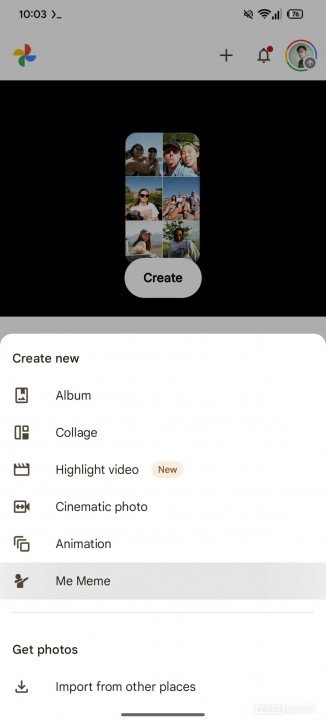
We access the Google Photos app and then tap the Create button . In the list of options, tap Me Meme to use the meme generator available in the Google Photos app. There you can choose the image template you want to use.
Tap "Add photo" to add images to Me Meme. Users will use AI to analyze the image and create a meme based on their chosen template.
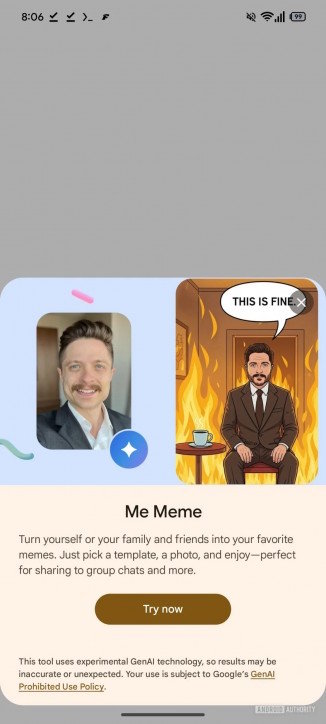
After successfully creating a meme, you have the option to download or share it with others.
Essentially, the Me meme option on Google Photos is still in the rollout phase, with limited meme templates available and currently only rolled out in the US market before a stable version is released for other markets.
Final Thoughts
Use this guide as a practical checklist for how to turn personal photos into memes on google photos. Work through the steps in order, verify each result, and adjust the options to match your needs.
FAQ
What do you need before following this How to Turn Personal Photos into Memes on Google Photos guide?
Review the required tools, accounts, settings, or materials mentioned in the article. Learn how to turn personal photos into memes on Google photos with clear steps, practical tips, and troubleshooting guidance for a reliable result.
What are the main steps for how to turn personal photos into memes on google photos?
Follow the sections in order, especially Guide to creating memes on Google Photos. Complete each step before continuing and verify the result as you go.
What should you do if the process does not work as expected?
Recheck the prerequisites, update the relevant app or service, review the settings, and repeat the step that caused the issue. Use any troubleshooting notes included in the guide.
Related Articles
 Guide to Finding Free AI Memes: Complete Guide3 minutes read
 How to Hide Google Photos Content from Other Apps2 minutes read
 How to Turn Off Moving Photos in Google Photos: Step-by-Step Guide4 minutes read
 How to Turn Off Automatic Saving of Screenshots to Google Photos2 minutes read
 5 Annoying Features on Google Photos You Should Turn Off Immediately6 minutes read
 6 Annoying Google Photos Features You Should Turn Off5 minutes read
Reader Comments 0
Sign in with email or Google to join the discussion.