Table of Contents
The following guide provides a clear overview of Send whatsapp blank message, with the most relevant background, details, and practical takeaways.
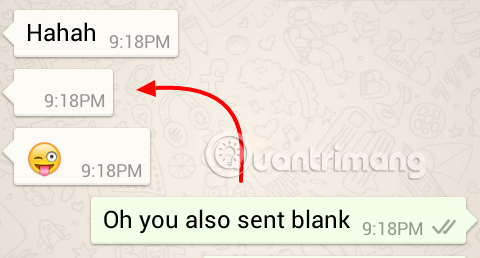
There are many tricks you can use on this instant messaging application and one of its famous tricks is to send a blank message. This article will show you how to send this message on WhatsApp. Although, there are many ways to send blank messages in WhatsApp, but if you are looking for the most convenient way, please read the following article. The following three methods have been tested and work on all devices.
- These features make it easier to master WhatsApp
Method 1: How to Send a Black Message on Whatsapp Using a PC Desktop
This method is for Windows computer users. Follow the steps below to send a black message:
Step 1: First, open the Notepad text editor on your computer.
Step 2: Type Alt + 0160 or Alt + 255 to add space in Notepad.
Step 3: After entering these digits, you will see a space created, save the file and transfer it to your Android, iOS phone or tablet or any device that has WhatsApp installed.
Step 4: Now, access the File Manager or the location to save the file. Open the file and copy the contents of the file. Then, open WhatsApp and select the address you want to send a blank message, paste it and press send. You should now see a blank message sent to your friend.
Method 2: Send a Blank Message in Whatsapp Using Blank Characters
With this method, we will use Arabic characters because this character is not defined on WhatsAPP so it will create a blank message when sent to the recipient. To find this character you must use this character's Unicode 0xFDFF.

This space is placed between '' (quotation marks). Copy the content and paste it into WhatsApp. Note, you must remove this quotation mark before pressing the submit button. You will see the message sent without content.
Download the empty character here.
Method 3: Send a Blank Message in Whatsapp Using the Noword Application
This method uses Noword application to send blank messages in WhatsApp.
Download: Noword for Android
After downloading the application, open it and click the Send button. You will see a message appear, select WhatsApp from this list.
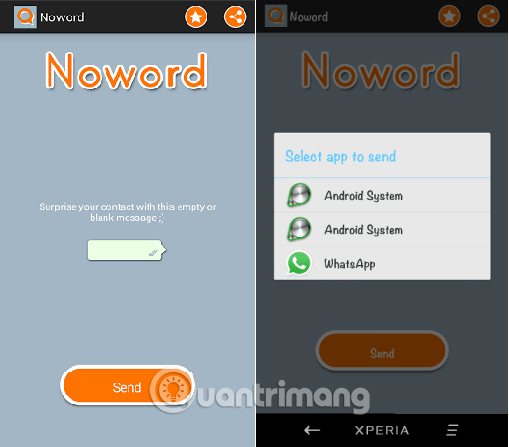
Then WhatsApp will be opened, you can select recipients to send this blank message.
I wish you all success!
- How to use WhatsApp to chat, call, message your friends
- How to recover messages on WhastApp
- Delete WhatsApp account on phone in 6 steps
FAQ
How does Send whatsapp blank message work?
The following guide provides a clear overview of Send whatsapp blank message, with the most relevant background, details, and practical takeaways.
What should you prepare before using this method?
There are many tricks you can use on this instant messaging application and one of its famous tricks is to send a blank message.
What should you do if the process does not work as expected?
This article will show you how to send this message on WhatsApp.
Related Articles
 These Features Make It Easier to Master Whatsapp16 minutes read
 How to Set Up Away Message on WhatsApp2 minutes read
 WhatsApp Updates New Message Notifications3 minutes read
 How to Only Allow Admin to Send Messages in Whatsapp Group Chat on3 minutes read
 How to Send Voice Messages in Whatsapp on Iphone3 minutes read
 How to Record Live Video Sent on Whatsapp3 minutes read
Reader Comments 0
Sign in with email or Google to join the discussion.