Table of Contents
The “Free DWG Viewer” installer in the original guide is an old third-party trial and should not be your first choice today. For a current, free desktop viewer on Windows, install Autodesk DWG TrueView from Autodesk. If you only need to inspect a drawing occasionally, Autodesk Viewer works in a browser without installing software.

Choose a viewer first
| Option | Best for | Important limitation |
|---|---|---|
| Autodesk DWG TrueView | Viewing, measuring, plotting and converting DWG files on Windows | Desktop application; not a full CAD editor |
| Autodesk Viewer | Quick browser-based viewing and sharing across platforms | Files are uploaded to a cloud service; sign-in and internet access may be required |
| Autodesk Design Review | DWF markup, measurement and review | DWG/DXF support also requires DWG TrueView |
| ODA Drawings Explorer | Testing and inspecting DWG and DGN files | Current licensing is a time-limited trial, not permanently free |
LibreCAD is a useful open-source 2D CAD application, but its compatibility with complex DWG content is not a replacement for TrueView. If possible, exchange DXF files when using LibreCAD and verify fonts, dimensions, layouts and unsupported objects.
How to install Autodesk DWG TrueView
1. Check the requirements
Open the official DWG TrueView product page and review Autodesk's system requirements. Current releases are designed for 64-bit Windows and require substantially more memory and storage than the obsolete 57.5 MB viewer described in the original article.
2. Download only from Autodesk
Select the download for the current DWG TrueView release. Save the installer, verify that it comes from Autodesk, and avoid third-party repacks or “portable” builds. Autodesk may first download a small setup component that retrieves the full installation files.
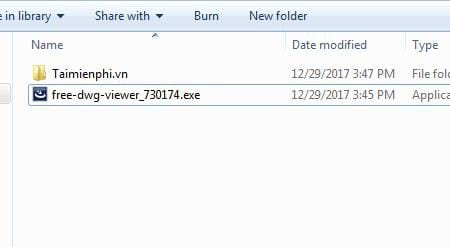
3. Run the installer
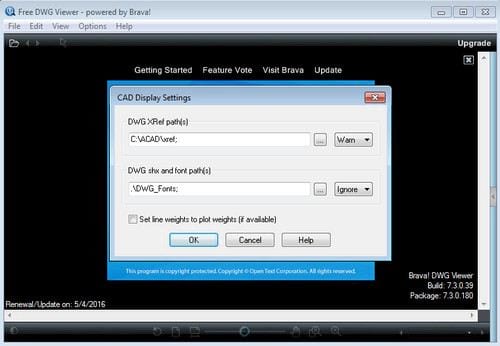
Close CAD applications, open the downloaded Autodesk installer, accept the license terms after reading them, and choose the installation location if offered. Allow the setup to finish, then restart Windows if requested. The screens below show the older viewer's general installer sequence, not the current DWG TrueView interface.
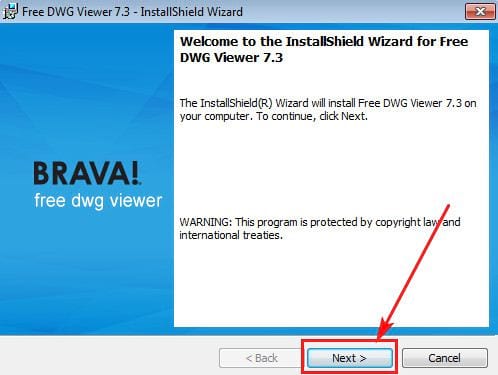
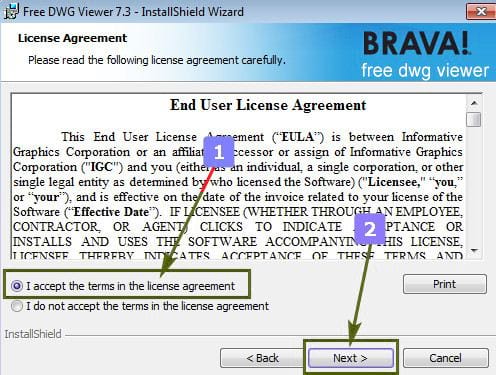
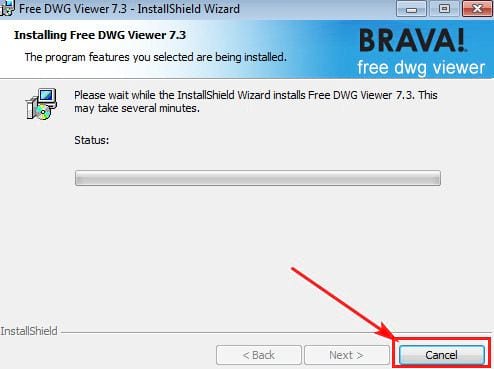
4. Open and inspect a DWG file
- Launch DWG TrueView and choose Open.
- Select the DWG file. Keep referenced fonts, plot-style files and external references in their expected folders when they were supplied with the drawing.
- Use pan, zoom, layer controls and measurement tools to inspect the model and layouts.
- Use plot or publish tools when you need a PDF or paper copy. Check scale, paper size and line weights in the preview.
- If a colleague uses an older AutoCAD release, use DWG Convert to create a compatible copy. Preserve the original file.
View a DWG file online instead
Open Autodesk Viewer, sign in, upload the design and wait for processing. The service supports DWG, DXF and numerous other 2D and 3D formats. It is convenient on macOS, Linux or a managed computer where you cannot install desktop software.
Do not upload confidential drawings unless your organization permits cloud processing and the service terms meet its requirements. For sensitive plans, use an approved local viewer. Delete shared projects when they are no longer needed and control who receives a share link.
What happened to the old Free DWG Viewer?
The source article described version 7.3.0.174 of a product called Free DWG Viewer and called it both “free” and a “trial.” Its supported-format claims stopped at AutoCAD 2018, and the installation package is no longer a dependable recommendation. The old screenshots are therefore not a safe current download guide.
For DWF-focused review and markup, Autodesk still provides Design Review; DWG and DXF handling there depends on DWG TrueView. ODA Drawings Explorer is another current option, but its official page describes a 60-day trial, so it should not be presented as permanently free.
Troubleshooting DWG viewing
- The file appears blank: switch between Model and Layout tabs, use Zoom Extents, and check whether relevant layers are off or frozen.
- Text or symbols are missing: ask the sender for the required SHX fonts, external references and plot styles.
- The viewer reports an unsupported or damaged file: obtain a fresh copy, ask the sender to run AutoCAD's AUDIT/RECOVER tools, or request an older compatible DWG export.
- You need to edit: a viewer is not a full CAD application. Consider one of these AutoCAD alternatives and confirm its DWG compatibility first.
See other ways to open DWG files, or learn how AutoCAD BAK recovery files relate to DWG drawings. For most Windows users who only need faithful viewing and conversion, DWG TrueView is the clearest current replacement for the obsolete Free DWG Viewer package.
Related Articles
 How to Add // Remove Xps Viewer Application in Windows 103 minutes read
 Link Download Microsoft Excel Viewer 12.0.6611.10007 minutes read
 Download Pdf-xchange Viewer 2.5.322.106 minutes read
 Look Up the Event ID from Event Viewer with the Free Tool12 minutes read
 How to Access Event Viewer in Windows 103 minutes read
 How to Install and Remove Fonts on Linux: Install Fonts on Linux7 minutes read
Reader Comments 0
Sign in with email or Google to join the discussion.