Table of Contents
Online logo makers can produce a usable first draft without installed design software, but “free to create” does not always mean “free to download.” Canva, Adobe Express, Shopify Logo Maker, Wixel and Namecheap offer free starting routes; Looka and Tailor Brands are better treated as paid download options after free experimentation.
Quick comparison
| Tool | Best for | Free-use note |
|---|---|---|
| Canva | Manual template editing and matching brand content | Free plan available; premium assets and features cost extra |
| Adobe Express | Guided generation plus a general design editor | Free logo maker and core plan available |
| Shopify Logo Maker | Fast, simple generated concepts | Shopify describes the tool as free |
| Wixel by Wix | AI-assisted logo creation within Wix's ecosystem | Free plan includes a limited number of AI credits |
| Namecheap Logo Maker | Simple free download after guided choices | Account required to download or share |
| Looka | AI-generated options and matching brand kit | Free to generate; payment required to download and use the logo |
| Tailor Brands | Logo plus broader business setup services | Check the current package before download |
Pricing, credits, asset access and export formats can change. Confirm the final checkout and license rather than relying on a preview screen or an old comparison.
1. Canva: best for hands-on customization
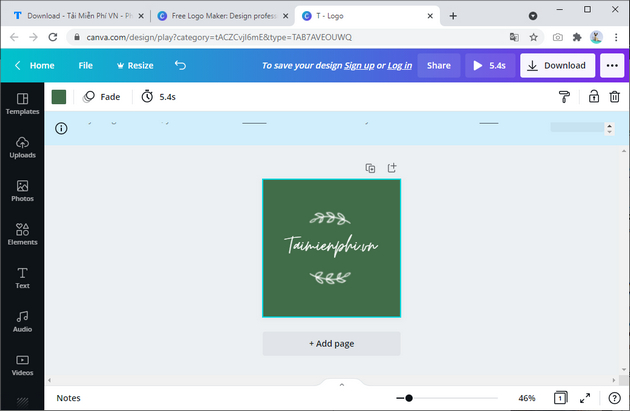
Canva gives you templates, text, shapes, icons, uploads and a drag-and-drop editor. It is a practical option when you want to control the layout yourself and later create social posts or presentations in the same visual style. Replace more than the business name: refine the spacing, symbol, typeface and palette so the result is not a lightly edited stock template.
2. Adobe Express: best guided all-rounder
Adobe Express can suggest logo directions from a business name, industry and style, then open the result in an editor with type, icons and graphics. It also suits users who need the mark in flyers, posts and other branded content.
3. Shopify Logo Maker: best for a quick free draft
Shopify's current tool replaces the older Hatchful branding found in many lists. It asks for brand information and produces customizable options with controls for the name, slogan, font, colors, symbol and layout. You do not need a Shopify store to evaluate the logo maker.
4. Wixel by Wix: best for Wix users
Wix now presents its logo workflow through Wixel. The free plan provides a limited number of AI credits for generating or editing a logo, and the service connects naturally with Wix site-building tools. Check the current credit and download conditions for your account.
5. Namecheap Logo Maker: clear free-download route
Namecheap's tool guides you through style, font, color and icon choices. Its official page says the design tool is free for personal and business use, with a Namecheap account required to download or share the result. Review the asset terms and trademark availability before commercial launch.
6. Looka: best for AI concepts and a matching brand kit
Looka generates logo directions from your business name and visual preferences, then offers matching brand materials. The design process is free to explore, but Looka states that you pay when you decide to download and use the logo. This makes it useful for comparing directions before purchasing a package.
7. Tailor Brands: logo plus business services
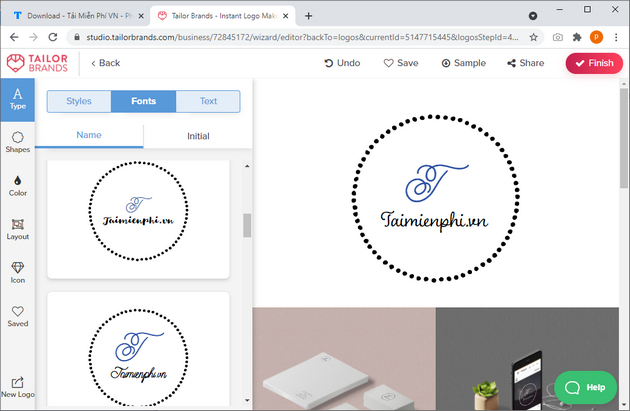
Tailor Brands asks for business details and a preferred logo type—wordmark, monogram or icon—before generating concepts. It is geared toward entrepreneurs who may also want website or business-formation services, so compare the logo package on its own before adding unrelated products.
How to evaluate the result
- Make it distinctive. Search competitors and avoid the most obvious template symbols in your industry.
- Test small and large. The mark should remain recognizable as a favicon and on a sign.
- Check one-color use. A strong logo should not depend entirely on gradients or effects.
- Get the right files. Keep a transparent PNG for everyday digital use and obtain SVG, EPS or PDF vector artwork when available for scalable production.
- Review rights. Read the license for icons, fonts and AI-generated elements. A tool does not guarantee that a design is available for trademark registration.
- Keep records. Save the license, receipt, editable source and color/font specifications.
When to hire a designer
A logo maker is suitable for prototypes, internal projects and small-budget launches. Hire a qualified designer when the brand needs a defensible original system, extensive trademark research, multilingual typography, complex production requirements or consistent use across many touchpoints.
For other workflows, compare mobile logo design apps, review desktop logo software, or learn the practical differences between Illustrator and Photoshop.
Related Articles
 Collection of the Most Beautiful Football Logos2 minutes read
 5 Websites and PowerPoint Add-Ins to Find Beautiful, Free Templates8 minutes read
 Top Websites to Create Online Logos, Beautiful, Free Online7 minutes read
 Please Refer and Download the Beautiful Font from the Big Brand Logo3 minutes read
 Top 5 Websites for Creating Beautiful Online Infographics4 minutes read
 Make Fire Letters, Fire Letters on the Website: Create Fire Letters3 minutes read
Reader Comments 0
Sign in with email or Google to join the discussion.