Table of Contents
This updated guide explains how to download private Facebook videos to your phone super fast with clear steps, practical tips, and useful context. The trick to download private Facebook videos to your phone works effectively on both iPhone and Android, helping you store important videos or personal memories and can share or review them at any time.
How to Download Private Videos from Facebook to Your Phone
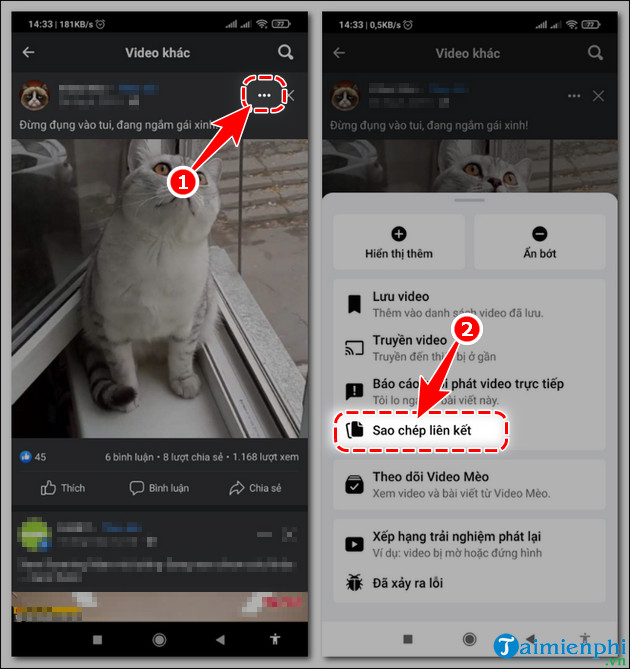
Step 1: Open the Facebook video you want to download to your phone. Step 2: Select the 3-dot icon => Copy Facebook video link.
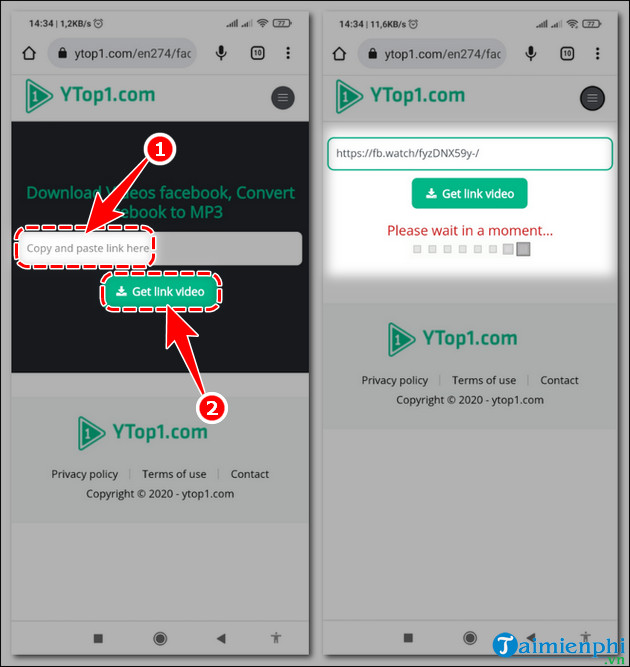
Step 3: Open a new web browser, access the Ytop1 tool that supports downloading private Facebook videos to your phone via the link below.
Step 4: Paste the Facebook video link into Copy and paste link here => Get video link . - Then the system will automatically process it within a few seconds.
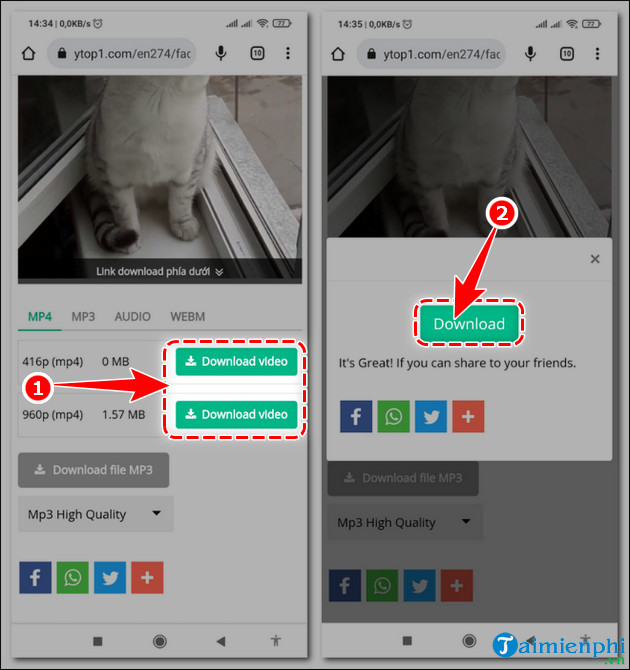
Step 5: Scroll down, select Download Video corresponding to the resolution. Step 6: Click Download to download private Facebook videos to your phone.
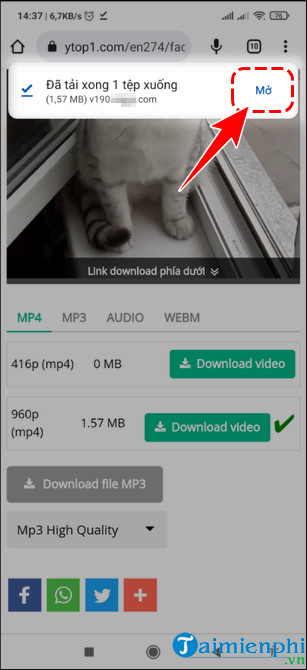
- When the download is complete, select Open to watch the Facebook video or open the Library on your phone to watch it anytime, even when your phone is not connected to the Internet.
Above are simple and effective ways to help you download private Facebook videos to your phone without installing additional complicated software. Whether the video is in friends mode, closed groups or only me, you can still save it to your device to watch it again when needed. Still, to download videos that appear in the comments section, for instance, friends send videos as comments or in private groups, the method will be a little different. You can refer to the detailed instructions in the article How to download videos in comments on Facebook to do it more accurately and quickly.
Combining these tips will make it easy to save every important video from Facebook, no matter what format or location.
AMPOK
FAQ
What should I prepare before I download private facebook videos to your phone super fast?
Review the requirements and options in the guide first. Having the correct device, app version, account access, or materials ready helps prevent avoidable errors.
How long does it take to download private facebook videos to your phone super fast?
The time depends on the task and your setup. Most basic steps can be completed quickly, while downloads, updates, scans, or troubleshooting may take longer.
What should I do if the steps do not work?
Repeat the instructions in order, confirm that your software or device is supported, and check permissions, connectivity, and available updates before trying again.
Related Articles
 Instructions for Downloading Private Videos on Facebook3 minutes read
 Guide to Downloading Facebook Videos to Your Computer Super Fast6 minutes read
 Instructions for Downloading Facebook Videos on iOS and Android8 minutes read
 The Fastest Way to Download Facebook Videos to Your Computer Without10 minutes read
 Download Facebook Videos Fast and Easily6 minutes read
 Facebook Creator - Private Application for People Who Like to Share Videos4 minutes read
Reader Comments 0
Sign in with email or Google to join the discussion.