Table of Contents
This updated guide explains how to download videos in Facebook comments to your computer or phone with clear steps, practical tips, and useful context. Facebook does not currently support the ability to download videos directly from the comments section because of privacy and copyright issues. Still, if you are the person who shared the content or have access to the content, there are still simple tricks to save the video to.
How to Download Videos in Facebook Comments Using Coc Coc
Coc Coc is a tool that integrates the function of downloading videos from FB comments without using any other third-party software. If your computer does not have it, install it now.
==> Download Coc Coc for PC ==> Download Coc Coc for Android ==> Download Coc Coc for iPhone
Step 1: Open Coc Coc web browser and open Facebook => log in to your account. Step 2: Open the post containing the video in the comment section you need to download. Step 3: choose the Play video button => select the blue arrow icon .
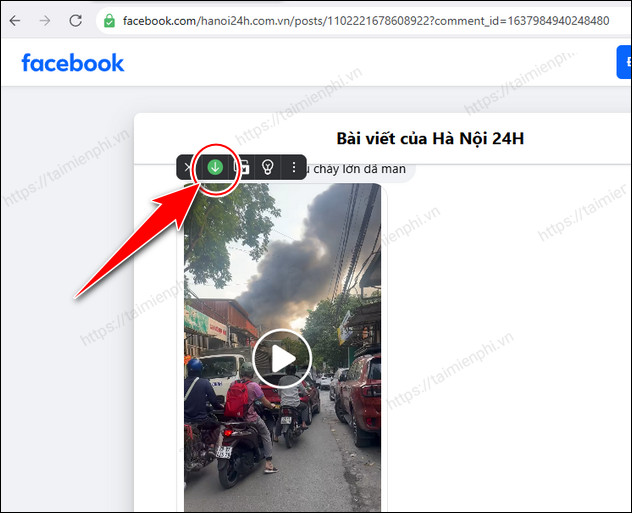
Step 4: Select video quality from standard, HD or FullHD. and the video will download automatically.
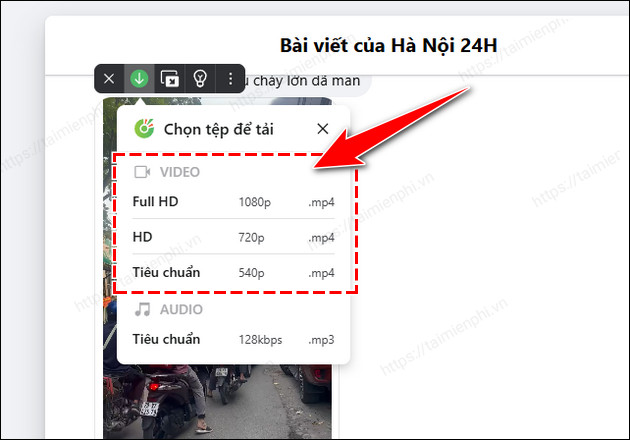
- Finally to track the download process, choose Details on the toolbar to check the file download process if needed.
How to Download Videos in Facebook Comments Using Mbasic
mbasic.facebook.com is the classic FB interface that lets you download videos from the comments section on both computers and phones easily.
1. for Computers
Step 1: Open the video comment you want to download - Find the comment section containing the video you want to download. - select the link showing the upload time (located below the video) to open that video on a new page.
Step 2: Switch to the basic Facebook interface - In the browser address bar, replace "www.facebook.com" with " mbasic.facebook.com "
for instance: https://www.facebook.com/groups/xyz/permalink/123?comment_id=456 => https:// mbasic.facebook.com /groups/xyz/permalink/123?comment_id=456
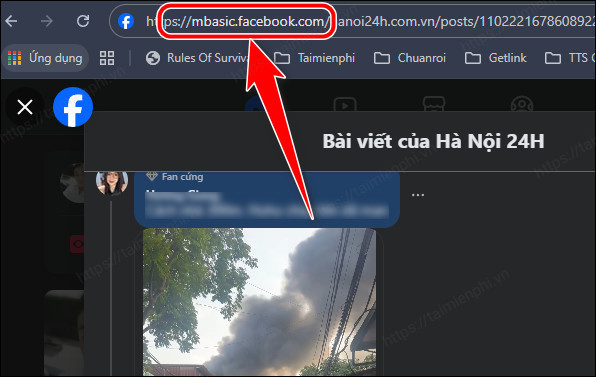
- Press Enter to reload the page with the basic Facebook interface.
Step 3: Download the video to your device - In the new interface, find the video with the comment. - select the video, the video will open in full screen mode. - Right choose and select "Save video as." to download it to your device.
2. for iOS Phones
Step 1: Download and install the Documents app - open the App Store, find and install the Documents by Readdle app.
Step 2: Get the video link - For videos in public posts: + Open the Facebook app → choose the Share button → Select Copy link.
- With videos in closed groups or friends mode: + Find the comment video and choose Like that video to easily track it later.
Step 3: Access Facebook using the browser in Documents - Open the Documents app → Tap the browser icon. - open facebook.com, log in to your account. - Paste the article link into the address bar. - Change the link to the basic interface by editing m.facebook.com or www.facebook.com to mbasic.facebook.com .
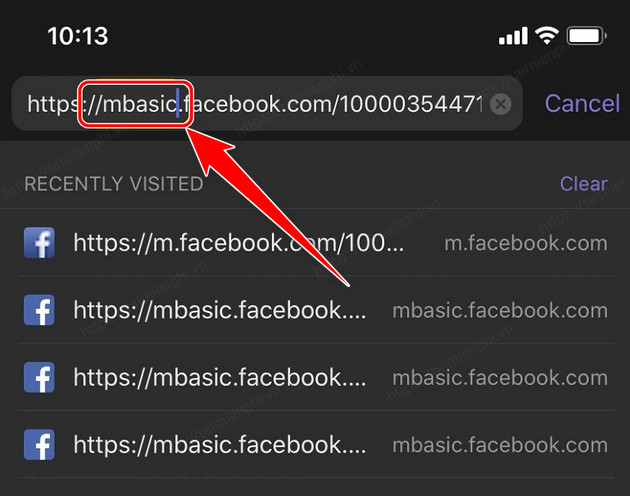
Step 4: Download video to iPhone - Find the comment section containing the video you want to download. - select the video → A new window appears → choose Done to start downloading the video.
Step 5: Save the video to your photo library - After downloading, select the eye icon to watch the video. - select the three dots → Select Move → Move the video to Photos.
Downloading videos in Facebook comments seems difficult but in fact it is very simple if you know the trick. Whether you are using a computer or an iPhone, just follow the instructions above and you can save any video from the comment section to your device quickly.
AMPOK
FAQ
What should I prepare before I download videos in facebook comments to your computer or phone?
Review the requirements and options in the guide first. Having the correct device, app version, account access, or materials ready helps prevent avoidable errors.
How long does it take to download videos in facebook comments to your computer or phone?
The time depends on the task and your setup. Most basic steps can be completed quickly, while downloads, updates, scans, or troubleshooting may take longer.
What should I do if the steps do not work?
Repeat the instructions in order, confirm that your software or device is supported, and check permissions, connectivity, and available updates before trying again.
Related Articles
 The Fastest Way to Download Facebook Videos to Your Computer Without10 minutes read
 Guide to Downloading Facebook Videos to Your Computer Super Fast6 minutes read
 Instructions for Downloading Facebook Videos on iOS and Android8 minutes read
 How to Download the Facebook Video HD on the Computer4 minutes read
 Instructions for Downloading Private Videos on Facebook3 minutes read
 How to Download Private Facebook Videos to Your Phone Super Fast4 minutes read
Reader Comments 0
Sign in with email or Google to join the discussion.