Table of Contents
ReverseImageSearch.org is a powerful online tool that allows you to easily search for any image content on the Internet, or check for plagiarism.
The images you share or upload to social media are most likely used on some illegal website. This will definitely affect you and your privacy. ReverseImageSearch.org is a powerful online tool that lets you easily search any image content on the Internet, or check for plagiarism. You can simply upload directly to the tool or enter the URL to see where the image appears, its origin and other similar image elements. Here is how to check on ReverseImageSearch.
Instructions for checking where the image appears
Step 1:
First, you access the link below to go to the ReverseImageSearch tool website.
Https://www.reverseimagesearch.org/Step 2:
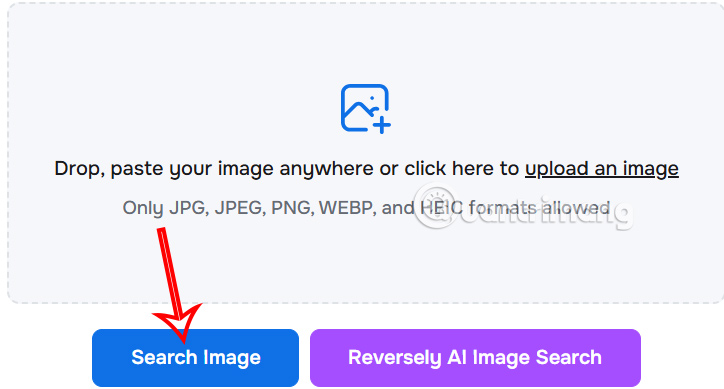
On the home page interface, you Upload the image you want to check To the website and then click the Search images button to search for the image.
Step 3:
The tool will then Scan the data to see if the image appears on any website . In the results section, there will be a Similar section to display similar images, and you can click People, Duplicates to check further.
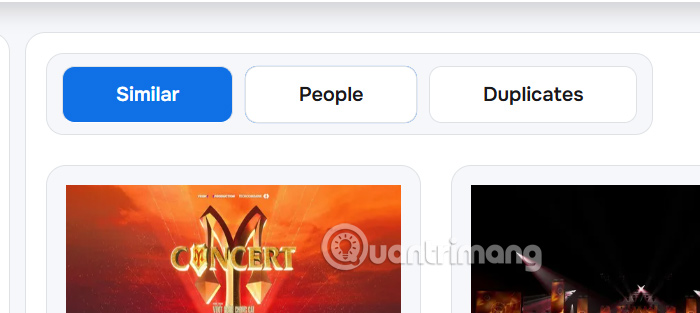
Here you can see where your images have appeared without permission, and whether or not they are credited. However, this feature is currently only available to paid accounts.

FAQ
How do you check which websites your photos appear on: step-by-step guide?
In practical terms, reverseImageSearch.org is a powerful online tool that allows you to easily search for any image content on the Internet, or check for plagiarism.
What should you check before getting started?
Review the requirements, compatible device or software version, and any warnings described in the guide before making changes.
What should you do if the steps do not work?
Repeat the steps in order, confirm that your app or system is up to date, and review the troubleshooting details provided above.
Related Articles
 45+ Websites Download Free, High Quality Images for Graphic Design8 minutes read
 6 Websites to Help You Check Your Typing Speed Online8 minutes read
 How to Save Photos and Content from Websites That Are Not4 minutes read
 Want to Find Stock Stock Images for Free? Do Not Ignore These9 minutes read
 10 Websites to Find High Quality Photos, Without Copyright9 minutes read
 How to Download Photos Without Copying on the Web to a Computer?5 minutes read
Reader Comments 0
Sign in with email or Google to join the discussion.