Table of Contents
Learn how to create an anime photo collage with torn paper revealing eyes with clear steps.
How to create an anime photo collage with torn paper revealing eyes
Step 1
You can download anime character images from the internet and then access the link below.
https://taoanhdep.com/ghep-anh-xe-giay-lo-mat-anime/On the website, click the "Select image" button to upload an image.

Step 2
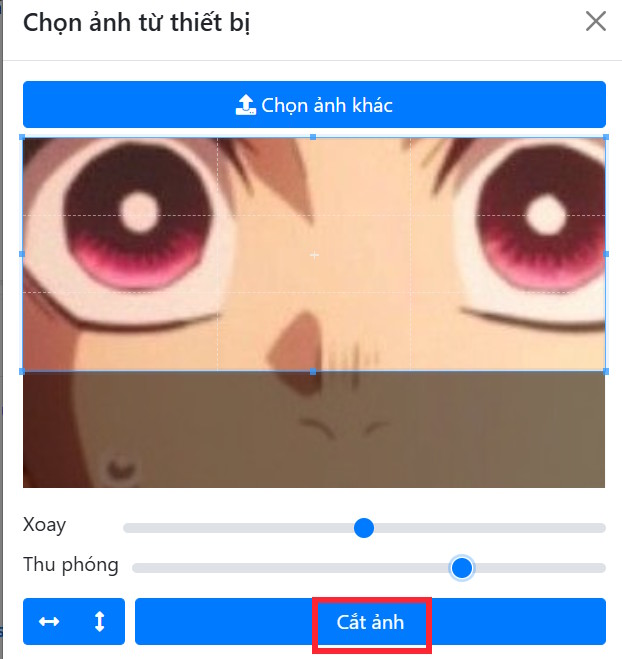
After uploading the image, adjust the cropping area to capture only the eyes. Use the zoom sliders to precisely select the eye area. Once you've made your selection, click the Crop button at the bottom.
Step 3
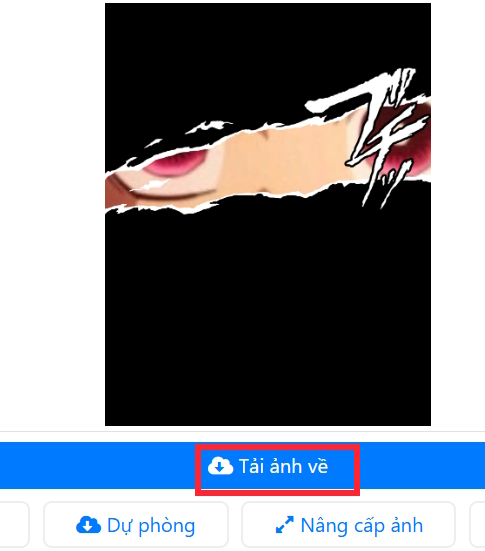
Finally, press the Create Image button to proceed with the image merging process.

The result is a collage of anime eyes as shown below. If you like it, you can download the image as usual.
Final Thoughts
Use this guide as a practical checklist for how to create an anime photo collage with torn paper revealing eyes. Work through the steps in order, verify each result, and adjust the options to match your needs.
FAQ
What do you need before following this How to Create an Anime Photo Collage with Torn Paper Revealing Eyes guide?
Review the required tools, accounts, settings, or materials mentioned in the article. Learn how to create an anime photo collage with torn paper revealing eyes with clear steps.
What are the main steps for how to create an anime photo collage with torn paper revealing eyes?
Follow the sections in order, especially How to create an anime photo collage with torn paper revealing eyes, Step 1, Step 2. Complete each step before continuing and verify the result as you go.
What should you do if the process does not work as expected?
Recheck the prerequisites, update the relevant app or service, review the settings, and repeat the step that caused the issue. Use any troubleshooting notes included in the guide.
Related Articles
 How to Create a Collage Video on Capcut3 minutes read
 Instructions for Choosing a Photo Collage Frame on Google Photos3 minutes read
 How to Online Photo Collage: Step-by-Step Guide3 minutes read
 Revealing 4-step Painting, Simple, Beautiful Anime Characters10 minutes read
 How to Draw Crying Anime Eyes5 minutes read
 Guide to Drawing Eye-catching Anime Characters6 minutes read
Reader Comments 0
Sign in with email or Google to join the discussion.