Table of Contents
This updated guide explains how to check views on featured Instagram stories with clear steps, practical tips, and useful context. Instagram Highlights are Stories that are always displayed in the Instagram account interface and do not disappear like when you post a regular Instagram Story.
How to Check Instagram Story Views
Step 1:
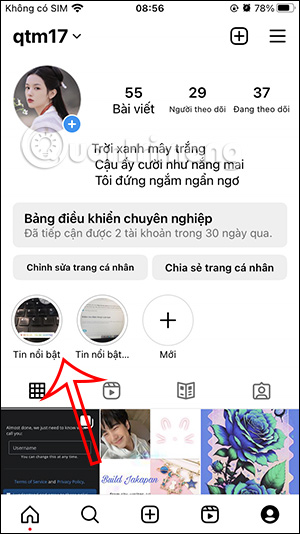
First, we access your Instagram account interface. Here you will see featured Instagram Story videos. If you want to check the views of a featured Story video, select that video .
Step 2:
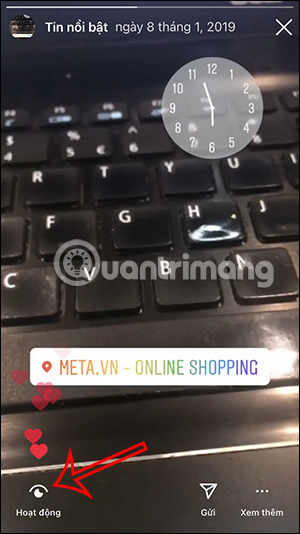
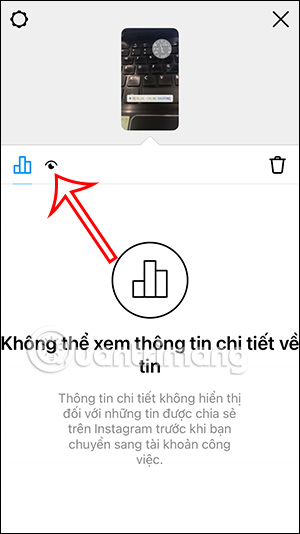
In the featured Instagram Story video interface, select the Activity section in the bottom left corner of the interface. Then switch to the activity statistics interface for the featured Instagram Story video. select the eye icon to check the number of views.
Step 3:
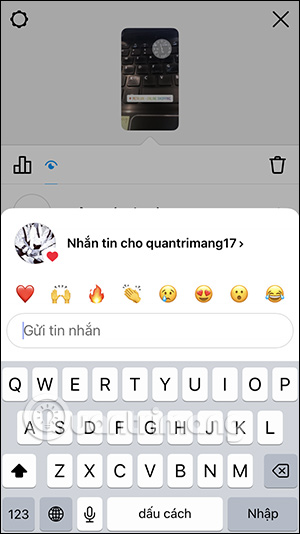
Here you will see the number of people who viewed the featured Instagram Story video, and also show the emojis that person used.
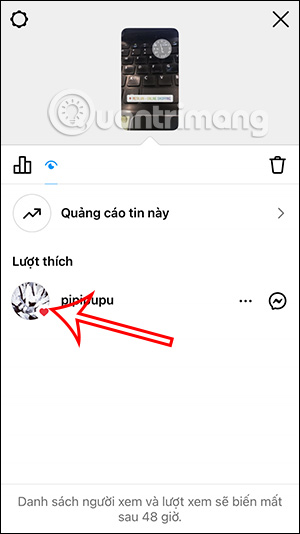
To message that account directly, clicking on the message icon right at the name of the account that viewed your featured Instagram Story video.
FAQ
What should I prepare before I check views on featured instagram stories?
Review the requirements and options in the guide first. Having the correct device, app version, account access, or materials ready helps prevent avoidable errors.
How long does it take to check views on featured instagram stories?
The time depends on the task and your setup. Most basic steps can be completed quickly, while downloads, updates, scans, or troubleshooting may take longer.
What should I do if the steps do not work?
Repeat the instructions in order, confirm that your software or device is supported, and check permissions, connectivity, and available updates before trying again.
Related Articles
 How to Download Instagram Stories and Save Other People's Featured Stories on Instagram6 minutes read
 How to Add Featured Instagram2 minutes read
 10 Visual Tricks Make Your Instagram Stories Stand Out10 minutes read
 How to Tell Stories with Stories on Instagram5 minutes read
 15 Tips for Instagram Stories You May Not Know Yet11 minutes read
 How to Create Instagram Stories from Your Voice and Photos5 minutes read
Reader Comments 0
Sign in with email or Google to join the discussion.