Table of Contents
When you post on Instagram, it notifies your followers. If so, you can try posting on Instagram without notifying your followers.
When you post on Instagram, it will notify your followers. Many people do not like this notification feature because it is unnecessary. If so, you can try the feature of posting Instagram without notifying your followers, posting Instagram silently. Below is a detailed guide to posting Instagram without notification.
How to post on Instagram without notifications
Step 1:
On the Instagram application, you Access Your personal page. Then we click on The plus icon In the top right corner.
Step 2:
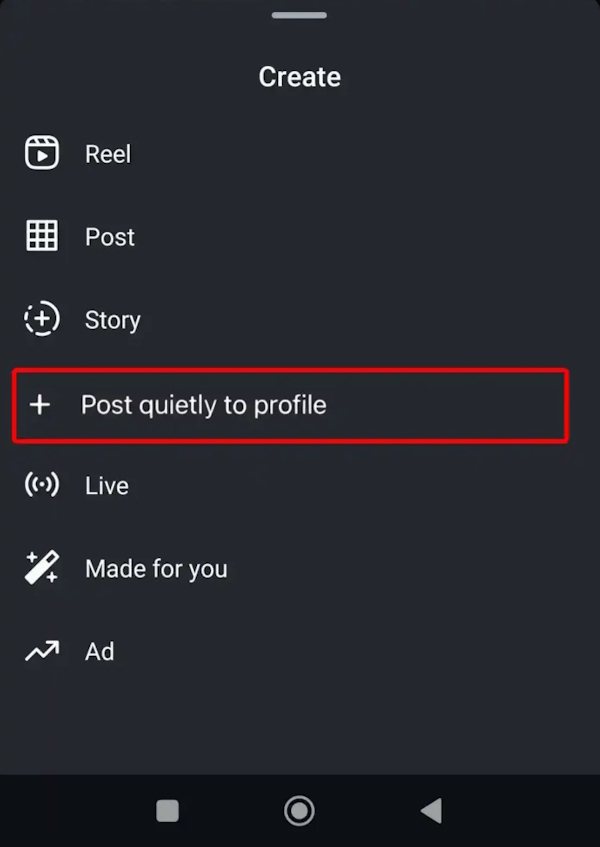
Display the options below the interface, we Click on Post quietly to profile To choose to post quietly, without sending notifications to your followers on Instagram.
Step 3:
We select the content to post on Instagram, and then you will see the notification content above, You can see this post on your personal page but not on their news feed.
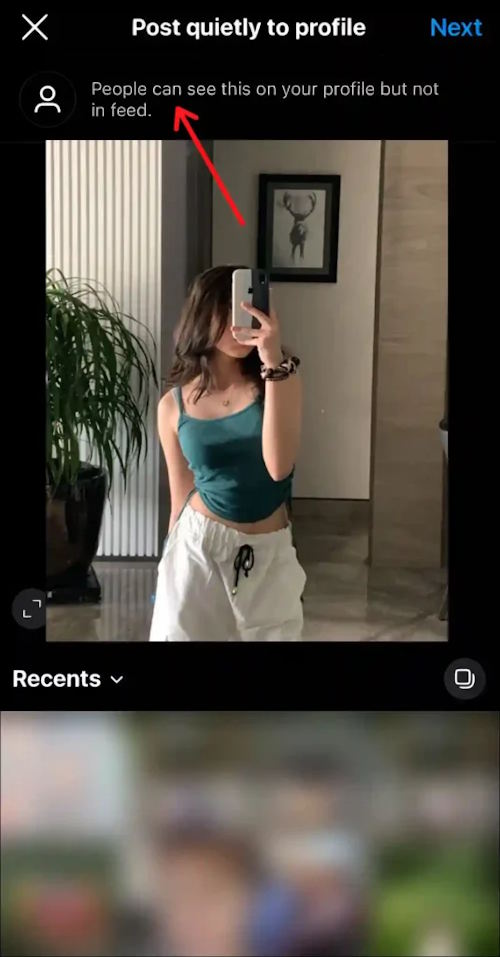
Proceed to customize the post further and then publish to your account as usual.
Silent posting to your profile is a new feature in the Instagram app that lets you share photos and videos without notifying your followers. Posts created using this feature will not appear in your followers' news feeds.
FAQ
How do you post on instagram without sending notifications to friends: how-to guide?
In practical terms, when you post on Instagram, it notifies your followers. If so, you can try posting on Instagram without notifying your followers.
What should you check before getting started?
Review the requirements, compatible device or software version, and any warnings described in the guide before making changes.
What should you do if the steps do not work?
Repeat the steps in order, confirm that your app or system is up to date, and review the troubleshooting details provided above.
Related Articles
 3 Ways to Turn Off Instagram Notifications to Avoid Being Disturbed: Top Picks6 minutes read
 How to Turn Instagram Notifications on and Off: Complete Guide10 minutes read
 Receive Notifications of New Activities of a Specific User on3 minutes read
 Schedule Automatic Posts on Instagram5 minutes read
 How to Turn Off Instagram Notifications on iPhone5 minutes read
 Customize Instagram Notifications to Be Less Annoying: Step-by-Step Guide6 minutes read
Reader Comments 0
Sign in with email or Google to join the discussion.