Table of Contents
The Google Wallet app is getting a Material 3 Expressive design update that focuses on personalization, easy-to-read information, and smoother interactions, including a refreshed home page and more dynamic tap-to-pay animations.
Google Wallet Material 3 Overview
The Google Wallet app is getting a Material 3 Expressive design update that focuses on personalization, easy-to-read information, and smoother interactions, including a refreshed home page and more dynamic tap-to-pay animations.
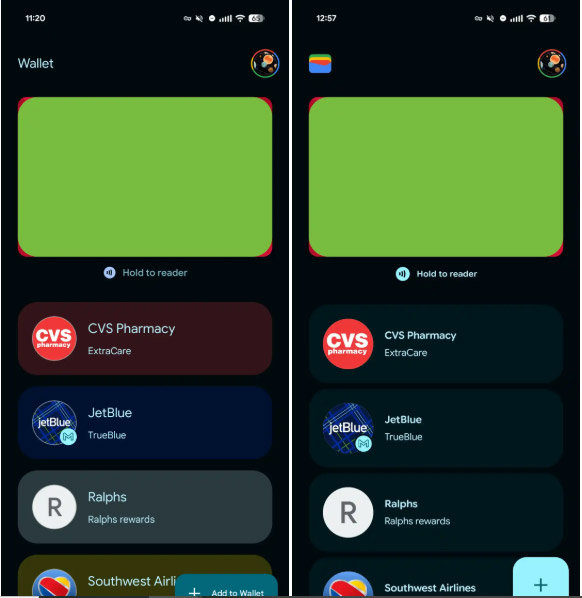
On the home page, the Wallet app name in the top left corner is replaced by the app's icon, while a square-shaped floating button (FAB) replaces the rectangular "Add to Wallet" button.
Previously, the cards below the payment section were designed according to the card theme. However, with this new design, Dynamic Color has been used to match the overall look of the card. At the bottom, the Archive Card button is designed in a border frame.
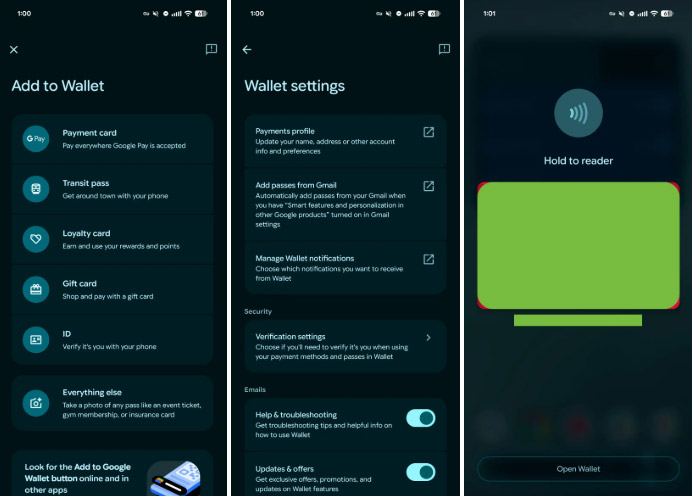
When you open a credit or debit card, previous transactions are grouped into separate containers, making information clearer and easier to manage. This improved grouping also applies to the Add to Wallet menu and the Settings page.
The in-app card payment interface has been refreshed with more vivid and crisp animations, including NFC waves, a white loading ring, and a green tick. The new Pixel devices also get an overlay when opening Wallet by double-pressing the power button, also refreshed with Material 3 Expressive design.
Overall, this is a simple modernization that is rolling out to users. It will start in June and then Google will bring this new design to everyone.
FAQ
What is new about Google wallet material 3 redesign interface?
In practical terms, the Google Wallet app is getting a Material 3 Expressive design update that focuses on personalization, easy-to-read information, and smoother interactions, including a refreshed home page and more dynamic tap-to-pay animations.
Why does this update matter?
The article highlights that on the home page, the Wallet app name in the top left corner is replaced by the app's icon, while a square-shaped floating button (FAB) replaces the rectangular "Add to Wallet" button.
Is the change available to everyone?
Availability may depend on the product version, region, account, or rollout stage described in the article.
Related Articles
 Designed with the Material Design 2.0 Interface, How Will Google Applications Change?3 minutes read
 YouTube on Android Uses Material Interface3 minutes read
 Instructions for Using Google Wallet for Beginners8 minutes read
 Google Accidentally Reveals Upcoming Android Material Redesign4 minutes read
 Gmail Started Updating the New Google Material Theme Interface on Both iOS and Android4 minutes read
 Google Docs, Sheets and Slides Update the New Material Interface3 minutes read
Reader Comments 0
Sign in with email or Google to join the discussion.