Table of Contents
Microsoft has just launched AI Agent in Office (Word, Excel, PowerPoint), allowing users to analyze data, create reports, and build slides using only natural language.
If you've ever heard of 'vibe-coding' – the trend of turning ideas into software with just a few lines of description, now Microsoft is bringing a similar concept to Office, calling it 'vibe working.'
This is a set of new experiences based on artificial intelligence (AI), to help users escape boring tasks such as poring over documents or processing raw data, to quickly turn them into useful reports or documents.
Agent Mode – 'virtual assistant' in Word and Excel
Microsoft is officially introducing Agent Mode In the Office suite, starting with Word and Excel , and will soon expand to PowerPoint .
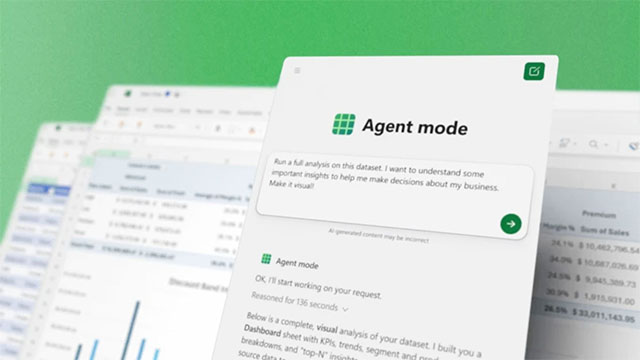
Instead of having to write formulas or edit documents manually, You can now simply give commands in natural language. For example:
'Analyze this entire sales data set. I want to pull out key insights to help make business decisions. Present it visually.'
In an instant, Copilot AI automatically creates formulas, builds charts, and exports complete Excel spreadsheets. In Word, the AI agent can turn dry numbers into professional documents, neatly formatted, and add edits as needed.
Interestingly, a few days ago, Anthropic introduced the ability for chatbot Claude to create and edit Excel, PowerPoint, Word or PDF files with just a command, without even opening these files directly.
In response, Microsoft announced that Claude would soon coexist with OpenAI's GPT in Office. And today, the company announced Office Agent in Copilot, promising to help users create beautiful PowerPoint slides or polished Word reports without much effort.
In terms of rollout, Agent Mode in Excel and Word is now available to Microsoft 365 Copilot and Microsoft 365 Personal/Family web users. The desktop version will be released soon, while Office Agent with Claude is available to customers in the US starting today. Microsoft hopes this feature will change the way people work with Office, turning Copilot into an 'anonymous expert' who can handle everything from complex data to professional presentations.
FAQ
What should you know about Microsoft integrates AI agent into office?
In practical terms, Microsoft has just launched AI Agent in Office (Word, Excel, PowerPoint), allowing users to analyze data, create reports, and build slides using only natural language.
Why does Microsoft integrates AI agent into office matter?
The article highlights that agent Mode – 'virtual assistant' in Word and Excel Microsoft is officially introducing Agent Mode in the Office suite, starting with Word and Excel , and will soon expand to PowerPoint .
What is the main takeaway?
The main takeaway is that and today, the company announced Office Agent in Copilot, promising to help users create beautiful PowerPoint slides or polished Word reports without much effort.
Related Articles
 Secedit Analyze: Secedit: Analyze Command in Windows5 minutes read
 How to Make a Shared Spreadsheet3 minutes read
 MS Access - Lesson 13: Creating Reports (Report)4 minutes read
 New Points in Microsoft Office Excel 200722 minutes read
 Microsoft Excel Announces Python Integration, Can Experience3 minutes read
 Run the Test and View the Agent Evaluation Results9 minutes read
Reader Comments 0
Sign in with email or Google to join the discussion.