Table of Contents
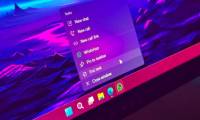
The Taskbar has a big impact on the overall Windows experience because it is the area that users interact with most often.
Windows 11 Overview
The taskbar has a big impact on the overall Windows experience because it is the area that users interact with most often. Therefore, optimizing the taskbar is one of Microsoft's top priorities in Windows 11.
Microsoft recently released Windows 11 version 25H2, which brought a long list of new features and improvements (which are also available in Windows 11 version 24H2, as they share the same codebase and branch). However, Microsoft hasn't been entirely consistent about what's in the changelog. After saying that the Administrator Protection Preview would be coming later, the company has now revealed that a 'long-awaited' feature is now available in both Windows 11 25H2 and 24H2.
According to Microsoft's updated documentation, patch KB5065789 brings a number of improvements to the taskbar and notification center. Specifically, multi-monitor You can now open the notification center directly on the secondary monitor. Previously, tapping the date and time on the secondary monitor would not do anything, forcing users to switch back to the main monitor - a rather strange omission that has existed since Windows 10. Now this limitation has been fixed.
Additionally, Microsoft has also brought back the calendar clock in the notification center. You can open the calendar panel in a pop-up format and see a large clock with seconds displayed right above it – a feature that was very popular with the Windows 10 community. If you want to 'upgrade' the taskbar clock (like displaying CPU/GPU load), you can refer to some third-party customization utilities.
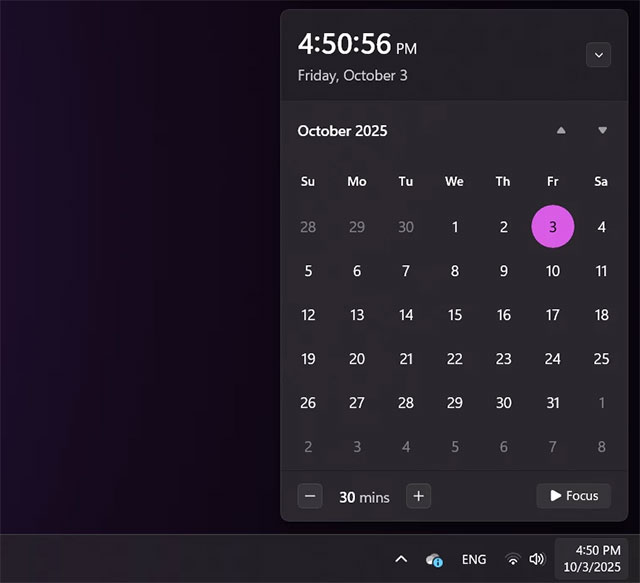
Note: The default seconds calendar clock will be turned off. To turn it on, go to Settings > Time & Language > Date & Time , then enable the ' Show time Notification Center ' option.
The above features are available in the Windows 11 24H2 and 25H2 non-security updates. To install them, You should enable the ' Get the latest updates as soon as they are available ' option, then download and install KB5065789 .
FAQ
What should you know about Microsoft brings back a cool feature for the Windows 11 taskbar?
In practical terms, the Taskbar has a big impact on the overall Windows experience because it is the area that users interact with most often.
Why does Microsoft brings back a cool feature for the Windows 11 taskbar matter?
The article highlights that Microsoft recently released Windows 11 version 25H2, which brought a long list of new features and improvements (which are also available in Windows 11 version 24H2, as they share the same codebase and branch).
What is the main takeaway?
The main takeaway is that after saying that the Administrator Protection Preview would be coming later, the company has now revealed that a 'long-awaited' feature is now available in both Windows 11 25H2 and 24H2.
Related Articles
 Microsoft Will Bring This Useful Feature Back to the Windows4 minutes read
 This Application Can Bring Drag and Drop Back to the Windows4 minutes read
 Taskbar: Complete Guide: After All, Microsoft Seems to Be Working on3 minutes read
 Windows 11 Dev Channel: Complete Guide5 minutes read
 5 Useful Hidden Taskbar Features on Windows 11: Practical Guide6 minutes read
 How to Change the Taskbar Position on Windows 11 to the Left5 minutes read
Reader Comments 0
Sign in with email or Google to join the discussion.