Table of Contents
Everything by voidtools is a Windows filename search tool. It builds a compact index of file and folder names, then updates results as you type. It is especially useful when you know part of a name but do not remember the folder.

Download Everything safely
Use the official voidtools website. Choose the stable installer unless you specifically need a feature documented for a preview or beta build. Match the package to your Windows architecture and avoid unofficial download pages that may bundle additional software.
During setup, read the options for the Everything service, startup behavior, and index locations. The defaults work for many users, but a managed work computer may require administrator approval.
Run a basic filename search
Step 1: Open Everything and type part of a file or folder name in the search box. Results update immediately as the query becomes more specific.
Step 2: Review the full path, size, and modified date before opening a result. Double-clicking a result opens it with the associated Windows application.
For example, searching for quarterly report narrows the list to names containing both terms under the default search behavior. Add an extension such as .xlsx when you know the file format.
Use the match options
Open the Search menu to control how terms are matched:
- Match Case distinguishes uppercase from lowercase.
- Match Whole Word avoids partial matches inside a longer word.
- Match Path includes folder paths, not only the final file or folder name.
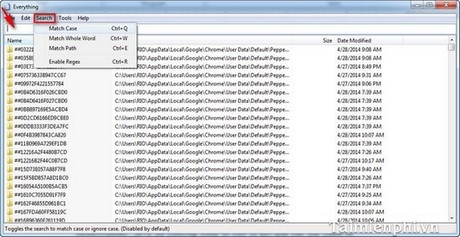
Check the status bar when results seem unexpected; a match option left enabled from an earlier search can make a new query too narrow.
Search for either of two terms
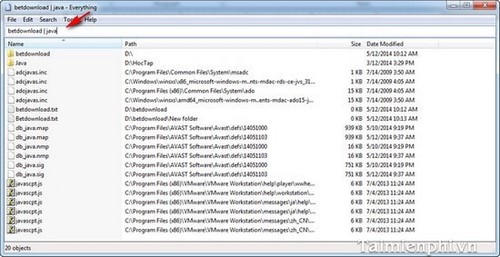
Use the vertical bar to mean OR. A query such as invoice | receipt returns names matching either term. Add another term outside the alternatives to narrow both groups.
Use wildcards for an incomplete name
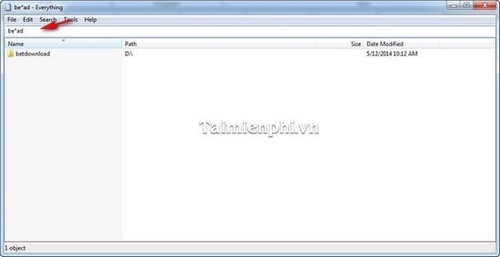
An asterisk represents any number of characters. Use project*.docx to find Word documents whose names start with “project”, or be*ad when you remember only the beginning and end of a name.
Search syntax differs between stable and preview builds. Open Help > Search Syntax in your installed version, or consult the official Everything documentation, before relying on an advanced function.
Sort and inspect results
Select a column header to sort by name, path, size, or date. Select it again to reverse the order. Sorting by size helps locate large archives or videos, while sorting by date helps find a recently edited file with an uncertain name.
Right-click a result for actions such as opening the containing path or copying path information. Confirm the location before deleting, moving, or launching a file with a generic or suspicious name.
What Everything may not find
- Text inside documents: Everything is primarily a filename search engine. Content-search features are slower and depend on the installed version and file type.
- Cloud-only files: An item that is not represented in the local file system may not be available to the index.
- Excluded or unsupported locations: A drive, folder, network share, or file system not included in the index will not appear.
- Restricted paths: Windows permissions can limit access even when a name is visible in results.
Everything or Windows Search?
Use Everything for near-instant filename and path lookup across large local collections. Use Windows Search when you want integrated taskbar results, settings, supported document contents, or cloud-connected results.
TipsMake's guide to finding files in Windows covers the built-in workflow. For another database-based search approach and its maintenance limitations, see the Locate32 guide.
Related Articles
 How to Find Files and Files on Your Computer Fast and Effective5 minutes read
 Speed up Searching on Your Computer with Everything4 minutes read
 Top 10 Best Instant Camera in 201912 minutes read
 How to Find Quick Attachments in Outlook Emails3 minutes read
 How to Compress and Decompress ZIP Files Quickly5 minutes read
 What Are Instant Articles? How to Create Instant Articles?6 minutes read
Reader Comments 0
Sign in with email or Google to join the discussion.