Table of Contents
BlogGIF can turn a short line of text into an animated GIF without installing software. Open its Animated Text tool, enter the words, choose an effect and font, adjust the optional styling, then generate and save the result.

What BlogGIF can create
BlogGIF includes separate browser tools for animated text, image slideshows, effects, rotating cubes, glitter, frames, animated smileys and video-to-GIF conversion. This guide focuses on the Animated Text tool. The site layout may change, but the current text generator still provides the same core workflow.
Create an animated text GIF
1. Enter the text and choose an effect
Open the BlogGIF Animated Text tool. In Your text, type the short message you want to animate. Then select an animation effect and a readable font.
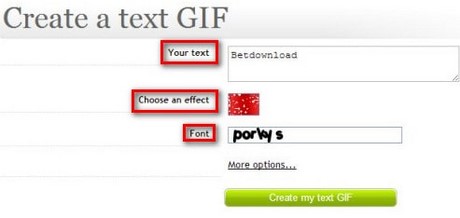
Keep the message concise. Long text can produce a wide or heavy GIF that is difficult to read on a phone.
2. Adjust the optional styling
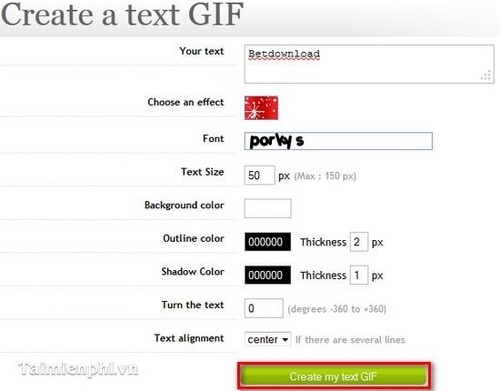
Expand More options to refine the result. Depending on the current interface, available controls can include:
- Text size for the output lettering.
- Background color or a transparent background.
- Outline color and thickness to separate letters from the background.
- Shadow color and thickness for depth.
- Rotation for angled text.
- Text alignment for multi-line messages.
Use an outline or shadow only when it improves contrast. Too many effects make small animated text harder to read.
3. Generate and inspect the GIF
Click Create my text GIF. Watch at least two complete loops and check spelling, legibility, background transparency and the speed of the effect. Go back and adjust the design if the text flashes too quickly or becomes difficult to follow.
4. Save the animation
Use the site's download option if one appears. Otherwise, right-click the generated GIF and choose Save image as. Make sure the saved filename ends in .gif; saving a preview as a still format will remove the animation.
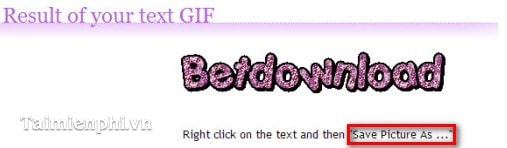
The finished file should animate when opened in a browser or other GIF-compatible viewer.

Make the GIF easier to use
- Avoid rapid flashing or high-contrast strobing effects.
- Use large, simple lettering and adequate contrast.
- Keep pixel dimensions and the number of frames reasonable to reduce file size.
- When publishing the GIF on a website, provide meaningful alternative text for the message.
- Do not upload private photos or copyrighted material you do not have permission to use.
Other ways to create a GIF
For animations made from photographs or video rather than text, see TipsMake's guide to creating GIFs online or compare several online GIF makers. TipsMake's online tools also include GIF creation and conversion utilities.
Related Articles
 Create Animated Images Online with PictureStudio3 minutes read
 5 Effective Online GIF Image Creation Tools4 minutes read
 Instructions for Creating GIF Images on YouTube Do Not Need Software7 minutes read
 How to Install IrfanView to Display Animated Images3 minutes read
 Instructions for Creating Animated GIF Images in Adobe Photoshop12 minutes read
 GifCam - Create Animated Gifs from Videos Quickly and for Free4 minutes read
Reader Comments 0
Sign in with email or Google to join the discussion.