Table of Contents
Picasion creates a simple slideshow-style GIF from multiple images. Upload the frames in playback order, select the output size and transition speed, click Create animation, then preview and download the finished file.

Prepare the frames
Use at least two related images; three or more usually make the motion or sequence easier to see. Crop each frame to the same aspect ratio and use consistent dimensions so the GIF does not jump or shift unexpectedly.

- Rename frames in order if that helps you upload them correctly.
- Use copies and retain the full-resolution originals.
- Do not upload private images or material you do not have permission to use.
- Compress or resize very large source files before upload if needed.
Create the GIF in Picasion
1. Add the images
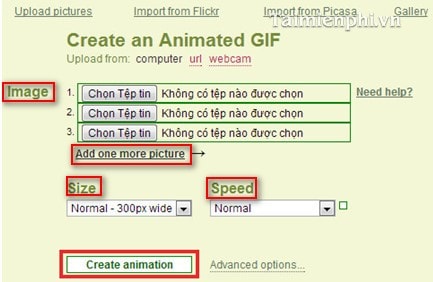
Open the Picasion GIF maker. Choose images from your computer in the sequence in which they should appear. Use Add one more picture for additional frames.
The site displays its current per-image, frame and output limits beside the form. Follow those live limits rather than relying on older screenshots or saved instructions.
2. Choose size and speed
- Size: select a preset or enter a custom output width within the site's displayed limit. A smaller GIF generally loads faster.
- Speed: choose how long each frame remains visible. Use an advanced/custom value when the presets are too fast or too slow.
A larger delay creates a slower animation. Allow enough time for viewers to read text or understand each frame.
3. Generate the animation
Review the frame order, size and speed, then click Create animation. Processing time depends on the number and size of the uploaded images.
4. Preview and save the GIF
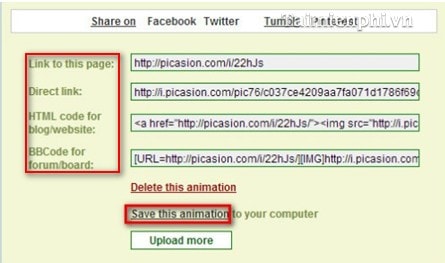
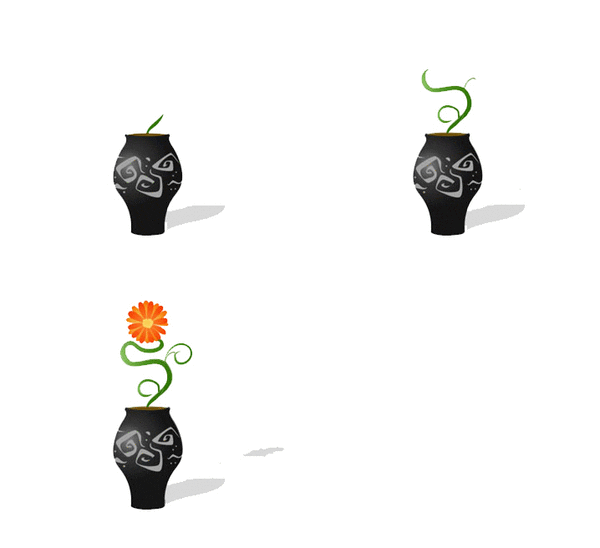
Watch at least two full loops. If the sequence or timing is wrong, return to the form and recreate it. When the result is correct, choose Save this animation to download the GIF. The result page may also provide sharing or embed code.
Open the downloaded file in a browser to confirm that it still animates.
Improve quality and accessibility
- Keep the camera position and subject placement consistent between frames.
- Avoid rapid flashing, especially strong changes in brightness or color.
- Use fewer frames or smaller dimensions if the GIF is too large.
- Add descriptive alternative text when embedding the GIF on a website.
- Provide the same information in static text when the animation communicates instructions or essential content.
Alternatives to Picasion
Picasion is suited to a basic image sequence. For captions, cropping, video conversion or more editing controls, compare TipsMake's online GIF makers, follow the general guide to creating a GIF online, or use the GIF utilities in TipsMake's online tools.
Related Articles
 Instructions for Creating GIF Images on YouTube Do Not Need Software7 minutes read
 Create Animated Images Online Using Gickr4 minutes read
 Create Animated Images Online Using Makeagif1 minutes read
 Add Text to GIF Images, Add Text to Animated Images5 minutes read
 How to Create GIF Images Quickly with Giphy3 minutes read
 Top 10 Best Websites for Creating Animated Images and Gifs Online8 minutes read
Reader Comments 0
Sign in with email or Google to join the discussion.