Table of Contents
GifCam is a portable Windows utility that records whatever appears inside its movable window and saves the result as an animated GIF. It does not import a video in the way a conventional editor does; to capture a video segment, play the video behind GifCam and record the relevant area of the screen.
Download and open GifCam safely
Get the ZIP archive from the developer's official GifCam page, extract it, and run the executable. GifCam is portable, so there is normally no installation wizard. Avoid similarly named download sites that may distribute modified installers.
Record a section of the screen
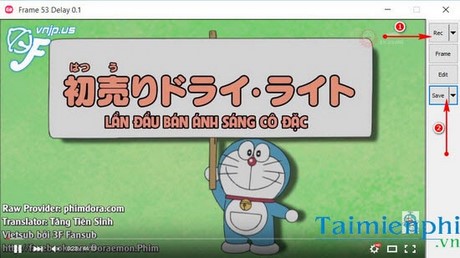
- Move the GifCam window over the content you want to capture.
- Drag the window edges until the transparent capture area fits the subject.
- Open the arrow beside Rec if you need to change the frame rate or cursor-capture option.
- Click Rec, perform or play the action, and then click Stop.
Keep the recording short and the window reasonably small. Both duration and pixel dimensions have a large effect on GIF file size.
Edit the captured frames
Click Edit to open the frame editor. Right-click a frame to see the available commands. You can remove an unwanted frame with Delete This Frame, delete a range, adjust the delay, or add text.
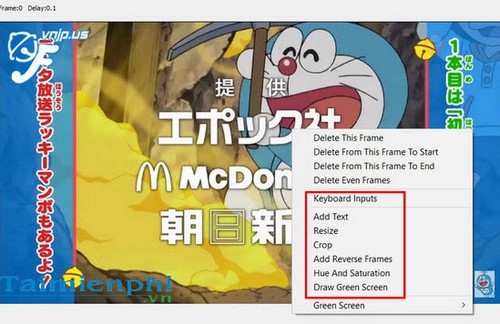
When adding text, select the frame range that should display it, enter the caption, and position it where it does not obscure the important action. Preview the animation afterward to check timing and readability.
Save and review the GIF
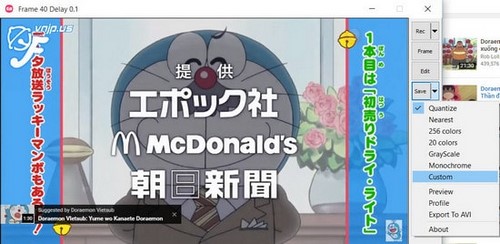
Click the arrow beside Save to choose an output mode, then click Save and select a destination. GifCam can also offer AVI output in some versions, but choose GIF when you need an animation that can be embedded on a web page or in a message.
Open the saved file in a browser to verify the loop, text, and image quality.

Create a simple animated text signature
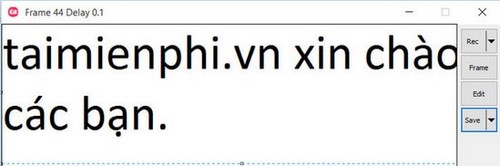
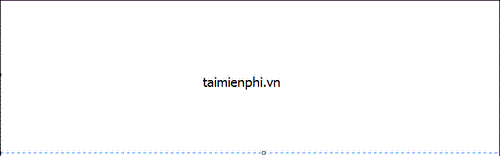
GifCam can also record text or drawings created in another program. Open Paint or a similar editor, place GifCam over the working area, start recording, and then type or draw. Stop the capture as soon as the animation is complete.
Tips for a smaller, clearer result
- Record only the part of the screen readers need to see.
- Delete pauses and duplicate-looking frames in the editor.
- Use a lower frame rate for slow interface demonstrations.
- Do not use GIF for long clips or material that depends on sound; a video format is usually more efficient.
If you prefer not to install a desktop utility, see how to create a GIF online. You can also compare other options in TipsMake's list of GIF creation software.
Related Articles
 How to Create Animations from YouTube Videos Quickly5 minutes read
 Create Animated Images Online Using Makeagif1 minutes read
 The Simplest Way to Quickly Create Gifs and Animated Images Using GIF Movie Gear3 minutes read
 How to Create Animated GIFs in PowerPoint7 minutes read
 YouTube Is Testing the Ability to Create Gifs from Video3 minutes read
 Create GIF Animations from Videos Using Camtasia Studio3 minutes read
Reader Comments 0
Sign in with email or Google to join the discussion.