Table of Contents
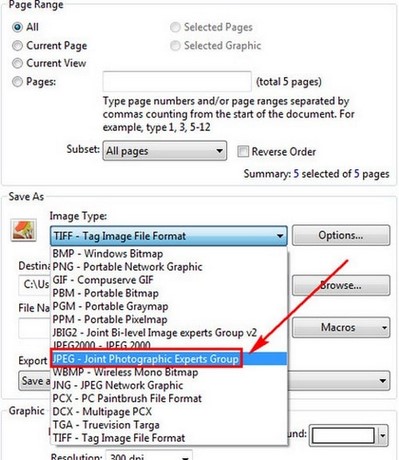
PDF-XChange can export each PDF page as an image. Use JPEG for photographs and general sharing, PNG for screenshots or sharp text, and TIFF when a workflow requires that format. Converting to images does not necessarily reduce file size, and it removes searchable text unless OCR is applied later.
PDF-XChange Viewer versus PDF-XChange Editor
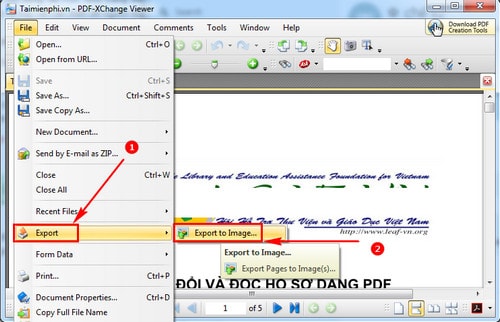
The screenshots below show the older PDF-XChange Viewer interface. In current PDF-XChange Editor releases, the command is typically under Convert > Export to Images. The main choices—page range, format, destination, filename, and resolution—remain similar.
Export the PDF pages
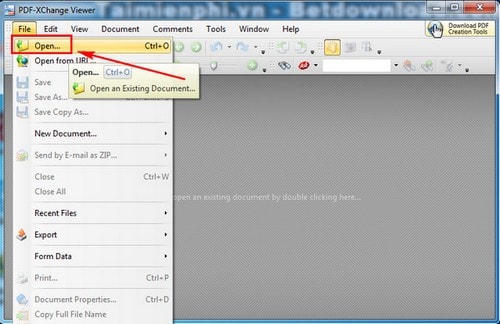
- Open PDF-XChange and choose File > Open.
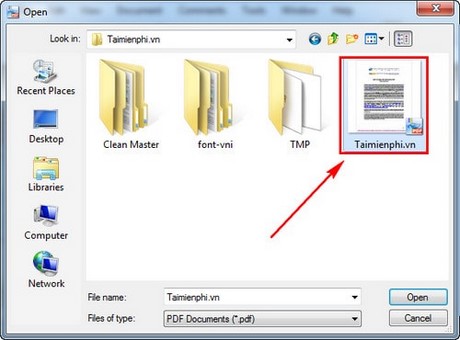
- Select the source PDF.
- In the legacy Viewer, choose File > Export > Export to Image. In current Editor versions, use Convert > Export to Images.
- Choose the page range:
- All for the whole PDF;
- Current Page for one page;
- a page list or range such as 1-3, 7, 10-12 for selected pages.
- Select the image type and destination folder.
- Set a filename pattern that includes the page number so files do not overwrite one another.
- Choose the resolution and other image options, then select Export.
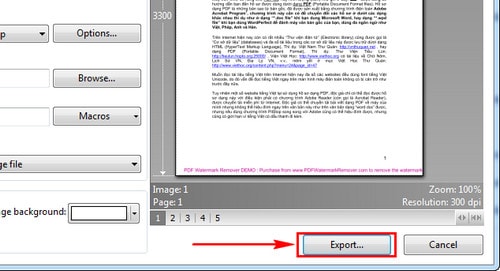
Wait for the selected pages to finish exporting.
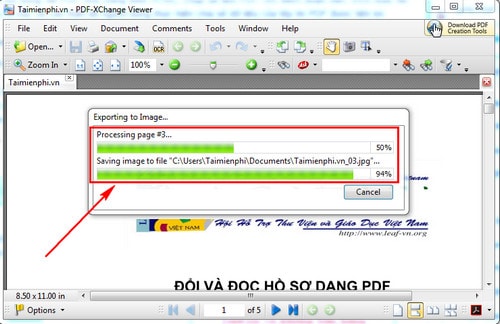
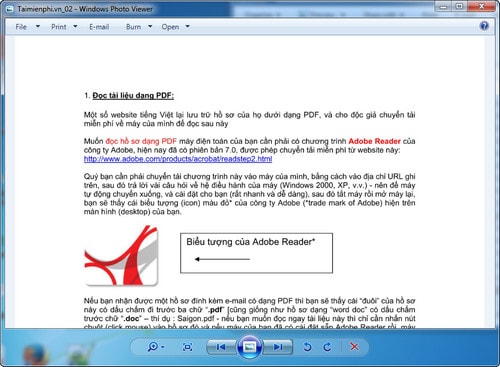
Open several output files and check the first, last, and a middle page.
The current PDF-XChange manual describes page ranges, multi-page image modes, resolution, background color, destination folders, and filename macros.
Choose the right image format
| Format | Best use | Trade-off |
|---|---|---|
| JPEG | Photos and general-purpose viewing | Lossy compression can soften small text |
| PNG | Screenshots, diagrams, and pages with sharp text | Can produce larger files for photographic pages |
| TIFF | Scanning, print, or archival workflows that request TIFF | Files can be large; viewer support is less universal |
Set a useful resolution
Higher resolution creates more pixels and larger files. Use the lowest setting that keeps the intended content readable. Test one representative page before exporting hundreds of pages, especially when the PDF contains fine print, line drawings, or detailed tables.
Do not repeatedly convert JPEG pages and resave them at lower quality; each lossy generation can degrade the image.
What is lost when a PDF becomes images
- searchable and selectable text;
- links, bookmarks, comments, form fields, attachments, and many annotations;
- document structure used by assistive technology;
- digital-signature validity and other PDF-specific behavior.
Keep the original PDF. If recipients need searchable text, use OCR or share the PDF instead. TipsMake's PDFgear overview includes OCR and conversion options.
Related PDF workflows
If you need only part of each page, crop a copy before export; see how to crop PDF pages. If you later need to place image pages back into a PDF, compare the methods in the JPG-to-PDF guide.
To inspect the original and output on another platform, TipsMake's PDF-opening guide lists common viewers.
Final checks
- Confirm the correct page range and order.
- Verify filenames include unique page numbers.
- Zoom in to check small text and line art.
- Compare colors and transparency where they matter.
- Check the total output size before sharing.
- Do not upload confidential pages to an online converter when a local export is available.
Related Articles
 Download Pdf-xchange Viewer 2.5.322.106 minutes read
 Extract Images from PDF Files10 minutes read
 How to Convert Images into PDF Files on iPhone and iPad4 minutes read
 How to Convert PDF to Word Using Document Viewer on Your Phone3 minutes read
 How to Convert PDF to JPG, PNG Images: Convert Format14 minutes read
 How to Convert a JPG Image to a PDF5 minutes read
Reader Comments 0
Sign in with email or Google to join the discussion.