Table of Contents
Canon's Direct Photo Printer, Smart Paper Processor is easier to understand when the core ideas are paired with practical examples. The sections below explain the topic clearly, highlight useful steps, and point out details that can prevent common errors.
Canon has just released the PIXMA iP6600D, which can print on CD / DVD, via standard PictBridge support and print directly from the memory card, through many available slots. It also prints from personal computers and mobile phones, with Bluetooth adapters. 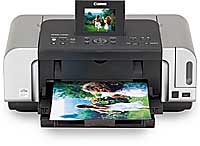
PIXMA iP6600D direct photo printer ( Source: crutchfield )
In this direct printing mode, the image is also automatically adjusted. PIXMA iP6600D integrates Easy-WebPrint software, which helps Windows users fully print website information and colors. The product is equipped with a 3.5-inch LCD monitor and ChromaLife100 technology, reproducing natural color image. It has a 6-color ink system, resolution up to 9,600 x 2,400 (dpi) and design LED ink cartridges, replacing indirect ink. When the ink is low, the LED indicator blinks and flashes faster if the ink is depleted. It has automatic dual printing function, self-copy two sides of paper, which helps to reduce the cumbersome when having to flip documents manually. Photo paper is supplied in two lines, allowing paper to be stored in a tray and adjusting the paper in another tray, without having to move between two trays. When printing, the paper is loaded with both trays, with up to 300 sheets. PIXMA iP6600D produces 4-by-6-inch photos, each taking about 46 seconds. Thanh Luong
FAQ
What is Canon's Direct Photo Printer, Smart Paper Processor?
Canon has just released the PIXMA iP6600D, which can print on CD / DVD, via standard PictBridge support and print directly from the memory card, through many available slots.
Why is Canon's Direct Photo Printer, Smart Paper Processor important?
A clear understanding of Canon's Direct Photo Printer, Smart Paper Processor helps you make informed decisions, avoid common mistakes, and use the relevant tools or techniques more effectively.
How should beginners approach Canon's Direct Photo Printer, Smart Paper Processor?
Start with the fundamental concepts, follow the examples step by step, and test each change in a safe environment before applying it to important systems or data.
Related Articles
 How to Fix Out of Paper Error on HP Printer5 minutes read
 Printer 2900 Pulls the Wrong Paper - How to Fix Printer 29007 minutes read
 The Printer Can't Get Paper, What's Wrong: Complete Overview7 minutes read
 The Printer Has Black Edges of Paper, Black 2 Margins8 minutes read
 Epson Printer with Paper Deviation - How to Fix Epson4 minutes read
 The Printer Is Jammed - Causes and Ways to Fix the Error6 minutes read
Reader Comments 0
Sign in with email or Google to join the discussion.