Artificial intelligence
How to Create a Fantasy Map in Canva with AI
Generate a fantasy map through Canva Apps, write a precise world-building prompt, fix labels and geography manually, and export a usable map for a story, lesson, or game.
Browse more Explore technology news, emerging trends and practical insights into the products, platforms and innovations shaping the digital world.
Generate a fantasy map through Canva Apps, write a precise world-building prompt, fix labels and geography manually, and export a usable map for a story, lesson, or game.

Evaluate build versus buy, system complexity, data quality, inference timing, prompting versus fine-tuning, and human oversight with measurable production criteria.
Turn a story idea or script into an Anijam storyboard, define consistent characters and style, generate scenes carefully, and check audio, continuity, rights, and credits before export.

A practical workflow for uploading spreadsheets to ChatGPT, checking the data, requesting useful analysis and charts, and validating the results before use.
Set up Claude Cowork, give it useful context, review its plan, and use local files, projects, connectors, and scheduled tasks with appropriate safeguards.
Add an n8n Code node, choose the correct execution mode, work with input items, return valid output, test safely, and understand module restrictions.

AI agents can accelerate data preparation, experimentation, documentation, and monitoring, but reliable data science still requires controlled tools, evaluation, and accountable human review.

Compare six Chrome extensions for autofill, research, connected automation, knowledge capture, local browser agents, and cited search—with a security checklist before installation.

Arc runs on Windows 10 and 11, including supported ARM PCs. Check current requirements, understand Spaces, Split View, Peek, and extension support, and decide whether its maintenance-focused direction suits you.

Compare Comet, Dia, Edge Copilot, BrowserOS, and Opera Neon by automation, privacy, platform, and cost model—and understand why ChatGPT Atlas is no longer an option.

Understand the agent loop, tool and state design, planning patterns, evaluation, observability, memory, and safety controls needed to move from a prototype to a production system.
Plan consistent storyboard panels, upload them as visual references in Google Flow, prompt one shot at a time, test motion and dialogue, then assemble and review the final sequence.

A practical workflow for scoping changes, exploring the repository, planning, testing, reviewing diffs, enforcing checks, and limiting permissions when AI writes code.
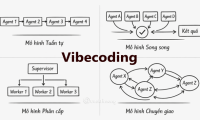
Learn how to turn a broad app idea into small, testable work units so an AI coding assistant receives clearer context, produces safer changes, and is easier to verify.

A plain-English guide to the AI terms you encounter most often, including generative AI, foundation models, prompts, tokens, context windows, RAG, fine-tuning, MCP, and AI agents.

Create a reusable Gemini Gem that analyzes an uploaded image and drafts a structured image-generation prompt, with a ready-to-copy instruction template and accuracy tips.

AI is changing accounting tasks, not removing the need for accountable professionals. These five skills help accountants validate outputs, protect data, advise stakeholders, and lead responsible adoption.
Import a PPT or PDF into HeyGen, choose an AI avatar, prepare a script for each scene, and generate a presentation video.

Use Higgsfield Angles to upload a reference image, adjust the virtual camera direction, and generate alternative viewpoints while checking visual consistency.

Build an n8n form, test a submission, inspect the output data, and switch safely from the temporary Test URL to the Production URL.