Table of Contents
Arc Browser is available on Windows 10 version 19H1 or newer and on Windows 11. Native support for Windows PCs with ARM processors was added in October 2024, so the earlier warning that devices such as Snapdragon-based Surface models could not run Arc is obsolete.
Arc remains a Chromium-based browser with a distinctive sidebar, Spaces, Split View, and support for Chrome extensions. Its recent desktop releases have focused mainly on Chromium upgrades, security, stability, and compatibility rather than major new features, so new users should evaluate the current product rather than the launch-era promises.
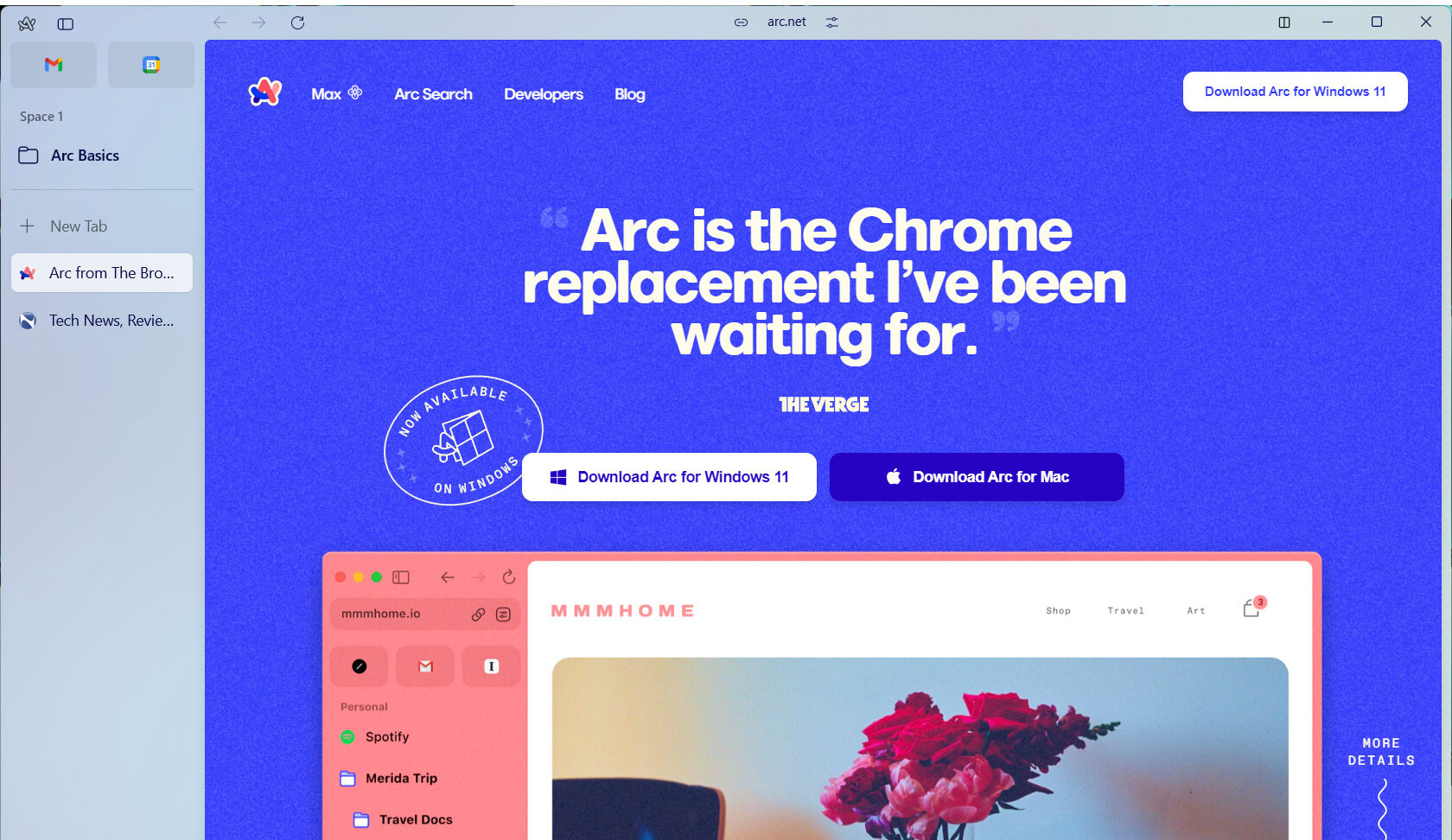
Arc for Windows requirements
- Operating system: Windows 10 version 19H1 or later, or Windows 11.
- Processor: supported x64 or ARM64 hardware. Early BMI2-related restrictions were relaxed in later Windows releases.
- Updates: use Arc's updater to receive current Chromium security fixes.
- Account: Arc uses an account for parts of setup and synchronization.
Download the installer only from the official Arc download page. If installation fails, run Windows Update, confirm the Windows version under Settings > System > About, and try the installer that matches the PC architecture.
What makes Arc different?
Spaces
Spaces separate browsing contexts such as work, study, and personal use. Each Space has its own theme, icon, pinned area, and unpinned tabs. Profiles can add stronger separation by using different logins, cookies, histories, and extensions.
Spaces are most useful when they represent stable areas of life rather than short-lived projects. Pin the services you return to and let temporary tabs remain unpinned so they do not crowd the long-term structure.
Sidebar and vertical tabs
Arc replaces the conventional tab strip with a sidebar. Pinned tabs and folders stay near the top, while temporary browsing appears below. The change takes time to learn, but it provides more room for titles and makes large tab collections easier to scan.
Split View
Split View places multiple webpages in one Arc window. It is useful for comparing documents, taking notes beside a source, or monitoring a dashboard while working in another app. Performance still depends on the number and weight of the open pages.
Peek
Peek opens certain links in a temporary overlay so you can inspect the destination without losing the current context. On Windows, feature behavior and shortcuts can differ from macOS, so check Arc's current help page or command menu if launch-era instructions do not match the installed build.
Chrome extension compatibility
Because Arc for desktop uses Chromium, it can install many extensions from the Chrome Web Store. Compatibility is broad, not guaranteed: an extension may assume Chrome-specific menus or behave differently in Arc's sidebar. Install only extensions you trust and review their site permissions.
Sync and data that may not follow you
Arc Sync can synchronize core Arc organization such as Spaces, folders, and tabs between supported desktop installations. Do not assume it is a full browser backup. Passwords, history, extensions, profiles, and other local data may follow separate mechanisms or remain on the device.
Before changing computers, export or verify important bookmarks and passwords separately, record essential extensions, and confirm that Arc Sync is active. Store the recovery information Arc provides in a safe place.
ARM support on Windows
The promised ARM version is no longer “upcoming.” Arc's Windows release notes record ARM processor support beginning with version 1.22.0 in October 2024. If an ARM PC still cannot install Arc, update Windows and obtain a fresh installer rather than relying on an old x64 package.
Extension compatibility may vary on ARM even when the browser itself runs normally, especially for extensions that bundle native components. Test essential work tools before making Arc the default browser.
Arc's current development direction
The Browser Company shifted much of its product attention toward Dia, while Arc continued to receive Chromium and security maintenance. Arc can still be a practical browser for people who value its sidebar and Spaces, but it is not the best choice if you expect rapid expansion of the original feature set.
TipsMake's article on why Dia may not feel like an Arc successor explains the different design direction. For a broader comparison, see the current list of AI browsers that can replace Chrome or Safari.
Should you switch to Arc?
Arc is worth trying if vertical tabs, stable workspaces, and side-by-side browsing solve a real organization problem. Keep the existing browser installed while testing, import only what you need, and confirm that password management, video calls, protected media, extensions, and enterprise sites work correctly.
Stay with Chrome, Edge, Firefox, or another actively developed browser if conventional bookmarks and tabs fit your workflow, your organization requires a supported browser, or Arc's account and sync model do not meet your needs.
The video shows the original Windows launch experience. Interface details may differ from the current build, but the core sidebar, Spaces, and Split View concepts remain useful points of comparison.
Related Articles
 Microsoft Changed Its View in IE 11 Browser3 minutes read
 Microsoft Released an 11-minute Video Revealing About3 minutes read
 Coc Coc Has a Version Running Mac OS X2 minutes read
 Opera Mini and the Journey to Windows Phone2 minutes read
 Leaked Series of Upcoming Features on Windows 113 minutes read
 Which Browser Is the Fastest on Android: Chrome, Firefox, Samsung4 minutes read
Reader Comments 0
Sign in with email or Google to join the discussion.