Table of Contents
AdBlock starts filtering many common banners, pop-ups, and page elements as soon as it is installed in Chrome. For better results, verify that you installed the genuine extension, give it only the site access you intend, keep the default filter list active, and use custom blocking or allowlisting only when needed.
No browser extension blocks every ad, and a blocker is not a replacement for Chrome updates or antimalware protection. Sponsored content embedded directly in a video or article may remain, and some sites can break when required scripts are filtered.
Install the genuine AdBlock extension
- Open the official AdBlock listing in the Chrome Web Store.
- Check the product name, publisher, website, update information, and requested permissions. Similar names and copied icons are common.
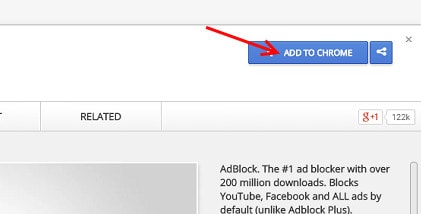
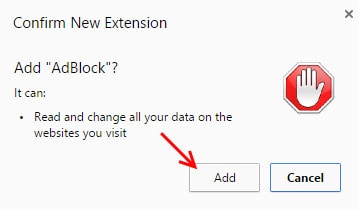
- Select Add to Chrome, review the permission prompt, and choose Add extension.
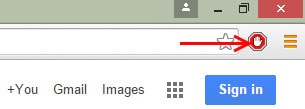
- Open Chrome's Extensions puzzle-piece menu and pin AdBlock if you want its icon available beside the address bar.
The screenshots below show Chrome's older store and confirmation interface. Current Chrome uses different wording and layout, but the safe sequence is still to inspect the listing before confirming.
Check AdBlock's site access in Chrome
Ad blockers need permission to read and change page content so they can match requests and hide elements. Chrome lets you control that access:
- Select the Extensions button beside the address bar.
- Open AdBlock's menu and point to This can read and change site data.
- Choose access on the current site, on specific sites, or on all sites.
If you restrict access to “when you select the extension,” AdBlock cannot automatically filter every new tab. If privacy is your priority, a specific-site list offers more control but requires more maintenance. Google's extension-management guide explains these permission options.
Review filter lists
Filter lists are collections of rules that tell AdBlock what to block or hide. To inspect them:
- Select the AdBlock icon, then the settings gear.
- Open the Filter lists area.
- Keep the main list appropriate for your language and region active.
- Add only a list that solves a specific problem, then test your usual sites.
More lists are not automatically better. Overlapping or abandoned lists can increase false positives and make it harder to identify why a page broke. AdBlock also supports Acceptable Ads in its desktop extensions; review that option if you want to understand why some advertising remains.
The developer's filter-list guide describes the default and optional lists.
Block a page element manually
If a nonessential banner, overlay, or placeholder remains:
- Select the AdBlock icon.
- Choose the option to hide or block something on the page.
- Move the pointer over the unwanted element and select it.
- Adjust the preview carefully, then confirm the rule.
- Reload the page and check that navigation, forms, video, and other content still work.
The manual hiding wizard creates a local custom filter. It is best for a stable visual element, not for a security warning, consent control, or content you merely disagree with. AdBlock's hiding-wizard instructions explain the current workflow.
Undo a custom rule that hides too much
Open AdBlock > Settings > Customize, edit the custom filters, remove only the rule associated with the affected site, save, and reload. If you are unsure which rule caused the problem, back up the custom-filter text before changing it.
Allow ads on a trusted site
- Open the site.
- Select the AdBlock icon.
- Choose Pause on this site, or use the additional pause options to exclude a particular page or URL range.
- Reload and test the site.
A narrow exception is preferable to disabling AdBlock globally. Use Resume Blocking Ads when you want to remove the exception. Do not allowlist a page that reached you through an unexpected redirect or displays suspicious download buttons.
If ads still appear
- Confirm that AdBlock is enabled at
chrome://extensionsand has access to the site. - Update Chrome and the extension, then reload the tab.
- Check whether the site is allowlisted or AdBlock is paused.
- Update the active filter lists.
- Disable duplicate ad blockers or privacy extensions temporarily to identify conflicts.
- Remember that creator-read sponsorships and other content embedded in media are not separate ad requests.
If a page stops working
- Pause AdBlock for the site and reload. If the feature returns, filtering is likely involved.
- Remove recent custom filters or optional lists one at a time.
- Check for another blocker, script-control extension, antivirus browser add-on, or Chrome site permission.
- Use a site-specific exception rather than turning off protection on every website.
For a broader product comparison, see AdBlock versus Adblock Plus. If you want to compare other approaches, our guide to browser extensions that reduce common web annoyances explains several different tool types.
Disable or remove AdBlock
Enter chrome://extensions in the address bar. Turn the AdBlock switch off to disable it temporarily, or select Remove to uninstall it. Hiding or unpinning the toolbar icon does not disable filtering.
Related Articles
 How to Block Ads on Google Chrome: Step-by-Step Guide9 minutes read
 How to Block Ads When Surfing the Web7 minutes read
 What Is Adblock? How to Use Adblock to Block Ads3 minutes read
 Install Adblock, an Add-on to Block Ads on Google Chrome and Firefox Browsers4 minutes read
 How to Block Ads on Coc Coc?: Coc Coc Ads4 minutes read
 What Is the Difference Between Adblock and Adblock Plus?5 minutes read
Reader Comments 0
Sign in with email or Google to join the discussion.