Table of Contents
A ZIP file is an archive that stores one or more files and folders in a single .zip container. ZIP can apply lossless compression, which means extracted files reproduce the original data exactly. It is useful for packaging a set of files, reducing the size of compressible data, and preserving a folder structure during transfer.
ZIP does not always make data much smaller. JPEG photos, MP4 video, and many modern document formats are already compressed, so putting them in a ZIP may save little space. The single-archive packaging can still be convenient.
Common uses for ZIP archives
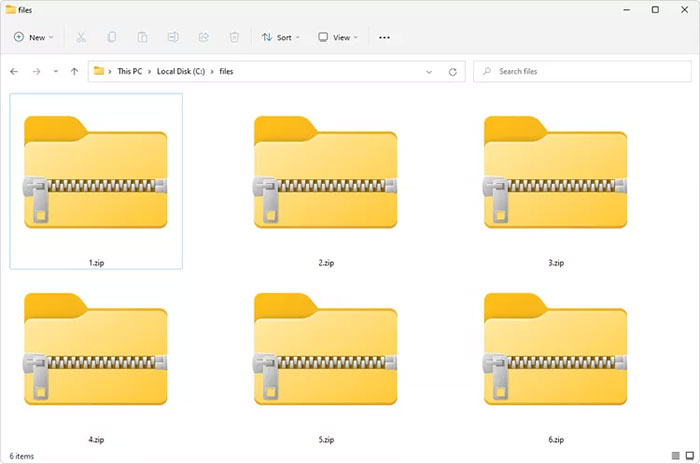
- Send a folder of documents or images as one attachment.
- Package software source code or a release containing many files.
- Preserve nested folders during an upload or download.
- Compress plain text, logs, CSV data, and other highly compressible files.
- Split a collection into a portable archive for short-term storage or transfer.
A ZIP file is not a backup strategy by itself. Keep important data in more than one location, verify backups, and retain version history where accidental deletion or corruption matters.
How to view and extract a ZIP file
Windows, macOS, ChromeOS, iOS, Android, and many Linux desktop environments can open ordinary ZIP archives without additional software. Viewing the archive shows its directory, but software or complex documents should normally be extracted before use.
Extract a ZIP in Windows
- Open File Explorer and locate the
.zipfile. - Right-click it and choose Extract All, or open it and select Extract All from the toolbar.
- Choose a destination folder.
- Select Extract.
In current Windows versions, the right-click menu can also offer Extract All directly. If Windows cannot handle the archive's encryption or compression method, use a reputable tool that supports it; TipsMake compares several file compression and extraction tools.
Extract a ZIP in macOS
Double-click the ZIP in Finder. Archive Utility creates an extracted folder in the same location. For a different destination or an unsupported format, use another trusted archive utility.
Extract only one file
Open the archive, select the required item, and copy or drag it to a normal folder. Do not edit an important document while it is still inside the compressed archive; save an extracted copy first.
Check an archive before opening its contents
A ZIP can contain malicious executables, scripts, shortcuts, or misleading filenames. Compression does not make a file safe.
- Verify the sender and expected contents before downloading.
- Show file extensions so
invoice.pdf.exeis not mistaken for a PDF. - Scan an unexpected archive with current security software.
- Extract into a new empty folder, not directly into a system or application directory.
- Do not enable macros or run an executable merely because it arrived inside a ZIP.
- Avoid archives that expand to an implausibly large size; a “ZIP bomb” is designed to exhaust storage or processing resources.
How to create a ZIP file
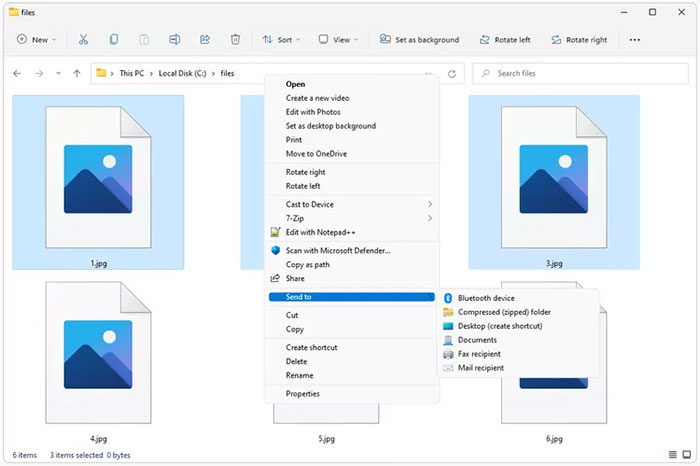
Create a ZIP in Windows 11
- Select the files and folders in File Explorer.
- Right-click the selection.
- Choose Compress to ZIP file.
- Enter a descriptive filename and press Enter.
On older Windows versions, use Send to > Compressed (zipped) folder. TipsMake's step-by-step guide to making a ZIP file covers the common desktop methods.
Create a ZIP in macOS
- Select the files or folder in Finder.
- Control-click or right-click the selection.
- Choose Compress.
A single folder normally produces a ZIP named after that folder; multiple selected items usually produce Archive.zip. Rename it without removing the .zip extension.
Choose useful archive contents
Before sharing, open the new ZIP and confirm that it contains the intended top-level folder and no temporary, hidden, backup, credential, or personal files. Avoid nesting the same ZIP inside itself or including unrelated installers.
Use short, portable filenames when recipients work across operating systems. Characters that are valid on one system can be invalid or confusing on another.
Password-protected ZIP files
Some archive tools can encrypt a ZIP with a password, but the security varies. Legacy ZipCrypto is weak; prefer modern AES encryption when all recipients have compatible software. Use a long unique password and send it through a separate channel.
A password does not hide all metadata in every ZIP implementation: filenames or archive structure may remain visible. For highly sensitive data, use an approved encrypted sharing service with identity-based access, expiration, revocation, and audit logs.
ZIP, 7Z, RAR, and TAR are not the same
| Format | Typical advantage | Compatibility note |
|---|---|---|
| ZIP | Broad built-in support and convenient sharing | Advanced compression or encryption features vary by tool |
| 7Z | Often strong compression and AES encryption | Recipients may need 7-Zip or another compatible app |
| RAR | Useful recovery and multi-part archive features in supporting software | Creation is tied to licensed RAR-compatible tools |
| TAR.GZ | Common on Unix-like systems; TAR packages files and gzip compresses the package | Windows recipients may need appropriate extraction support |
For additional Windows format support, TipsMake's NanaZip overview covers an open-source option.
Convert a ZIP to another archive format
To convert a ZIP to 7Z, TAR.GZ, or another archive format safely:
- Extract the ZIP into a new folder.
- Inspect the files and confirm that extraction completed without errors.
- Create a new archive from the extracted folder using the desired format and settings.
- Test the new archive before deleting the original.
A ZIP cannot meaningfully be converted straight into a PDF, MP4, or other content format because it is a container. Extract the real file first, then convert that file with a tool appropriate to its type. Renaming .zip to another extension does not convert anything.
If a ZIP will not open
- Download or copy the archive again; an incomplete transfer is a common cause.
- Check that enough free storage exists for both the ZIP and its expanded contents.
- Confirm the password and keyboard layout for an encrypted archive.
- Try a current archive utility if the built-in tool does not support the compression or encryption method.
- Ask the sender to test and recreate the archive if a checksum or extraction error persists.
- Do not use an unknown “ZIP repair” download from an untrusted website.
Keep the original archive until the extracted files have been opened and verified. If the archive is the only copy of important data, duplicate it before attempting repair.
Related Articles
 What Is a DAT File? How to Open DAT Files, How to Read DAT12 minutes read
 What Is DMG File?7 minutes read
 M3U Is What File? How to Open, Edit and Convert M3U Files8 minutes read
 What Are BMP Files? What Is a DIB File?5 minutes read
 How to Reduce PDF File Size by Software6 minutes read
 How to Open EXE Files: Practical Guide11 minutes read
Reader Comments 0
Sign in with email or Google to join the discussion.