Table of Contents
Outlook becomes faster when repeated decisions are turned into reusable actions. Start with one high-volume task—filing a report, flagging a request, or sending a standard reply—and automate that before creating a complicated folder system.
New Outlook, classic Outlook for Windows, Outlook on the web, and Outlook for Mac do not place every feature in the same menu. The instructions below identify the main differences.
1. Combine repeated actions with Quick Steps
A Quick Step can apply several actions to a selected message, such as marking it read, moving it to a folder, assigning a category, and forwarding it.
In new Outlook, open Home, use the menu beside Quick Steps, and choose Manage quick steps. In classic Outlook, expand the Quick Steps gallery and choose Create New or New Quick Step > Custom.
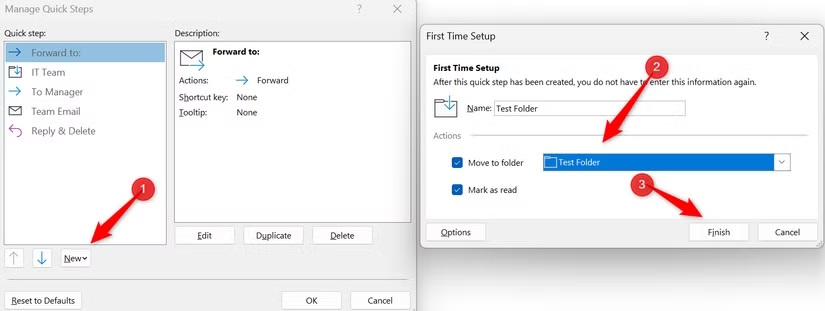
Name the action clearly and test it on a noncritical message. Avoid combining permanent deletion with other actions: a one-click workflow should be easy to verify and undo.
2. Surface important mail with Search Folders
A Search Folder is a saved view, not a second copy of the messages. Mail remains in its original folder, so deleting an item from the search result still deletes the original message.
First define what you need—unread mail, flagged items, messages from a person, or mail matching custom criteria.
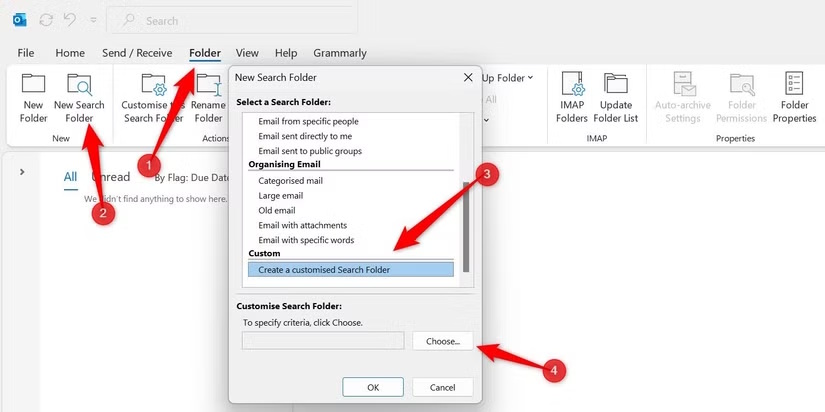
In classic Outlook, choose Folder > New Search Folder. Select a predefined view or Create a custom Search Folder, then set its criteria. In new Outlook and Outlook on the web, expand Search Folders in the folder list or open the Search folders settings and create one from the supported types.
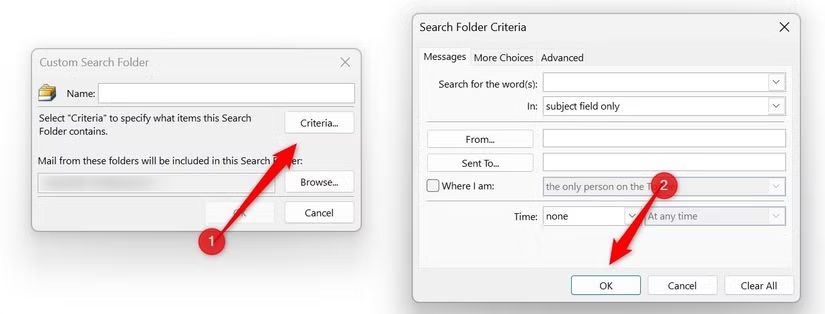
Keep the list small. A focused “Unread or flagged” view is easier to act on than several overlapping searches.
3. Use color only for messages that need attention
Conditional formatting changes how messages look in the list; it does not move them or alter their contents. Use a small number of accessible colors and pair color with a meaningful sender, subject, or category rule.
In classic Outlook, open View > View Settings > Conditional Formatting, add and name a rule, then choose Condition.
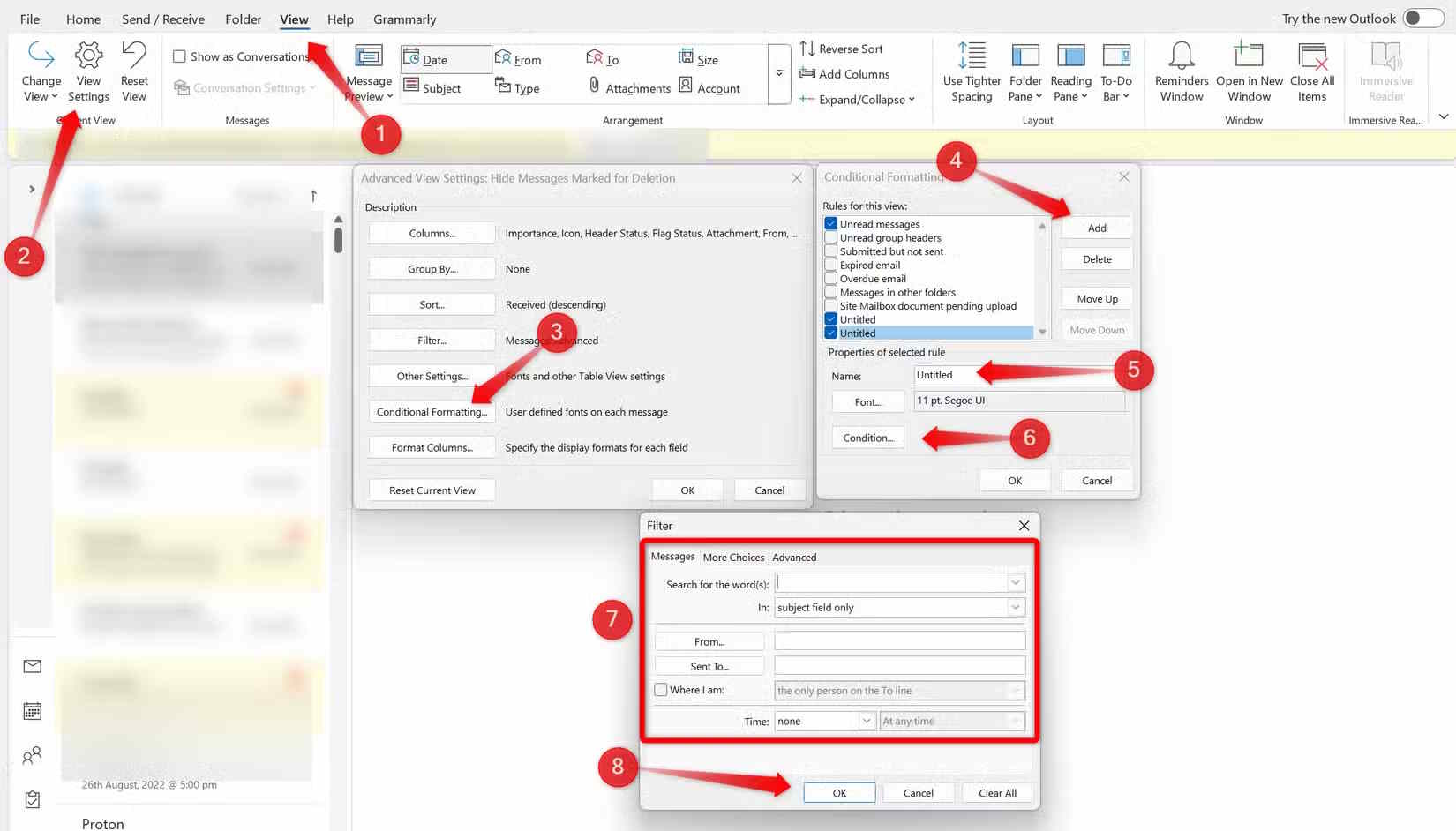
Select Font to choose the display style, then confirm all dialogs.
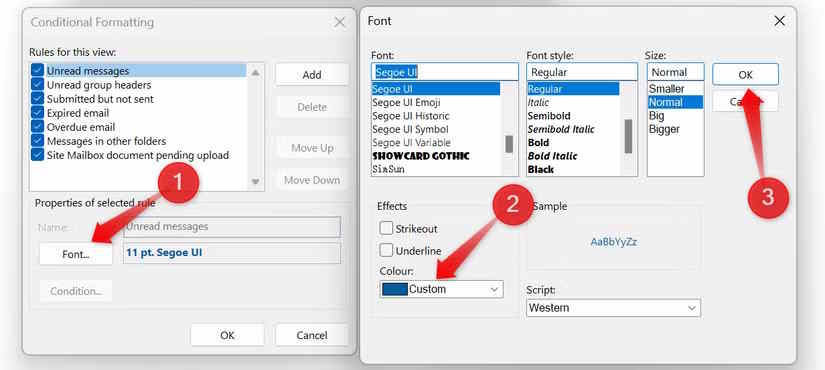
In new Outlook, use Settings > Mail > Conditional Formatting, add a rule, choose its conditions and font color, and save. If a rule highlights too much mail, narrow its conditions rather than adding another competing color.
4. Reuse messages and schedule delivery
Create a reusable message
In classic Outlook for Windows, compose the reusable content and choose File > Save As > Outlook Template (*.oft). Do not leave real recipients or confidential case details in the template.
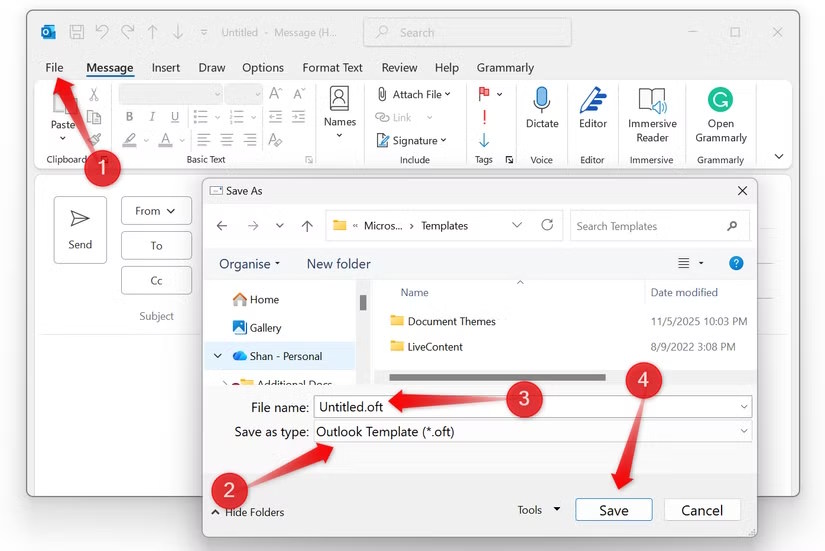
New Outlook and the web version use template features such as My Templates or organization-provided add-ins rather than the classic OFT workflow. A template saves writing time, but every message still needs a recipient, attachment, date, and tone check.
Schedule a message
In new Outlook or Outlook on the web, select the arrow beside Send, choose Schedule send, and set a date and time. In classic Outlook, open Options > Delay Delivery and set Do not deliver before.
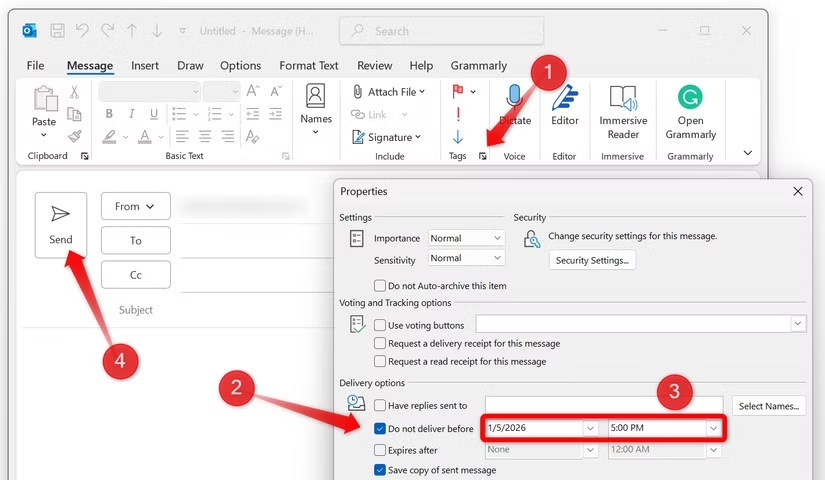
Check whether the scheduled message sits in Drafts or Outbox and whether your Outlook version requires the app to remain connected. Scheduling does not guarantee an exact arrival time, and the recipient may be in another time zone.
5. Learn a few high-value shortcuts
| Action | Common Windows shortcut |
|---|---|
| Reply | Ctrl+R |
| Reply all | Ctrl+Shift+R |
| Forward | Ctrl+F |
| New message | Ctrl+Shift+M in classic Outlook |
| Search | Ctrl+E |
| Mark unread | Ctrl+U |
Shortcuts vary on a Mac and can differ between new and classic Outlook. Use the key tips or Outlook help for your version before building a habit around an unfamiliar command.
6. Search with precise operators
Combine a few searchable fields instead of scrolling through folders. Useful examples include:
from:alex@example.com— messages from an address;to:alex@example.com— messages sent to an address;subject:"project meeting"— a phrase in the subject;hasattachment:yesorhasattachment:true— messages with attachments;received:"this month"— messages received in the current month, where supported;from:alex@example.com hasattachment:yes— combine criteria.
Search syntax can be localized and not every operator behaves identically in every Outlook client. Use the filter buttons if a typed operator is not recognized. Microsoft’s current Outlook search guide lists supported examples.
Add rules only after the workflow is clear
Rules can move, categorize, or flag incoming mail automatically. Create one condition, one action, and sensible exceptions; then monitor the destination folder so important mail is not hidden. Quick Steps are better when you want to approve each action, while rules are better for predictable mail that can be handled without review.
A streamlined inbox does not need to be empty. It needs clear next actions, reliable search, and a small set of automations you trust.
Related Articles
 Move Daily Email to a Folder in Outlook2 minutes read
 4 Ways to Manage Email Effectively17 minutes read
 How to Set Up Email in Outlook Latest 20225 minutes read
 How to Print Email in Outlook3 minutes read
 Detect and Block Malicious Emails on Outlook with Ransomsaver3 minutes read
 How to Print Emails on Outlook3 minutes read
Reader Comments 0
Sign in with email or Google to join the discussion.