Table of Contents
Google has made three inline Gmail AI features available at no additional cost for personal accounts: Help Me Write, more personalized Suggested Replies, and AI Overviews for email threads. Availability can still depend on language, country, account type, age, rollout stage, and Gmail’s smart-feature settings.
These tools generate drafts or summaries; they do not replace reviewing the source messages. Check names, dates, commitments, attachments, recipients, and quoted facts before you send or act on an AI result.
1. Help Me Write creates and refines a draft
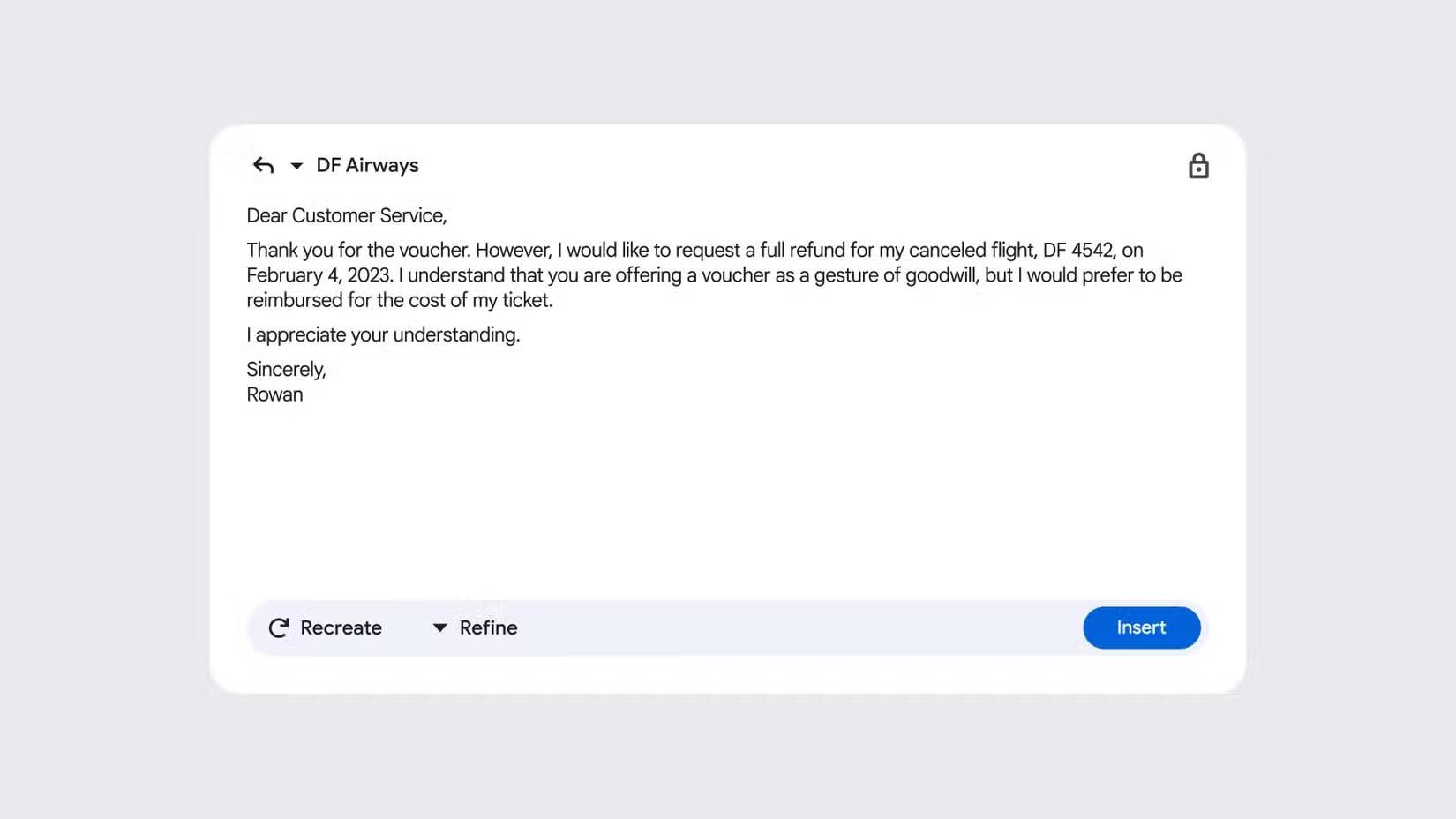
In a compose or reply window, select the Help me write control—often shown with a pencil or sparkle icon—and describe the message you need. Include the audience, purpose, essential facts, desired tone, and any length constraint.
A useful prompt is specific without including unnecessary sensitive information:
Draft a concise reply to a supplier. Confirm receipt of the revised quote, ask whether delivery by Friday is possible, and avoid making a purchase commitment.
Gmail may offer controls to formalize, shorten, elaborate, or polish the result. Edit the draft in your own voice. An AI-generated sentence can sound confident while misstating a deadline or inventing a detail that was never in the thread.
2. Suggested Replies can draft a contextual response
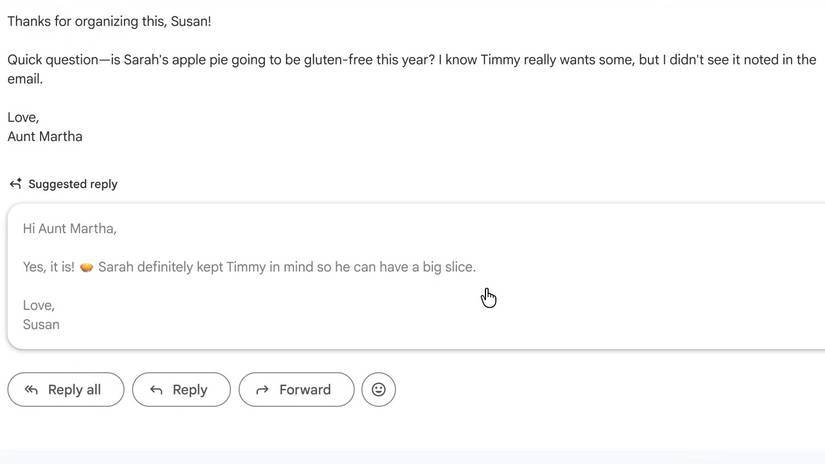
Suggested Replies go beyond a short Smart Reply chip by using the conversation context to propose a fuller response. When a suggestion appears, select it to place the text in the reply box, then revise it before sending.
Use the feature for routine acknowledgments, scheduling, and follow-ups. Write the response yourself when the message involves legal terms, performance feedback, medical or financial information, conflict, or a commitment that requires precise authorization.
A suggested reply may imitate a general tone associated with your email activity, but it cannot know every relationship or unstated boundary. Confirm the greeting, level of formality, pronouns, and whether “Reply” or “Reply all” is appropriate.
3. AI Overviews summarize long email threads
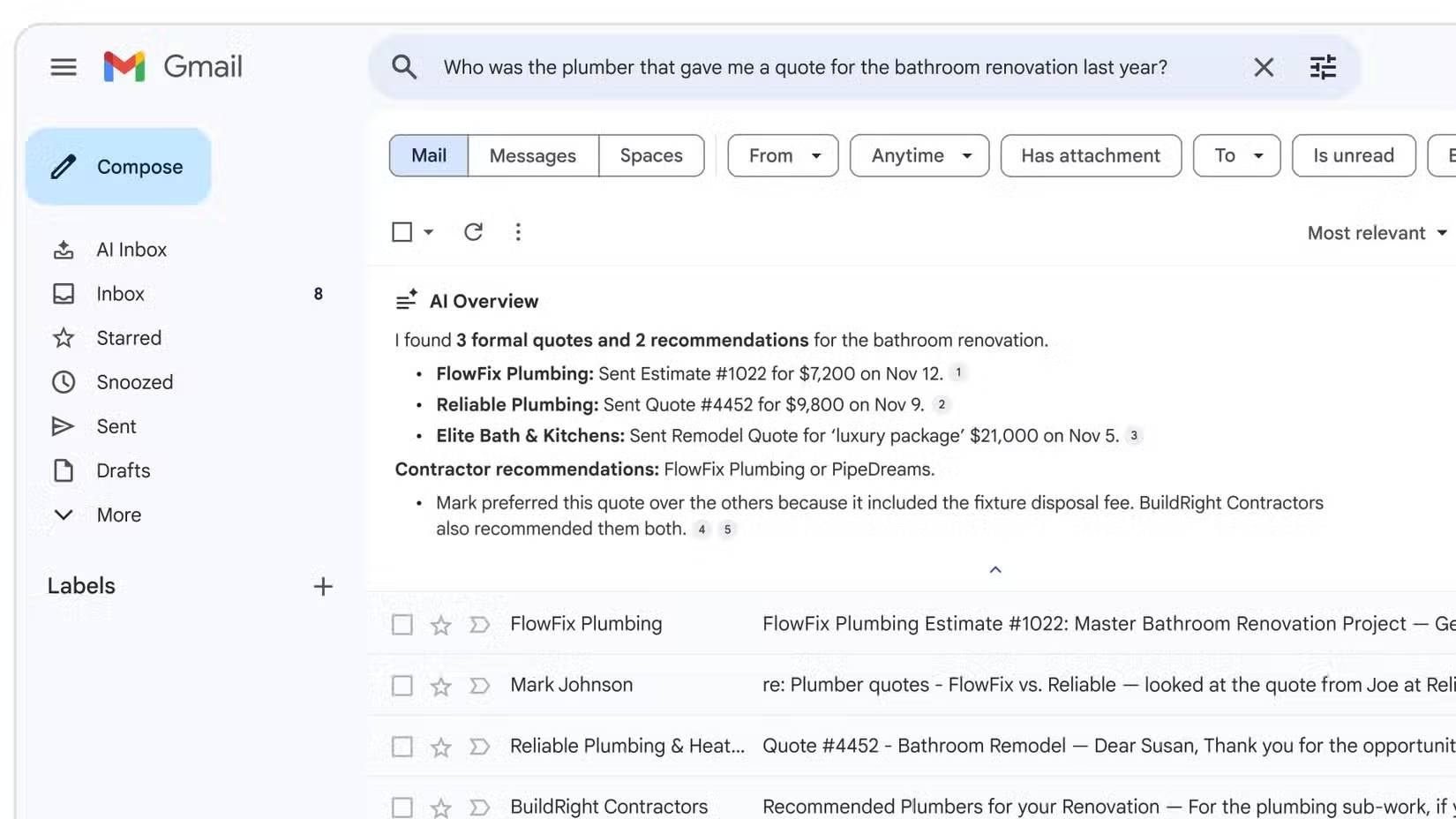
For an eligible long conversation, Gmail can display a summary near the top of the thread. It may extract decisions, outstanding questions, dates, and next steps, which is useful when returning to an old discussion.
Treat the overview as navigation, not as the official record. Open the messages that support an important point and confirm:
- who made the statement and whether someone later corrected it;
- the date, time zone, amount, version, and attachment involved;
- whether a proposed action became an approved decision;
- whether the summary omitted a condition or exception.
Google describes these inline features in its Gmail Gemini announcement and notes that generative AI is experimental.
Thread summaries are different from AI search answers
A summary shown inside an open thread is not the same as asking a natural-language question across the entire mailbox. Google’s support page for AI Overviews in Gmail search lists plan, language, and regional requirements for that broader search feature. For personal accounts, it may require an eligible Google AI plan and be limited to supported markets.
This distinction matters when comparing “free AI Overviews” with subscription features: the inline thread summary can be free while mailbox-wide question answering remains restricted.
What about AI Inbox?
AI Inbox is a separate Gmail experience intended to prioritize important people, messages, tasks, and relevant files. Google has announced and tested it in limited rollouts, but that does not mean every personal Gmail account has it. If it appears, review its controls and keep a way to return to the standard inbox view.
Prioritization can miss an unfamiliar but urgent sender, so continue checking Spam, Updates, Promotions, and other categories appropriate to your account. Do not assume that an AI-ranked inbox is a complete record of what needs attention.
If the features do not appear
- Update the Gmail mobile app or try Gmail on the web.
- Check whether the Google account is personal, work, school, supervised, or otherwise managed.
- Review Gmail’s smart features and personalization settings, along with organization policy where applicable.
- Confirm that your display language and country are supported.
- Allow for a staged rollout; an announcement date does not guarantee immediate access to every account.
Use Gmail AI without creating new mistakes
- Do not paste secrets or unrelated personal data into a prompt.
- Verify every recipient before sending an AI-assisted draft.
- Open referenced attachments instead of trusting a generated summary of them.
- Keep human approval for contracts, payments, account changes, and other consequential actions.
- Use the feedback controls when a result is incorrect, but avoid including confidential details in feedback text.
The three free features are most valuable for reducing routine reading and drafting time. Their output is a starting point; the sender remains responsible for the final email.
Related Articles
 Become a Player Using Gmail with the Following 5 Tips6 minutes read
 40 Interesting Features in Gmail1 minutes read
 Discover 6 Hidden Features on Gmail6 minutes read
 Free up Gmail Fastest5 minutes read
 In a Few Weeks Gmail Will Change to New Clothes, Will It Get New Users?3 minutes read
 14 Useful Tools for Gmail Should Not Be Ignored - P1: Gmail Tips8 minutes read
Reader Comments 0
Sign in with email or Google to join the discussion.