Table of Contents
Windows already includes clipboard history, so most people should try Windows + V before installing another utility. A third-party manager becomes useful when you need longer searchable history, tags, saved snippets, scripts, multiple tabs, or better handling of images and files.
Quick comparison
| Tool | Best for | Storage or sync model | Trade-off |
|---|---|---|---|
| Windows Clipboard History | Simple history with no installation | Local; optional Microsoft account or work account sync | Limited organization and automation |
| Ditto | Reliable Windows history and fast search | Local database; optional computer-to-computer sharing | Traditional interface and many settings |
| CopyQ | Developers and automation | Local history with commands and scripts | More complex than a basic clipboard popup |
| ClipAngel | Portable Windows use and rich clip inspection | Local history | Dense utility-style interface |
| PasteBar | Modern visual organization | Local-only according to the project | Newer project with a larger interface |
| ClipboardFusion | Cleaning formatting and clipboard macros | Local; sync is among the broader product features | Some capabilities require Pro |
1. Windows Clipboard History: best starting point
Press Windows + V. If history is off, select Turn on. After that, use Windows + V to select an earlier text or image item, pin something you want to keep, or clear the list.
Settings are under Settings > System > Clipboard. Windows can optionally sync clipboard history across devices signed in with the same Microsoft or work account. Leave cross-device sync off on shared or sensitive systems unless you have a clear reason to use it.
Best for: Most Windows 10 and 11 users who need only recent history and pinned snippets. The detailed Windows clipboard history guide covers activation, pinning, and clearing.
2. Ditto: best all-round Windows clipboard manager
Ditto is a free, open-source extension to the Windows clipboard. It stores text, images, HTML, and other clipboard formats in a searchable history and provides a quick-paste window.
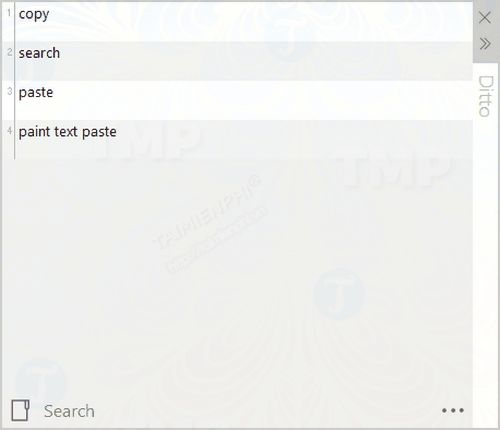
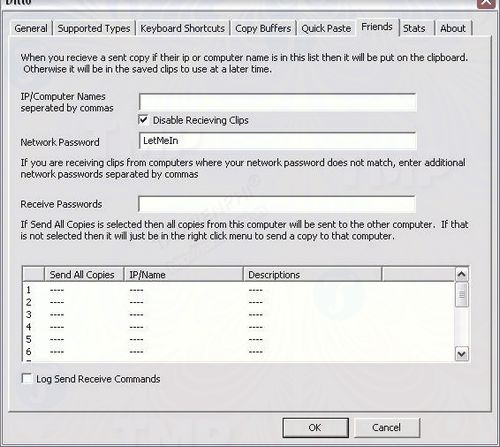
Ditto can organize clips into groups and offers computer-to-computer sharing. Treat that sharing feature as an explicit security decision: configure trusted peers and network rules carefully rather than enabling it on public networks.
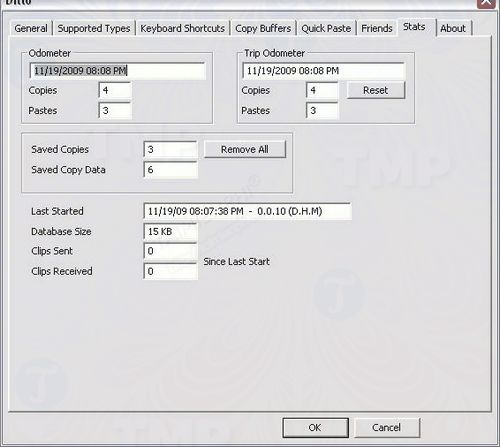
Usage statistics and extensive preferences are available for people who want to tune the workflow.
Best for: Windows users who want a mature searchable history without needing scripts.
3. CopyQ: best for developers and automation
CopyQ is a free, open-source, cross-platform clipboard manager. It stores text, HTML, images, and custom clipboard formats; lets you edit, tag, search, and sort items in tabs; and supports global shortcuts, a command-line interface, and scripts.
Best for: Developers, technical writers, support staff, and anyone who wants actions such as transforming copied text or routing clips into named collections.
Trade-off: Its power comes with configuration complexity. Start with history and search, then add commands only after understanding what they will do to copied data.
4. ClipAngel: best portable Windows utility
ClipAngel records text, HTML, rich text, images, files, folders, and URLs. It offers filtering, favorites, editing, text comparison, customizable hotkeys, and a portable mode.
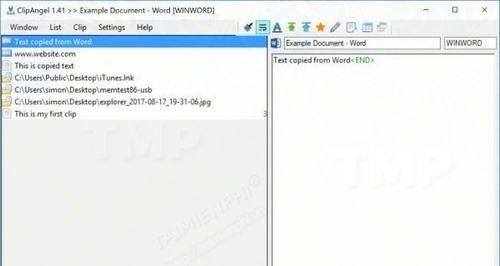
Best for: Users who inspect many clip types, compare copied text, or want a utility that can run without a conventional installation.
Trade-off: The interface prioritizes information density over simplicity. Download binaries only through the locations linked by the official project repository.
5. PasteBar: best modern organizer
PasteBar is a free, open-source clipboard manager for Windows 10 and 11 as well as macOS. It combines clipboard history with collections for reusable text, links, code, and other frequently pasted content.
The project states that clipboard history and custom clips remain on the local device rather than being sent to cloud storage. It also provides lock-screen and passcode controls, but these do not replace full-disk encryption or good account security.
Best for: People who prefer a visual workspace and reusable collections instead of a compact chronological list.
Trade-off: It is a newer and more visually elaborate application than Ditto or ClipAngel, so test its resource use and workflow fit before importing important snippets.
6. ClipboardFusion: best for cleaning and transforming text
ClipboardFusion can remove formatting, replace text, and run macros against clipboard content. It includes a clipboard history window and is especially useful when copied text carries unwanted fonts, styles, or repeated patterns.
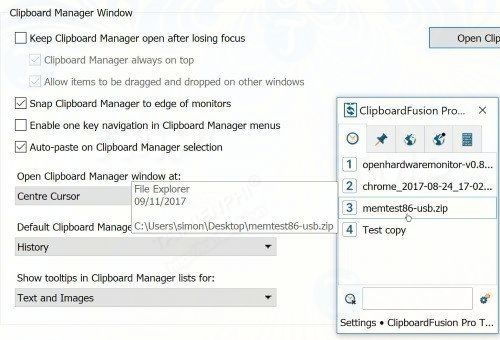

The installer starts with a 30-day Pro trial and then reverts to the Free edition. You can switch to Free earlier from the License Key settings. Check the publisher's Free-versus-Pro comparison before relying on a macro, hotkey, or synchronization feature.
Best for: Writers, spreadsheet users, and support teams that repeatedly normalize pasted text.
Why the older list changed
ClipCube, Save.me, and Ethervane Echo were useful in earlier Windows generations, but they are no longer the strongest default recommendations for a new installation. They have been replaced here by Windows Clipboard History, CopyQ, and PasteBar, which have clearer current support or active project information.
Clipboard privacy and security
A clipboard manager may retain passwords, one-time codes, recovery keys, private messages, customer data, copied files, and screenshots. Before using one:
- Review which formats and applications it captures, and use exclusion rules where available.
- Set a reasonable history-retention limit and clear old clips.
- Disable cloud or network sync unless it is required and approved.
- Do not install a clipboard utility from an unofficial download mirror.
- Lock the PC when away and protect the user account and disk.
- On a work computer, follow organizational policy; clipboard monitoring software may be prohibited.
Clipboard tools also cannot extract text that exists only inside an image without OCR. For that task, see OCR tools for extracting text from photos. If you mainly paste inside Word, the guide to copying and pasting multiple text selections may solve the problem without another background application.
Related Articles
 The Clipboard Management Software on Windows: Clipboard Application5 minutes read
 How to Use Copyandpaste to Manage Clipboard on Windows 105 minutes read
 Clipboard History: How to Delete the Clipboard on Windows 106 minutes read
 Instructions for Synchronizing Clipboard Between Android Device4 minutes read
 Clipboard History: an Extremely Useful but Often 'Forgotten' Feature On4 minutes read
 How to Sync Windows 11 Clipboard Across Multiple Computers3 minutes read
Reader Comments 0
Sign in with email or Google to join the discussion.