Table of Contents
You do not need a separate program just to open a PDF: Windows and macOS include capable viewers, and current browsers can display most files. A dedicated reader becomes useful when you need reliable form handling, annotations, signatures, OCR, multiple document formats, or a faster offline workflow.
Quick comparison
| PDF reader | Platforms | Best for | Main limitation |
|---|---|---|---|
| Adobe Acrobat Reader | Windows, macOS | Forms, signatures, broad PDF compatibility | Advanced editing requires Acrobat Pro |
| Foxit PDF Reader | Windows, macOS | Annotations, forms, signing, business workflows | Feature-rich interface may be more than basic readers need |
| PDF-XChange Editor | Windows 10 or later | Detailed markup, OCR, and power-user tools | Some tools require a paid license |
| SumatraPDF | Windows | Fast, simple local reading | Not intended as a full editing suite |
| Okular | Multiple desktop platforms | Open-source reading, annotation, and signature checks | Interface differs from typical commercial PDF suites |
| Preview | macOS | Built-in viewing, markup, forms, and signatures | Available only on Apple platforms |
1. Adobe Acrobat Reader: best for compatibility and forms
Adobe Acrobat Reader is the conservative choice when a document contains interactive forms, comments, certificates, or signatures. The free Reader includes viewing, annotation, form filling, and signing; editing existing page text and images, converting files, and other advanced workflows are part of paid Acrobat plans.
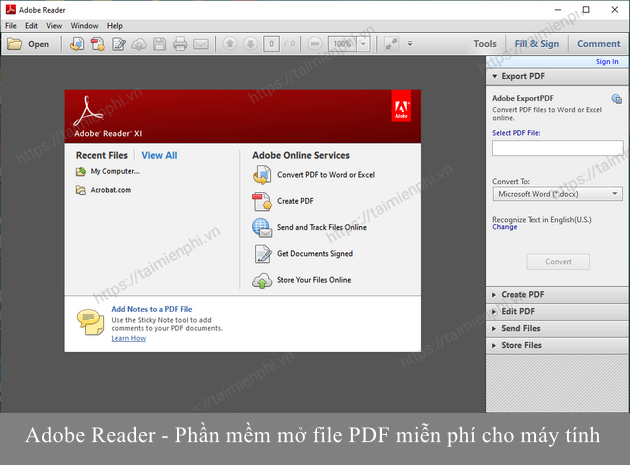
Choose it if: You exchange PDFs with government, legal, education, or business systems and want the viewer produced by the PDF format's creator.
Consider another option if: You need only a small, fast offline viewer and do not use forms or review tools.
2. Foxit PDF Reader: best feature-rich free reader
Foxit PDF Reader supports viewing, comments, highlighting, standard and XFA forms, and several signing methods. It is a practical choice for teams that need more than passive reading but are not ready to buy a full editor.
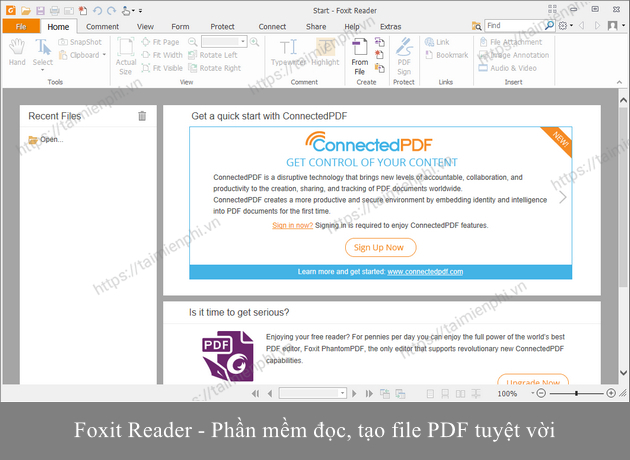
Choose it if: You regularly review documents, complete forms, or need managed deployment on Windows PCs.
Check before installing: Separate Foxit products and add-ons have different licenses. Download the Reader from Foxit's official page and distinguish its free tools from paid Editor or cloud services.
3. PDF-XChange Editor: best Windows power-user option
PDF-XChange Editor combines a capable viewer with extensive annotation, OCR, signing, document organization, and editing tools. The current product replaces the discontinued PDF-XChange Viewer name found in many older recommendations.
Choose it if: You use Windows and want dense toolbars, detailed markup controls, OCR, or document inspection without moving immediately to a subscription suite.
Check before saving: The application mixes free and licensed functions. Identify whether a selected command requires a license before applying it to an important file, and keep a backup of the original.
4. SumatraPDF: best lightweight Windows reader
SumatraPDF is free, open source, Windows-only, and designed for speed. In addition to PDF, it opens EPUB, MOBI, CBZ, CBR, DjVu, XPS, CHM, and many image formats. Installer and portable editions are available from the project's official site.
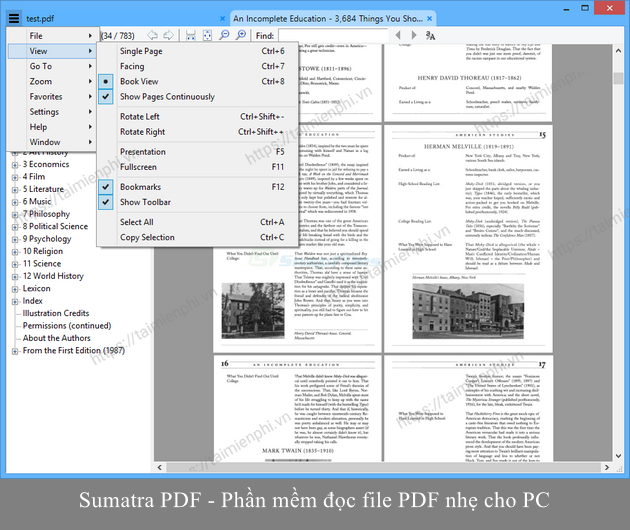
Choose it if: You mainly read local documents and ebooks, want a compact interface, or carry a portable viewer.
Consider another option if: Your work centers on advanced forms, collaboration, redaction, or page-content editing.
5. Okular: best open-source cross-platform reader
Okular is KDE's multi-platform document viewer. It supports PDF, EPUB, DjVu, Markdown, comic archives, common image formats, annotations, table and area selection, and PDF signature verification and creation.
Choose it if: You use Linux, prefer free and open-source software, or want one viewer for several document types.
Consider another option if: Your organization depends on a commercial vendor's support, deployment tooling, or a specific proprietary form workflow.
6. Preview: best built-in PDF reader for Mac
Apple's Preview opens PDFs without another download. It provides thumbnails, search, highlighting, notes, shapes, page organization, form filling, and signatures captured with a trackpad, camera, iPhone, or iPad.
Choose it if: You use a Mac and need everyday PDF viewing and markup without installing a third-party suite.
Consider another option if: A complex business form or certified-signature workflow specifically requires Acrobat or another validated product.
Can you read PDFs in a browser?
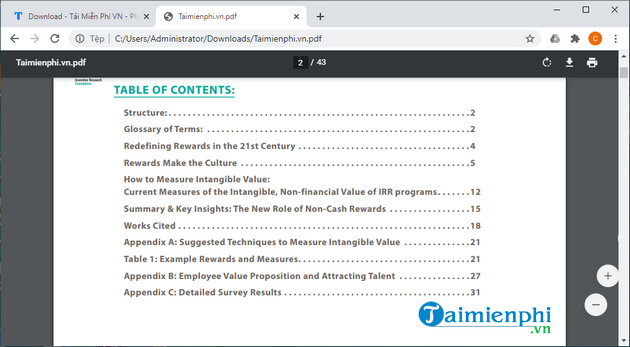
Yes. Microsoft Edge, Google Chrome, and Firefox can open local and web PDFs, search text, zoom, and print. This is the easiest option for occasional reading, but a browser may not support every interactive form, embedded file, certificate, or advanced annotation.
Set a browser as the default PDF viewer in Windows
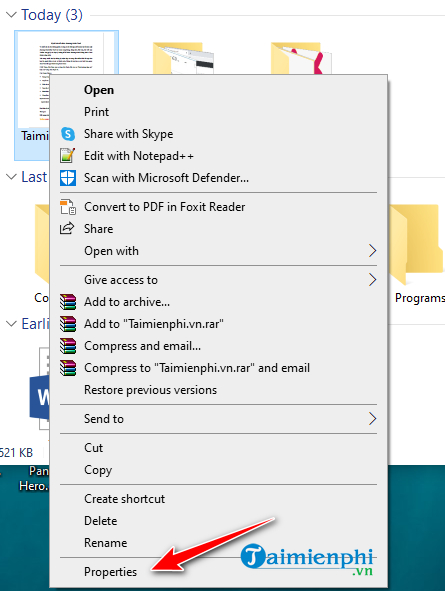
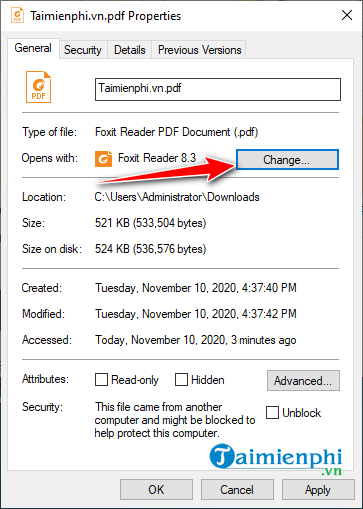
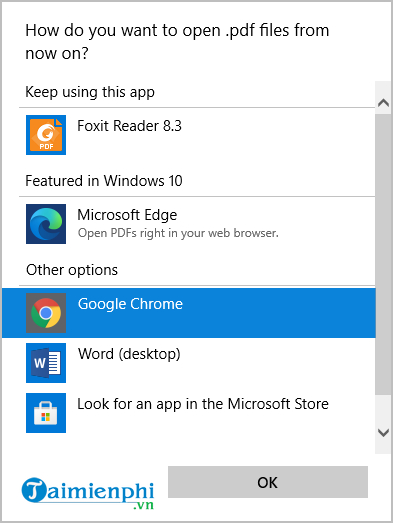
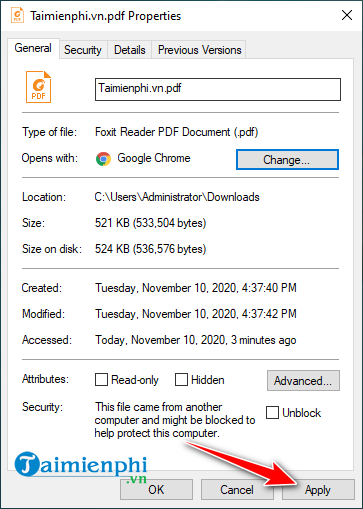
One current route is to right-click a PDF, select Open with > Choose another app, choose the browser, and enable the option to use it for .pdf files. You can also use the file's Properties:
Right-click a PDF and select Properties.
Next to Opens with, select Change.
Choose Edge, Chrome, Firefox, or a dedicated PDF reader.
Select OK, then Apply.
Double-click a PDF to confirm it opens in the selected app.
How to choose safely
- Reading only: Use Edge, Preview, or SumatraPDF.
- Forms and signatures: Start with Acrobat Reader or Foxit Reader.
- Heavy Windows annotation and OCR: Compare PDF-XChange Editor's free and licensed tools.
- Linux or open-source preference: Try Okular.
- Sensitive documents: Prefer a reputable offline reader rather than uploading the file to an unknown online service.
Install viewers only from their official publisher pages, enable automatic updates, and treat links and attachments inside an unfamiliar PDF cautiously. A PDF viewer is not a substitute for verifying the sender or the document's authenticity.
For more choices, compare 16 free PDF readers. If you need to change page content rather than merely annotate it, review free PDF editors or see how to edit a PDF with Sejda—but do not upload confidential files without reviewing the service's privacy and retention terms.
Related Articles
 Software to Read PDF Files: PDF Reader5 minutes read
 How to Use Foxit Reader to Read PDF Files3 minutes read
 Set Outlook as the Default Email for Mac Computers2 minutes read
 Top Top PDF Reading Software 2023 for Free on PC, Laptop: Top Picks and Buying21 minutes read
 Good Software to Replace Google Reader7 minutes read
 How to Install Vietnamese for Foxit Reader3 minutes read
Reader Comments 0
Sign in with email or Google to join the discussion.