Table of Contents
This guide answers "What Is a JOBOPTIONS File?" with a clear explanation, practical context, and the details that matter most.
What is a JOBOPTIONS file?
Files with the JOBOPTIONS file extension are Adobe PDF preset files.
Adobe products use this file to define the properties of the PDF file they create. Some of the settings this file controls include the font, image resolution, color palette, and security settings of the document.
Older versions of Adobe products save PDF presets as files with the PDFS file extension.
How to open JOBOPTIONS file
Acrobat Distiller is responsible for creating PDF files, so of course it can open and use JOBOPTIONS files correctly. Also, since PDF support is built into Adobe Creative Suite programs, any of them will work, including InDesign, Illustrator, Acrobat, and Photoshop.
In Acrobat Distiller, go to Settings > Add Adobe PDF Settings to browse and select the JOBOPTIONS file. In Photoshop, open the file by going to Edit > Adobe PDF Presets > Load .
The same steps apply to other Adobe tools. You can also try dragging and dropping the file directly into the program or double-clicking the file.
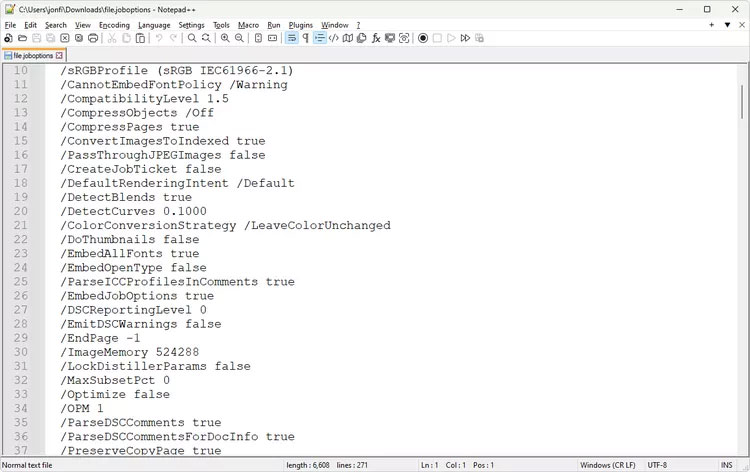
JOBOPTIONS files are text-only files, meaning you can also open them with a simple text editor and probably most web browsers. Using Notepad or Notepad++ will allow you to view the instructions in the file - you won't actually be able to use the file to define PDF creation.
Note : Some JOBOPTIONS files are provided as ZIP files, which means you must extract the files from the archive before you can use them with Adobe products. If the file is in a different archive format and you have trouble opening it, try using an archive opener such as 7-Zip.
How to convert JOBOPTIONS file
Older versions of Adobe InDesign use the PDFS file extension to store PDF presets. This older format can be converted to JOBOPTIONS if you import a PDF file into InDesign CS2 or later, then export or save it.
Due to the special role of JOBOPTIONS, converting to any other format will not bring any benefit.
Still can't open the file?
If your file doesn't open using the suggestions above, then you're probably misreading the file extension, meaning you don't actually have a JOBOPTIONS file.
One of the closest file extensions to this is JOB, which can be used for both MetaCAM Nest Job files and Windows Task Scheduler Job files, neither of which are related to PDF or used with Adobe programs.
If your file has the suffix JOB instead of JOBOPTIONS, it may work with Metamation or the built-in Task Scheduler in Windows.
Note : Task Scheduler-related JOB files are stored in Windows at C:WindowsTasks , but some programs may use the JOB file extension for their own purposes, such as running scheduled virus scans or automatically updating programs and saving the file elsewhere.
OPTIONS is another file extension that can be easily confused with JOBOPTIONS. It is used by SE-SOFT's SE-DesktopApps.
More information about the JOBOPTIONS file
New JOBOPTIONS files that you import into Adobe products are stored in this folder:
- Windows : C:ProgramDataAdobeAdobe PDF
- Windows XP : C:Documents and SettingsAll UsersApplication DataAdobeAdobe PDF
- macOS : /Library/Application Support/Adobe/Adobe PDF/
Some people have also seen them in this folder as they are used by Photoshop in Windows:
C:Program FilesAdobeAdobe Photoshop (phiên bản)RequiredPDFSettingsFAQ
What is a JOBOPTIONS file?
Files with the JOBOPTIONS file extension are Adobe PDF preset files.
How to open JOBOPTIONS file?
Acrobat Distiller is responsible for creating PDF files, so of course it can open and use JOBOPTIONS files correctly. Also, since PDF support is built into Adobe Creative Suite programs, any of them will work, including InDesign, Illustrator, Acrobat, and Photoshop.
How to convert JOBOPTIONS file?
Older versions of Adobe InDesign use the PDFS file extension to store PDF presets. This older format can be converted to JOBOPTIONS if you import a PDF file into InDesign CS2 or later, then export or save it.
Still can't open the file?
If your file doesn't open using the suggestions above, then you're probably misreading the file extension, meaning you don't actually have a JOBOPTIONS file.
Related Articles
 What Is ISO File?10 minutes read
 What Is the .DAT File: How to Open and Read the .DAT File?10 minutes read
 What Is File 000? Complete Guide6 minutes read
 All You Need to Know About ZIP Files - What Is a ZIP File?5 minutes read
 What Is DMG File?7 minutes read
 What Is Xml File: What Is an XML File and How to Open It?9 minutes read
Reader Comments 0
Sign in with email or Google to join the discussion.