Table of Contents
A GIF file is a raster image saved in the Graphics Interchange Format. A GIF can hold one still image or a sequence of frames that plays as a simple animation. The format is widely supported by browsers and messaging apps, but its limited color palette makes it a poor choice for detailed photographs or high-quality video.
How the GIF format works
A GIF uses indexed color, with a palette of up to 256 colors for an image or frame. It uses lossless LZW compression, so saving the same data does not introduce JPEG-style compression artifacts. However, reducing a full-color source to a small palette can still cause banding or dithering.
Animated GIFs store multiple image frames plus timing and loop instructions. They do not contain audio. The format can mark a palette color as transparent, but it does not provide the smooth, variable transparency available in PNG.
What are GIF files best for?
- Short, silent reactions or demonstrations
- Simple animations with flat colors
- Small decorative motion that must work in older software
- Still graphics that already use a limited palette
GIF is usually inefficient for long clips, large dimensions, smooth gradients, or photographic footage. MP4 or WebM video often delivers a much smaller file for that content, while animated WebP can retain animation and support more colors and better transparency.
How to open a GIF
In a web browser
Chrome, Edge, Firefox, and Safari can display still and animated GIFs. Drag the file into a browser window, or right-click it and choose the browser under Open with.
In Windows and macOS
The built-in photo viewer or preview app can open most GIFs, although animation controls vary. A browser is the simplest fallback when the default viewer shows only the first frame.
On iPhone, iPad, and Android
Open the file from the Photos, Gallery, Files, or messaging app. If an app shows only a still image, open the GIF in a mobile browser. Saving a GIF through some apps may convert it to a still image, so confirm that the downloaded file still ends in .gif.
How to edit an animated GIF
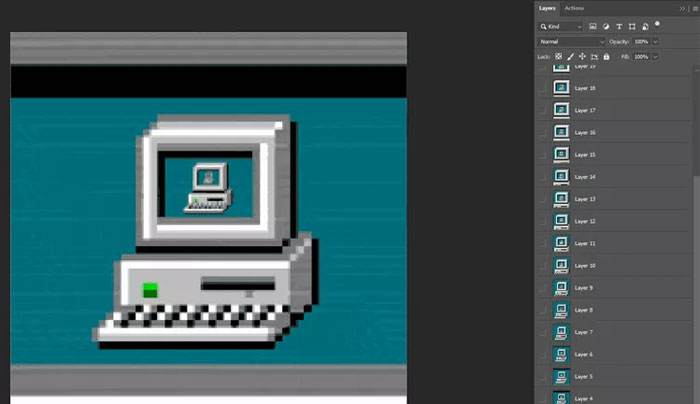
Editors such as GIMP and Adobe Photoshop typically expose animation frames as separate layers. That lets you crop the canvas, remove frames, change frame delays, resize the image, and choose whether the animation loops.
- Open the GIF in an editor that supports frame animation.
- Make a copy before editing so the original remains available.
- Reduce dimensions or frame count if the file is unnecessarily large.
- Preview the full loop and check the timing.
- Export as GIF with animation and looping enabled.
Do not simply use a normal “Save” command without checking the format options; some editors may flatten the animation to one frame.
How to create a GIF
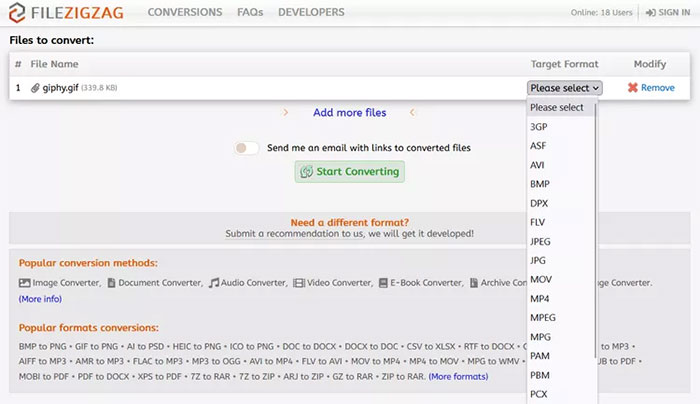
You can build a GIF from a short video or from a sequence of same-size images. Desktop editors offer better control and keep files local. Online converters are convenient, but uploaded material is sent to a third-party service, so they are unsuitable for private recordings or confidential images.
For a cleaner result, trim the source first, crop unused space, choose only the frame rate needed for visible motion, and resize to the actual display dimensions. Add captions directly to the frames if the animation communicates information without surrounding text.
How to convert a GIF
| Target format | What happens | Best use |
|---|---|---|
| MP4 or WebM | Keeps motion but becomes video; usually much smaller for complex footage | Longer or photographic animations |
| Animated WebP | Keeps animation and supports richer color and transparency | Modern websites and apps with compatible clients |
| PNG | A standard PNG export usually keeps only one frame | A lossless still image with transparency |
| JPG | Keeps one frame and removes transparency | A small photographic still |
To convert with an image editor, open the GIF, choose Export or Save As, and select the destination format. For video output, use an editor or converter that explicitly supports animated GIF input. Check the result before deleting the source because a still-image conversion normally discards all other frames.
Tips for smaller, more accessible GIFs
- Crop and resize before export rather than relying on the webpage to scale a large file.
- Remove duplicate frames and use the lowest acceptable frame rate.
- Limit the palette only as far as the image can tolerate without distracting banding.
- Avoid rapid flashing, and provide a pause or non-animated alternative when motion could distract users.
- Use meaningful alternative text for an informative GIF; mark purely decorative GIFs appropriately in the page design.
- For a substantial tutorial or clip, use captioned video instead of forcing it into a silent GIF.
Related Articles
 All You Need to Know About ZIP Files - What Is a ZIP File?5 minutes read
 What Is a DAT File? How to Open DAT Files, How to Read DAT12 minutes read
 What Is DMG File?7 minutes read
 M3U Is What File? How to Open, Edit and Convert M3U Files8 minutes read
 What Are BMP Files? What Is a DIB File?5 minutes read
 How to Reduce PDF File Size by Software6 minutes read
Reader Comments 0
Sign in with email or Google to join the discussion.