Table of Contents
An APK file is an Android application package. Android uses APKs to install an app's compiled code, resources, manifest, and signing information. Tapping an APK on Android starts the package installer; opening the same file on a computer usually means inspecting its contents or running the app in an Android environment.
Sideloading an APK can be legitimate, but it bypasses some of the checks and update handling provided by an app store. Install one only when you trust both the source and the app publisher.
What is inside an APK?
An APK is structured as a ZIP-compatible archive, but renaming or extracting it does not turn it into a normal desktop program. Common components include:
- AndroidManifest.xml, which describes the package, app components, permissions, and requirements
- classes.dex files containing compiled Android bytecode
- res and assets directories containing resources used by the app
- resources.arsc, the compiled resource table
- META-INF and other signing-related data, depending on the APK's signature scheme
- Native libraries for particular processor architectures when the app needs them
How to install an APK on Android
- Download the APK from a source you have verified. Avoid copies posted by unknown download sites or sent unexpectedly in messages.
- Open the file from the browser or file manager that downloaded it.
- If Android blocks the installation, follow the prompt to allow that specific app to Install unknown apps. The exact Settings path varies by phone maker and Android version.
- Return to the installer, review the app name and requested access, and choose Install.
- Afterward, turn off the install permission for the browser or file manager if you do not need it regularly.
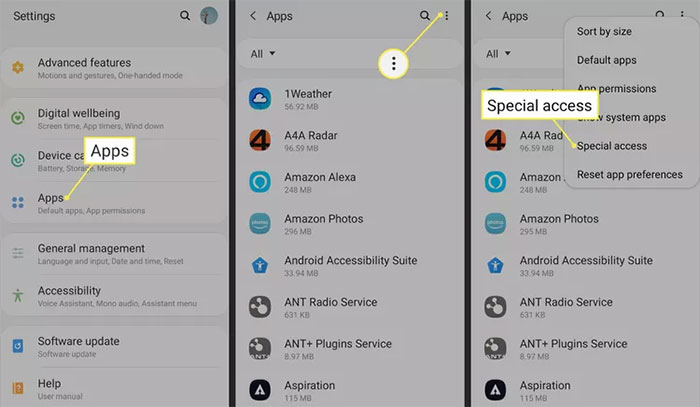
On modern Android versions, permission to install unknown apps is granted per source. For example, allowing a browser to start installations does not automatically grant the same ability to every file manager. Older devices may instead have a single Unknown sources switch.
Why an APK may not install
- Incompatible Android version: the app may require a newer system release.
- Wrong processor or device configuration: a package may contain native code for a different architecture.
- Conflicting signature: an installed copy signed by a different publisher key cannot normally be updated by the new APK.
- Incomplete package: some apps are delivered as a base APK plus configuration splits. A single extracted file may not be sufficient.
- Damaged download or insufficient storage: download the file again only from the trusted source and check free space.
- Security policy: a managed work device may prohibit sideloading.
Do not work around a warning by disabling broad device protections. If you cannot establish where the APK came from or why it needs unusual permissions, do not install it.
How to open or inspect an APK on a computer
View the archive contents
Make a copy, then open the APK with an archive tool such as 7-Zip or PeaZip. This reveals packaged files but does not make the Android app usable on Windows or macOS. Much of the content is compiled, so a basic archive viewer will not show readable source code.
Run the app in an Android environment
To execute an APK on a computer, use a reputable Android emulator or Android development tools. Keep the emulator and host system updated, and treat the app as untrusted until its origin is verified. Availability and compatibility vary, especially for apps that require Google services, hardware sensors, a particular CPU, or device integrity checks.
Inspect it for development or security work
Android development tools can examine package metadata and verify a digital signature. A valid signature confirms that the file has not changed since it was signed; it does not prove that the publisher or app is trustworthy. Compare the signing certificate with a known-good release when authenticity matters.
Can an APK be installed on iPhone or iPad?
No. iOS and iPadOS use a different application format, signing model, runtime, and distribution process. Renaming APK to IPA or using a file converter will not create a working iPhone app. The developer must build and sign a separate iOS version from compatible source code.
Can an APK be converted to EXE, IPA, or another app format?
Not in the way an image or document can be converted. APK, EXE, and IPA packages contain software built for different operating systems and runtimes. Running an Android app elsewhere requires emulation or a version built by the developer for that platform. Websites promising an instant APK-to-IPA or APK-to-EXE conversion should be treated with caution.
APK safety checklist
- Prefer the publisher's official store listing or website.
- Confirm the package name, publisher, version, and expected file source.
- Keep Google Play Protect or the device's equivalent security scanning enabled.
- Review permissions after installation and deny access the app does not need.
- Remove the app and change affected credentials if it behaves suspiciously.
- Keep the original download only if you have a reason; an old APK will not receive security updates by itself.
Related Articles
 All You Need to Know About ZIP Files - What Is a ZIP File?5 minutes read
 What Is a DAT File? How to Open DAT Files, How to Read DAT12 minutes read
 What Is DMG File?7 minutes read
 M3U Is What File? How to Open, Edit and Convert M3U Files8 minutes read
 What Are BMP Files? What Is a DIB File?5 minutes read
 How to Reduce PDF File Size by Software6 minutes read
Reader Comments 0
Sign in with email or Google to join the discussion.