Table of Contents
This guide provides a clear, practical overview of "Drone Sets Record for Flying Continuously for 40 Days and Still". It organizes the most useful details, explains important considerations, and highlights the steps or choices that matter most.
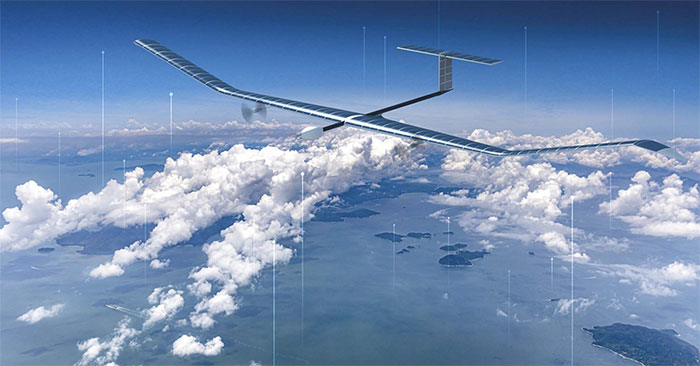
The plane, called the Zephyr, is designed to fly in the stratosphere. It has a wingspan of 25 meters and weighs less than 75 kg. Its power needs are very low, equivalent to the power needed to power a normal light bulb.
What is Zephyr used for?
Zephyr, like other drones that can fly higher than 18km, with long flight times, can be used in the military for intelligence, surveillance, and reconnaissance missions. In addition, these aircraft can also be used in the oil and gas industry, surveying, land management, forest fire monitoring, and crop monitoring.
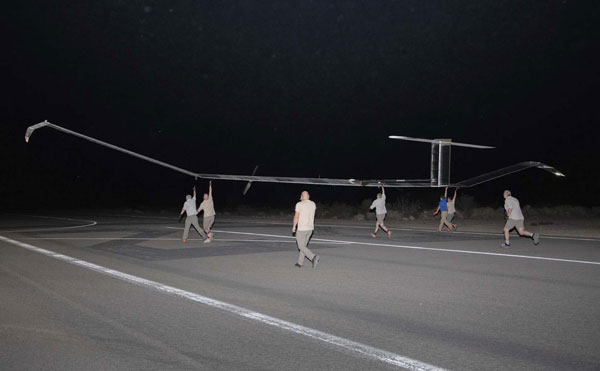
In 2010, Zephyr flew for two weeks in the sky, and in 2018, it was 26 days. Now, Zephyr has been upgraded internally, the software has been improved to fly longer. In 2021, this solar-powered drone also made two flights, each lasting about 18 days.
Zephyr's first flight in 2022 is still not over. It is still flying in the sky to demonstrate its energy storage capacity, battery durability, and solar panel efficiency.
FAQ
What does this guide cover?
This guide explains drone sets record for flying continuously for 40 days and still, including the main steps, important details, and practical considerations.
Who is this guide for?
It is designed for readers who want a clear, practical overview and a reliable process they can follow without unnecessary complexity.
What should you check before getting started?
Review the requirements, confirm that your software or device is up to date, and save any important data before changing settings.
Related Articles
 Bosch Introduces Sensor Boxes Designed for Unmanned 'Flying Taxis'7 minutes read
 Memorize with the World Record Set of 1,374 Unmanned Aircraft3 minutes read
 What Is a UAV (Drone), How Does One Control It and What Can It Be Used For?15 minutes read
 This Drone Can Identify Anyone with a Fever and Cough3 minutes read
 Contemplating the Performance of the Drone Model Has a Tremendous 'Evasion Index'7 minutes read
 Wingless Animals That Can Fly Like Birds6 minutes read
Reader Comments 0
Sign in with email or Google to join the discussion.