Table of Contents
An SVG file is a Scalable Vector Graphics document. It describes shapes, paths, text, colors, and effects with XML markup, allowing many graphics to scale from an icon to a large display without becoming pixelated. SVG is especially useful for logos, interface icons, diagrams, and illustrations on the web.
SVG is not automatically the best choice for every image. Detailed photographs are generally better stored as JPEG, WebP, or AVIF, and an overly complex SVG can be slower or larger than a well-optimized raster image.
How SVG differs from a raster image
A raster image such as JPG or PNG is a grid of pixels. Enlarging it beyond its original dimensions exposes that grid and makes the image look soft or jagged. SVG primarily describes geometry, so a browser or graphics app redraws the shapes at the requested size.
An SVG can also contain text, gradients, masks, filters, and embedded or linked raster images. Therefore, “SVG” does not guarantee that every element is truly resolution-independent or that the file will be small.

Advantages of SVG
- Sharp scaling: vector shapes remain crisp at different screen sizes and pixel densities.
- Editable structure: designers can change individual paths, fills, strokes, and text.
- Web support: current major browsers can render SVG directly.
- Styling and interaction: inline SVG elements can be styled with CSS and controlled with JavaScript.
- Potentially small files: simple icons and diagrams often compress efficiently.
- Accessible content: meaningful titles, descriptions, labels, and text can be included when the SVG is authored and embedded correctly.
Limitations and risks
- A photograph represented as vectors is usually impractical; embedded bitmap data can make an SVG large.
- Complex paths, filters, or animation may consume significant CPU and rendering time.
- Fonts can render differently when the required typeface is unavailable. Converting lettering to paths preserves appearance but removes editable, selectable text.
- Feature support may differ in older apps, email clients, content-management systems, and print workflows.
- SVG can contain links, scripts, and other active features. Treat an untrusted SVG as code-capable content and sanitize it before embedding it inline on a website.
How to open an SVG file
View it in a browser
Drag the SVG into Chrome, Edge, Firefox, or Safari, or use the browser's Open File command. This is the quickest way to view the rendered graphic, although it does not provide full editing tools.
Edit it in a vector graphics app
Use a vector editor such as Inkscape, Adobe Illustrator, Affinity Designer, or another application that explicitly supports SVG. Open the file, edit its objects, and save a copy. Check text, filters, masks, gradients, clipping paths, and embedded images after moving the file between applications.
Inspect the markup
Because SVG is XML, a developer can open it in a text or code editor. Work on a copy, keep the XML well formed, and preview the result in a browser. This approach is useful for small changes such as a fill color, viewBox, accessible title, or dimensions; it is not convenient for redrawing complex paths.
How to create an SVG
- Create the artwork in a vector graphics editor.
- Set an appropriate page or artboard size and ensure the viewBox covers the artwork.
- Decide whether text should remain selectable or be converted to paths for appearance consistency.
- Remove hidden objects, editing metadata, and unused definitions.
- Export or save as SVG, then test the file at small and large display sizes.
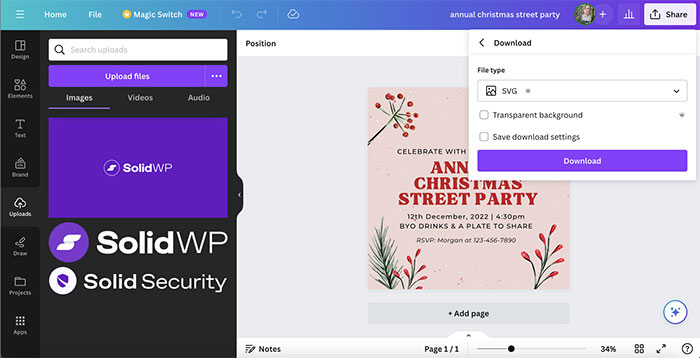
A raster editor may export limited SVG in some versions, but it is not the right tool for building editable vector artwork. Use a vector editor when paths and shapes must remain independently editable.
How to use SVG on a website
The simplest method is an image element:
<img src="logo.svg" alt="Company name">This keeps the SVG separate and limits direct styling of its internal elements. Inline SVG places the markup in the HTML and enables detailed styling or interaction, but it also requires careful sanitization if the content comes from users or third parties.
For an informative graphic, provide a concise accessible name and explain important information in nearby HTML when appropriate. Decorative SVG should be hidden from assistive technology using the method suitable for the way it is embedded. Visible text inside an SVG is not a substitute for a clear page heading, surrounding copy, or correctly implemented accessibility.
SVG, PNG, or JPG?
| Format | Best for | Main tradeoff |
|---|---|---|
| SVG | Logos, icons, diagrams, flat illustrations | Can be complex or unsafe if untrusted active content is embedded |
| PNG | Lossless raster graphics, screenshots, full alpha transparency | Becomes pixelated when enlarged and can be large |
| JPG | Photographs where small files are important | Lossy compression and no transparency |
How to convert SVG
Export SVG to PNG when a service needs a fixed-size raster image. Choose the final pixel dimensions during export; a small PNG cannot be enlarged later without quality loss. Converting PNG or JPG to SVG is different: placing the bitmap inside an SVG does not make it vector artwork, while automatic tracing may need extensive cleanup.
Before publishing, optimize a copy rather than the editable master. Confirm that optimization did not alter text, IDs, gradients, clipping, accessibility labels, or animation.
Related Articles
 All You Need to Know About ZIP Files - What Is a ZIP File?5 minutes read
 What Is a DAT File? How to Open DAT Files, How to Read DAT12 minutes read
 What Is DMG File?7 minutes read
 M3U Is What File? How to Open, Edit and Convert M3U Files8 minutes read
 What Are BMP Files? What Is a DIB File?5 minutes read
 How to Reduce PDF File Size by Software6 minutes read
Reader Comments 0
Sign in with email or Google to join the discussion.