Table of Contents
An AI context window is the amount of input and generated output a model can process for one response. It may include system instructions, your current prompt, earlier messages, selected files or tool results, and space reserved for the answer. If important information is not included in that working context, the model cannot reliably use it.
A larger window allows more material to be supplied at once, but it does not guarantee that every detail will be noticed, interpreted correctly, or given equal weight.
What counts toward the context window?
Language models process text as tokens, not as pages or a fixed number of words. A token may be a whole short word, part of a longer word, punctuation, code, or another text fragment. Tokenization varies by model and language, so word-count conversions are only rough estimates.
The context budget can include:
- hidden system and application instructions;
- the visible conversation history supplied to the model;
- the current user message;
- documents, images, search results, or tool output represented in the request;
- the model's response.
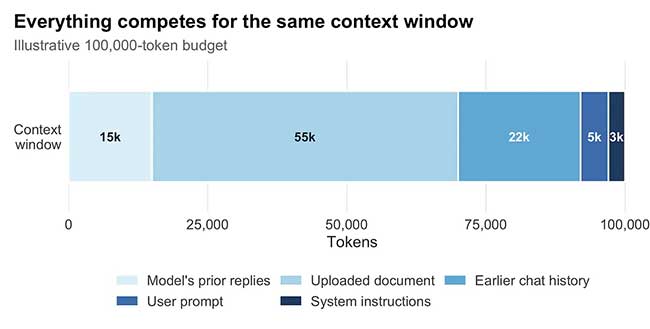
When the limit is approached, the product may reject an oversized request, omit older content, summarize previous messages, retrieve only selected passages, or use another product-specific strategy. The model itself does not decide to preserve every old message indefinitely.
Why long conversations can drift off topic
Earlier instructions may no longer be present
If an application drops or compresses old messages, a tone rule, definition, or constraint stated near the beginning may be missing or simplified in the next model call.
Important details can be buried
Even when a fact fits inside the window, models do not use long input perfectly. The Lost in the Middle study found that performance on tested retrieval tasks often declined when relevant information appeared in the middle of a long context rather than near the beginning or end. The result is a measured limitation, not a rule that every model always ignores the middle.
The conversation accumulates noise and contradictions
Long threads often contain abandoned ideas, corrections, examples, quoted text, and competing requirements. If the current instruction does not clearly identify which version is authoritative, the model may combine incompatible details.
Summaries can lose precision
Applications may summarize earlier conversation to save space. A summary can preserve the main direction while dropping exact wording, exceptions, code details, or unresolved decisions.
Long context is computationally demanding
In a standard full self-attention layer, comparisons grow quadratically with sequence length. Modern systems use several architectural and serving optimizations, so the practical cost is not captured by one simple formula, but processing more context still consumes time and resources.
Context window is not the same as memory
| Concept | What it means |
|---|---|
| Context window | The working input and output available to the model for the current response. |
| Saved chat history | Messages stored by the application; the app may not send all of them to the model every time. |
| Product memory | Selected information saved and later reintroduced by an application, subject to its settings. |
| Model training | Patterns learned before deployment; it is not a searchable record of your conversation. |
| Retrieval | Relevant passages fetched from files, search, or a knowledge base and placed into the current context. |
This distinction explains why a chatbot can display an old conversation in the interface yet fail to apply a detail from it: visible history, stored data, and the actual context sent for the current response are not necessarily identical.
How to keep a long AI task on track
- Maintain a current brief. Keep the objective, audience, constraints, definitions, and output format in a short authoritative block.
- Mark superseded decisions. State which earlier requirement has changed and what replaces it.
- Summarize at milestones. Ask for a structured project-state summary, then inspect and correct it.
- Split large sources by task. Send only the sections required for the current analysis while retaining citations to the originals.
- Request evidence. Ask the model to point to the passage or file supporting important claims.
- Start a clean thread when needed. Carry over a verified handoff summary instead of an entire noisy conversation.
- Preserve exact artifacts outside chat. Store code, tables, specifications, and final decisions in files or version control.
A reusable handoff template
Goal: [current objective]
Audience: [who the output is for]
Authoritative decisions: [current choices]
Constraints: [must and must not]
Source material: [files or links]
Completed work: [verified result]
Open questions: [unresolved items]
Next action: [one specific task]
Output format: [required structure]
Keep this block concise and update it after a major decision. Repeating a verified summary is more reliable than assuming the model will reconstruct the correct state from dozens of messages.
More context is useful only when it is relevant
A large context window is valuable for codebases, contracts, research collections, and long projects. The effective workflow still depends on retrieval quality, source structure, model capability, and clear instructions. Compare current model options in TipsMake's guide to large language models, and see the NotebookLM versus ChatGPT comparison for an example of source-grounded retrieval versus general chat.
For the underlying research, read Lost in the Middle and Google Research's Transformer paper.
Related Articles
 4 Best AI Chatbots for Handling Long Conversations8 minutes read
 3 Ways to Increase SEO Momentum from Competitors5 minutes read
 How to Prevent Google Gemini from Remembering Your Old Conversations6 minutes read
 AI Memory, Context Windows, and Few-Shot Examples7 minutes read
 Why Can't ChatGPT and Claude See the Time: Key Reasons Explained5 minutes read
 How Large Language Models Work: Tokens, Context, and Errors7 minutes read
Reader Comments 0
Sign in with email or Google to join the discussion.