Table of Contents
Tips for Effective 10-finger Typing is easier to approach with a clear overview and reliable steps. This guide organizes the essential information, highlights practical details, and explains what to check along the way.
Key Takeaways
- Review instructions for the fastest 10-finger typing technique.
- Follow the recommended steps in order to avoid common mistakes with tips for effective 10-finger typing.
- Review compatibility, settings, or requirements before making changes.
Instructions for the Fastest 10-finger Typing Technique
1. Need to change specific operations.
This operation is especially important and is placed first, helping you practice typing with 10 fingers as a habit when you first start using a computer, and is considered an essential factor.
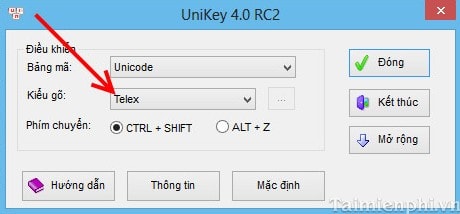
Select keyboard
With keyboards like Unikey or Vietkey, you should use Text typing as the current typing style, because this typing style is quite familiar and has advantages compared to other typing styles like VNI, when typing, the speed of movement to press will be less and with Text type you may not have to move too far to press the key, less tired during the typing process due to having to move. Therefore, Text type is the recommended type in this process.
Type with all 10 fingers
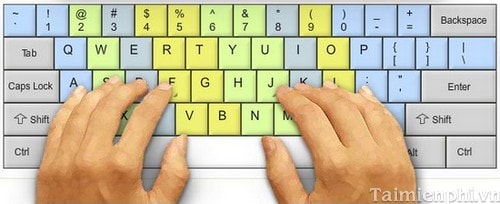
Place your 10 fingertips on areas like the little finger of your left hand controls the keys A, Q, Z, 1 and the outermost key, and your fourth finger on your left hand will control the next 6 keys and the next 2 numbers, and your thumb on the space bar, as if you let your 10 fingertips control those only keys. It's as if you're forming a key classification for your fingers. With fingers like the little finger, it's difficult to use it to press because it's too weak, but it's just because you're not used to it.
Don't look at the keys
You may be a little skeptical about this, but in fact, practicing this skill requires you to accurately identify the location of the keys. From there, you will form the key positions and not need to look at the keyboard while typing. You need to write down the key positions over and over again until you are familiar with them. This helps you identify the keys. At first, you will definitely have to look, but you should limit looking at the keyboard as little as possible. Although it is very difficult and slow to practice without looking at the keyboard at first, this is a very effective habit later on.
2. Use for support tools
This is a skill that you have reached proficiency but is still slow, you can apply this method to improve your typing ability.
Using the software
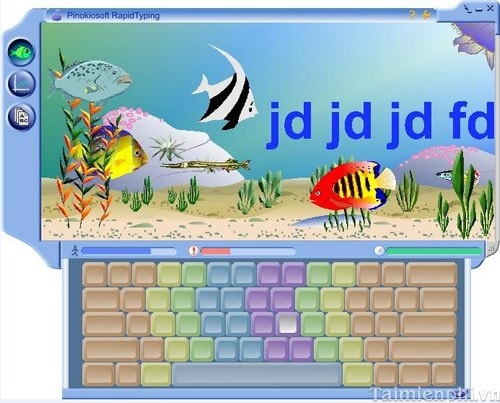
With some quite effective software to help you practice typing with 10 fingers quickly such as TypeFaster Typing Tutor, Typing Trainer, Portable RapidTyping,. You can choose the most suitable software for practice.
Every day you need to spend 15 minutes to practice typing with this software, then your typing speed will improve. Stop, because this is the standard level when you reach 60 words/minute.
Join as a member of the website.
You can join websites, social networks or online communities to practice your 10-finger typing skills. You can practice with different languages after registering an account. This way, you will become more flexible with languages.
Practice typing according to the program.
You can watch a video with subtitles or a song and type along with the words, but to get to this point you need to hit the 80 words per minute threshold.
3. Practice regularly
Apply the above steps and maintain regular and continuous typing test to make this technique more solid. Once you reach above 120 words / minute, it is great.
Practicing typing with 10 fingers helps you enter data faster and more accurately, improving work efficiency. You need to focus on hand posture, finger placement and appropriate practice methods. This helps you master this skill.
In addition, using 10-finger typing practice software such as TypingMaster or Typingtop can help improve your speed significantly. Check your progress with online typing speed tests to evaluate your improvement after a period of practice.
Final Thoughts
The most reliable way to handle tips for effective 10-finger typing is to follow the process in order, verify each important setting, and test the result before moving on. Use the guidance above as a practical reference, then adjust the details for your device, software version, or specific goal.
FAQ
What should I know first about Tips for Effective 10-finger Typing?
Practicing typing with 10 fingers not only helps you type faster but also improves accuracy.
How do I get the best results with Tips for Effective 10-finger Typing?
Use current software or equipment, follow the steps in order, review the recommended settings, and test one change at a time so you can identify what improves the result.
What should I do if Tips for Effective 10-finger Typing doesn't work as expected?
Check compatibility, permissions, connectivity, and version-specific settings. Restart the relevant device or app, then repeat the process carefully before trying a more advanced fix.
Related Articles
 Tux Typing - Free Typing Practice Tool for Kids: Main Insights6 minutes read
 How to Practicing Fast and Efficient 10-Finger Typing for Beginners7 minutes read
 Practice Typing with 10 Fingers, Effective 10-Finger Typing Practice Software5 minutes read
 Software for Practicing 10-Finger Typing and Increasing Typing Speed11 minutes read
 How to Download and Use Kiran's Typing Tutor to Practice 10-Finger Typing8 minutes read
 How to Install Rapid Typing Tutor and Practice 10-Finger Typing5 minutes read
Reader Comments 0
Sign in with email or Google to join the discussion.