Table of Contents
To use a reverse-cycle air conditioner for heating, turn the unit on, press MODE until HEAT or a sun symbol appears, set a temperature above the current room temperature, and allow the system a few minutes to begin blowing warm air. HEAT is available only on heat-pump or two-way models; a cooling-only unit cannot produce warm air.
Remote layouts and temperature ranges vary by model, so the unit's manual remains the final authority. The steps below cover the controls and behavior common to most Daikin, Panasonic, Mitsubishi, Funiki, LG, Samsung, Toshiba, Sharp and similar split systems.
How heating mode works
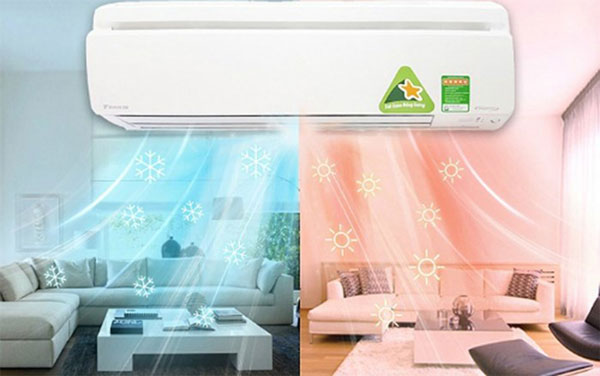
A reverse-cycle air conditioner is an air-source heat pump. In cooling mode, it transfers heat from the room to the outdoors. In heating mode, a reversing valve changes the refrigerant flow so the outdoor coil collects heat and the indoor coil releases it into the room. The fan then circulates that warmed air.
The compressor and fans use electricity, but the system is moving heat rather than creating all of it with an electric resistance element. Actual consumption depends on the unit's efficiency, the indoor and outdoor temperatures, insulation, room size, maintenance and the chosen setpoint. Some models also have auxiliary electric heat, which can increase power use when active.
Two normal behaviors can look like faults:
- Warm-up delay: the indoor fan may pause after HEAT is selected so it does not blow cold air.
- Defrost cycle: in cold, damp weather, the outdoor unit may temporarily stop heating while it removes frost. Heating should resume automatically.
How to turn on HEAT mode
- Confirm that the model supports heating. Look for HEAT, a sun icon, or a heating specification on the label or in the manual.
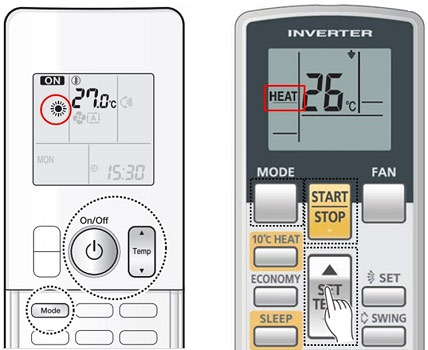
- Press ON/OFF or START/STOP.
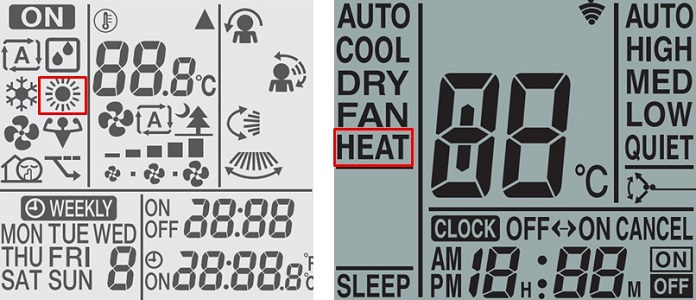
- Press MODE repeatedly until HEAT or the sun icon appears.
- Use TEMP +/− or the arrow buttons to set a temperature higher than the current room temperature.
- Choose AUTO fan speed initially. If available, direct the louver downward or enable swing so rising warm air mixes through the room.
- Wait through the unit's normal warm-up period before judging the output.

On many remotes, the common symbols are a snowflake for COOL, a water drop for DRY, a fan for FAN-only mode and a sun for HEAT. TipsMake's guide to air-conditioner remote symbols explains the usual icons.
If the air conditioner is already running
Press MODE until HEAT appears, raise the setpoint above room temperature and wait for the compressor and indoor fan to change operation. You normally do not need to switch the unit off first.
If HEAT does not appear
The unit may be cooling-only, the remote may belong to a different model, or a central/multi-split controller may restrict the available modes. Check the model number and manual rather than forcing a sequence intended for another brand.
Brand-specific controls
The basic MODE → HEAT → TEMP sequence is common, but button names and optional functions vary even within the same brand. A remote may show HEAT as text, a sun icon or both. Some systems hide heating when connected to a cooling-only outdoor unit.
- Daikin and Funiki: commonly use MODE to cycle through AUTO, COOL, DRY, FAN and HEAT on compatible models.
- Panasonic: compatible two-way models generally show HEAT after MODE is pressed. Do not assume a temperature-conversion shortcut applies to every remote.
- Mitsubishi: compatible models also use MODE, but symbols and fan/louver controls vary by controller series.
- LG, Samsung, Toshiba and other brands: verify that HEAT is listed for the exact indoor and outdoor unit combination.
For illustrated examples, see the TipsMake instructions for a Panasonic air-conditioner remote or an LG air-conditioner remote. Use those layouts only when they match your controller.
What temperature should you set?
Start with a moderate setpoint—often around 20–22°C—and adjust for comfort, clothing, room use and local conditions. A higher setpoint does not make the unit heat faster; it simply asks the system to run until the room reaches a higher temperature.
Avoid a large gap between indoor and outdoor temperatures when it is not needed. Every home is different, but reducing the setpoint slightly, using a timer and heating only occupied rooms generally cuts energy use. For bedrooms, use the sleep or timer function if the manual says it is available in HEAT mode.
Does HEAT use more electricity than COOL?
There is no universal answer. Heating and cooling use the same refrigeration system, but the workload changes with outdoor temperature, humidity and the temperature difference the unit must maintain. Heating can draw more power during very cold weather or when auxiliary resistance heat operates. In mild conditions, an efficient heat pump can warm a room with less electricity than a portable resistance heater delivering the same amount of heat.
Compare the heating input, seasonal efficiency rating and operating range on the exact model's specification sheet. Do not rely on a fixed percentage difference between heating and cooling.
How to heat efficiently
Use a correctly sized system
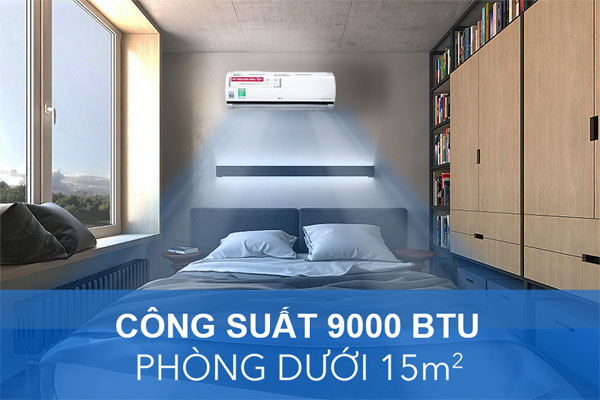
Capacity depends on more than floor area. Ceiling height, insulation, windows, sun exposure, outdoor climate and occupancy all matter. An undersized unit may run continuously without reaching the setpoint; a badly oversized unit may cycle inefficiently and control temperature poorly. Use a qualified load calculation when choosing or replacing equipment.
Reduce heat loss
Close exterior doors and windows while heating, seal obvious drafts and use curtains after sunset. Keep the indoor-unit intake, outlet and outdoor-unit airflow clear. Do not cover either unit.
Let the thermostat work
Avoid repeatedly switching the system off and on or making large setpoint changes. AUTO fan is usually a sensible starting point. If heat collects near the ceiling, direct the louver down or use a low-speed ceiling fan in its winter direction, where appropriate.
Clean the filters
Dust restricts airflow and can reduce comfort and efficiency. Inspect washable filters regularly and clean them according to the manual; the correct interval depends on use, pets and dust levels. Arrange professional maintenance for inaccessible coils, refrigerant problems, drainage issues or electrical faults.
Manage dry-feeling air safely
Heating raises air temperature and can lower relative humidity, which may make the room feel dry. Ventilate appropriately and, if needed, use a clean humidifier with humidity control. Avoid over-humidifying, because condensation on windows or walls can encourage mold.
Use timers and energy-saving features
Schedule the unit around occupancy instead of heating an empty room. ECO, ECONO, sleep and occupancy-sensor functions behave differently by model, so check the manual. TipsMake also covers broader air-conditioner energy-saving settings.
Why the air conditioner is not heating
- Wrong mode: confirm that the display says HEAT or shows a sun—not AUTO, COOL, DRY or FAN.
- Setpoint too low: set the target above the measured room temperature.
- Normal delay or defrost: wait for the cycle described in the manual to finish.
- Dirty filter or blocked airflow: switch the unit off and clean only user-serviceable filters as instructed. Clear leaves or snow from around the outdoor unit without touching internal parts.
- Multi-split mode conflict: indoor units sharing one outdoor unit may have to operate in the same heating or cooling mode.
- Remote problem: replace batteries, confirm the remote is transmitting and check for a timer, child lock or central-control restriction.
- Outdoor-temperature limit: every heat pump has an approved operating range. Performance may fall or the unit may stop outside that range.
- Fault: an error code, burning smell, repeated breaker trip, ice that does not clear, unusual noise or no heat after the normal startup period requires professional service.
Do not repeatedly reset a tripping breaker, open refrigerant lines or remove electrical covers. Turn the system off and contact a qualified technician if there is an electrical smell, smoke, damaged wiring or persistent fault code.
Related Articles
 How to Use Heating Mode on Proper Air Conditioning, Efficient5 minutes read
 Mysteriously Saving Electricity with Dry Mode on Air Conditioner5 minutes read
 Does the Bathroom Heating Lamp Cost Electricity?9 minutes read
 Learn Japanese the Secret to Saving Electricity Effectively When7 minutes read
 Things to Consider Using Air Conditioner for Babies in the Cold6 minutes read
 Things to Note When Using a Winter Heating Fan7 minutes read
Reader Comments 0
Sign in with email or Google to join the discussion.