Table of Contents
To type without looking at the keyboard, learn the home-row positions, use consistent fingers for each key, and practice slowly enough to avoid repeated mistakes. Speed develops through familiarity; there is no fixed deadline for mastering the skill.
The finger assignments below apply to a standard English QWERTY keyboard. Other layouts need a matching practice course.
1. Find the home row by touch
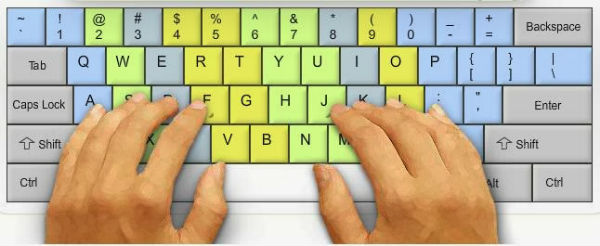
Home-row finger placement for touch typing.
Place your left hand on A S D F and your right hand on J K L ;. The raised marks on F and J on most keyboards help your index fingers find their starting positions. Let either thumb operate the spacebar.
Left hand
| Finger | Home key |
|---|---|
| Little | A |
| Ring | S |
| Middle | D |
| Index | F |
| Thumb | Spacebar |
Right hand
| Finger | Home key |
|---|---|
| Index | J |
| Middle | K |
| Ring | L |
| Little | Semicolon (;) |
| Thumb | Spacebar |
After reaching for another key, return toward the home row. Start with simple combinations such as asdf jkl;, then short words using those letters.
2. Give each finger a consistent group of keys
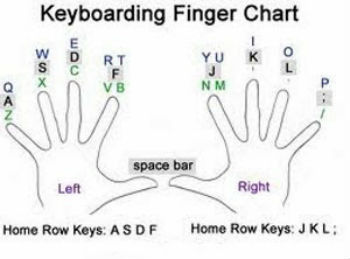
Finger zones on a QWERTY keyboard.
Left-hand letter keys
| Finger | Keys |
|---|---|
| Little | Q, A, Z |
| Ring | W, S, X |
| Middle | E, D, C |
| Index | R, T, F, G, V, B |
| Thumb | Spacebar |
Right-hand letter keys
| Finger | Keys |
|---|---|
| Index | Y, U, H, J, N, M |
| Middle | I, K |
| Ring | O, L |
| Little | P, semicolon, slash |
| Thumb | Spacebar |
Learn punctuation, number-row keys, Shift, and Backspace gradually with a tutor suited to your layout. For capital letters, practice holding Shift with the opposite hand. Avoid stretching painfully to follow a diagram; adapt your setup or technique when necessary.
3. Arrange the keyboard comfortably
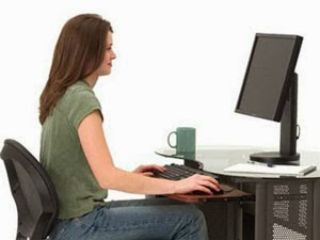
Set up your chair and keyboard before practicing.
Keep the keyboard centered in front of you and close enough that your shoulders stay relaxed. Adjust its height so your wrists remain roughly straight rather than bent upward or sideways. Do not press your wrists against a hard desk edge while typing. Change position and take breaks rather than holding one posture for a long session.
4. Practice accuracy before speed
- Choose a short lesson in a touch-typing practice website.
- Keep your eyes on the screen. If you lose position, locate F and J by touch and slow down.
- Repeat troublesome key pairs before moving on to whole sentences.
- Include capitals and punctuation, then practice text similar to what you type at work or school.
- Compare both accuracy and speed over several sessions; a faster score with many errors is not a useful improvement.
If you prefer guided desktop lessons, see how to practice with RapidTyping. Short, regular sessions are easier to sustain than occasional rushed tests. Increase the pace only while your movements remain controlled.
Related Articles
 Tux Typing - Free typing practice tool for kids
 How to Learn Touch Typing: A Beginner's Practice Guide
 5 Touch-Typing Programs for Windows and Offline Practice
 Typing 10 fingers, practice typing with 10 fingers fastest
 RapidTyping - Download RapidTyping here
 10 Typing Games for Kids to Build Speed and Accuracy
Reader Comments 0
Sign in with email or Google to join the discussion.