Table of Contents
Explore tips to convert units in word extremely quickly without installing.
How to enable unit conversion tool in Word is very simple
Step 1
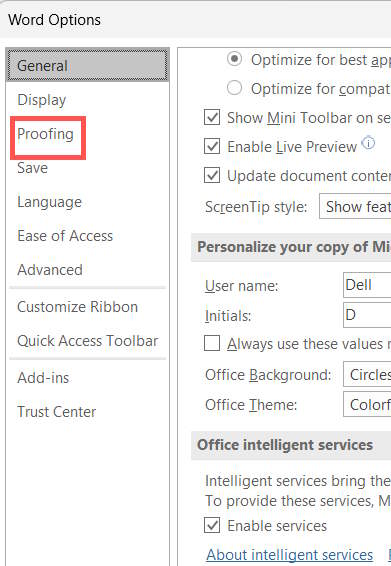
At the Word interface, click File, then click Options , then select Proofing in the next display interface.
Step 2
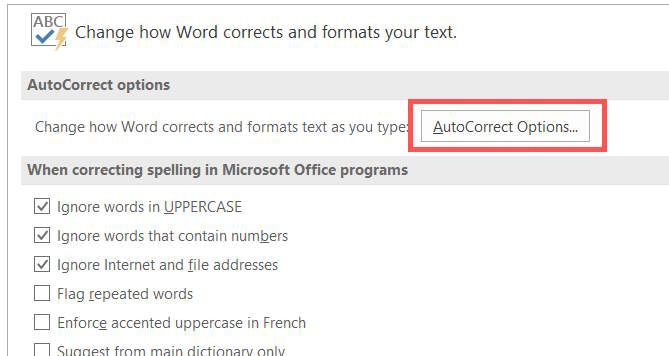
Look at the content next to you and click on AutoCorrect Options .
Step 3
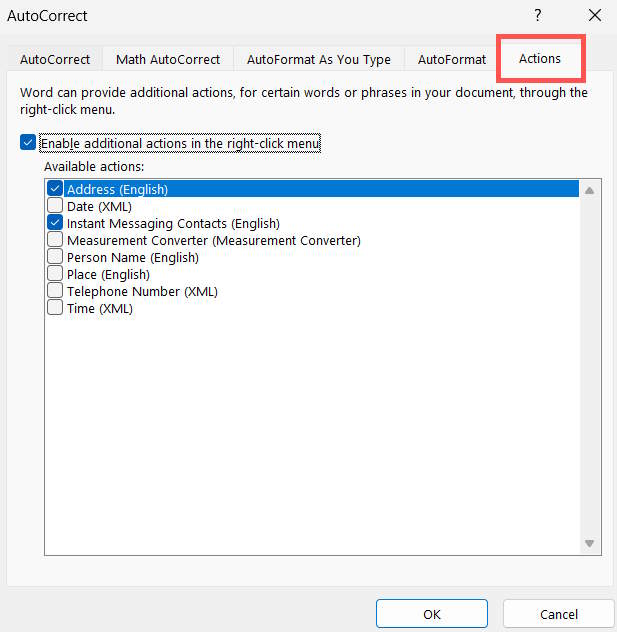
To display the new interface, click on the Actions tab and then select Enable additional actions in the right-click menu below.
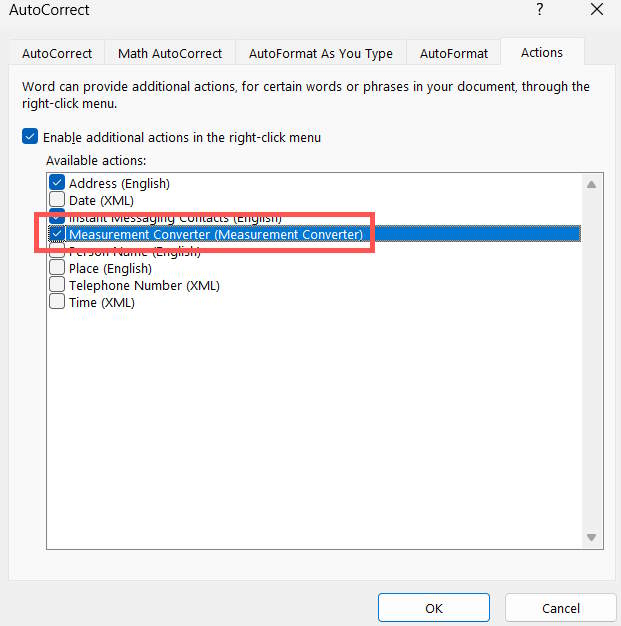
Then scroll down and select Measurement Converter to display the measurement unit conversion tool in Word via the right-click menu. Click OK below to save.
Instructions for converting units in Word
Once you have enabled the unit converter in Word, using it is very easy. You will not have to convert units manually anymore.
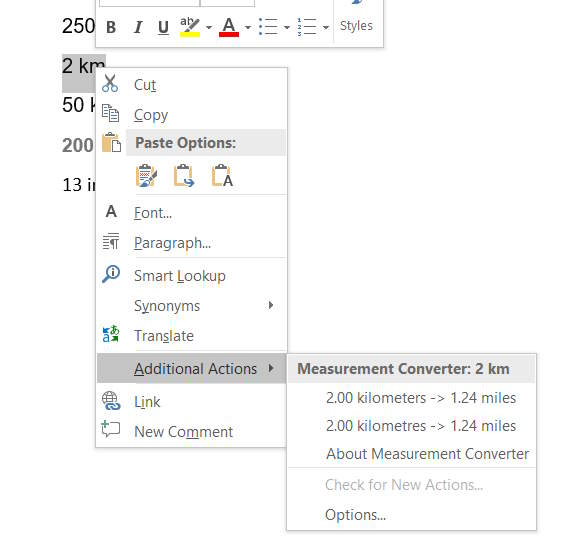
We enter numerical data into Word as usual. Highlight the data that needs to be converted to a unit of measurement, then right-click and click Additional Actions and you will see the conversion of the unit of measurement with units that support conversion as shown.
Some other actions in Word you can refer to.
|
Act |
Describe |
Available in |
|---|---|---|
|
Address (English) |
Support for Smart Tags in previous versions of Office up to Office 2010 only. |
Word Outlook |
|
Date (XML) |
Allows you to schedule a meeting or view Outlook calendar contents on a specific date. |
Word Outlook PowerPoint Excel |
|
Financial Symbol (XML) |
Allows you to view information about a stock ticker symbol. |
Word Outlook |
|
Instant Messaging Contacts (English) |
Lets you send a quick message to someone from right inside an Office document. |
Word Outlook |
|
Measurement Converter |
If your document originates in another country, you can insert this action to convert inches to centimeters while processing the document. |
Word Outlook PowerPoint |
|
Person Name (English) |
Allows you to view Outlook contact information associated with a name. |
Word Outlook |
|
Place (XML) |
Support for Smart Tags in previous versions of Office up to Office 2010 only. |
Word Outlook |
|
Telephone Number (XML) |
Support for Smart Tags in previous versions of Office up to Office 2010 only. |
Word Outlook |
|
Time (XML) |
Support for Smart Tags in previous versions of Office up to Office 2010 only. |
Word Outlook |
Final Thoughts
Understanding tips to convert units in word extremely quickly without installing the application makes it easier to evaluate the information and apply the most relevant recommendations. Focus on the key points above and verify details that may change over time.
FAQ
What is tips to convert units in word extremely quickly without installing the application?
Explore tips to convert units in word extremely quickly without installing.
What key points does this article cover?
The article focuses on How to enable unit conversion tool in Word is very simple, Step 1, Step 2, with practical explanations and examples.
How can you use this information in practice?
Use the explanations to compare options, verify important details, and make a more informed decision. Apply the recommendations that best match your goals and situation.
Related Articles
 How to Convert Measurement Units in Microsoft Word 20072 minutes read
 Instructions on How to Change Inch to Cm in Word 20073 minutes read
 How to Adjust to Cm Units in Word, Excel2 minutes read
 How to Quickly Convert Units via Live Text iPhone3 minutes read
 Convert PDF to Word, Convert PDF Files for Free12 minutes read
 Convert Word Files to PDF, Convert DOC / DOCX Files into PDF Quickly4 minutes read
Reader Comments 0
Sign in with email or Google to join the discussion.