Table of Contents
This updated guide explores new Windows tool makes moving to a new PC easier with practical details, clear explanations, and useful takeaways. Switching to another PC can be a pain unless you decide to plug in a storage drive. Microsoft has now been spotted testing a wireless data transfer feature that would make switching PCs a breeze.
- Windows is now smart enough to change settings for you
Transferring Data Between PCs Will Soon Be Easy
Windows has a built-in backup app that lets you quickly restore files and settings from your old PC via OneDrive. Still, it is not a perfect solution, and unless you have many OneDrive storage, it will not be very useful beyond transferring your Windows settings.
As spotted by Phantom of Earth on X, there's a new option to transfer files to a new PC in the Windows Backup app. This isn't your typical cloud transfer, but rather what appears to be a new wireless transfer mechanism between two Windows PCs connected to the same Wi-Fi network. When one PC initiates the transfer, you'll receive a 6-digit passcode to enter on the second PC to connect.
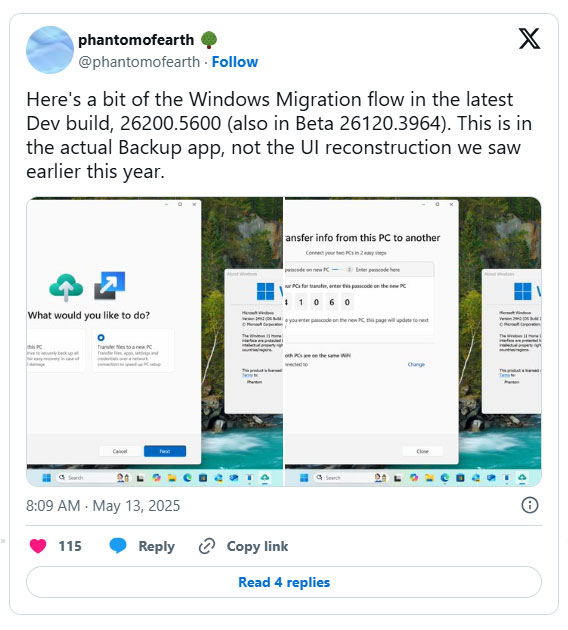
The description notes that the feature can transfer files, apps, settings, and credentials over the network. To be clear, the current Windows Backup app only lets you back up files from your Desktop, Documents, and Pictures folders to OneDrive, and it remembers your installed apps, pinned app preferences, accounts, Wi-Fi network passwords, other login information, and your Windows settings and preferences.
If implemented, this would make moving from an old PC to a new one a significantly better experience. Right now, even if you back everything up with Windows Backup, you still have to manually install all your apps after the move. The best way to copy your Windows installation is to move your entire storage drive between computers or clone your existing storage drive.
Windows has had a file transfer tool for transferring data between two PCs for a long time. Windows Easy Transfer debuted in Windows XP Service Pack 2 and was included with the operating system through Windows 8.1. This tool lets you transfer data between two PCs using a network connection, an external storage device such as a USB or CD/DVD, or a special USB cable designed to transfer data directly between two PCs.
Microsoft Feature Release Log
Given how unreliable Nearby Share, Windows 11's built-in wireless transfer tool, has been, this could be another attempt to finally fix Windows' wireless transfer woes. But do not get your hopes up until the feature starts rolling out in the stable build of Windows 11.
Unfortunately, Microsoft has a track record of releasing fairly unstable features that are discovered during testing. So just because a Windows backup feature is discovered, it does not necessarily mean it will make it into stable releases.
With Windows 10 reaching the end of support, the new feature should at least make the transition to Windows 11 easier. With new warnings for Windows 10 users, Microsoft is desperate for people to upgrade to its latest operating system.
FAQ
What is the main takeaway about New Windows Tool Makes Moving to a New PC Easier?
The key is to understand the core idea, compare the available options, and apply the practical guidance that matches your situation.
What should beginners know about New Windows Tool Makes Moving to a New PC Easier?
Start with the essential steps and terminology. Avoid changing advanced settings until you understand how they affect performance, privacy, cost, or compatibility.
How can I use this information in practice?
Follow the relevant section in order, test one change at a time, and confirm the result before moving to the next step or recommendation.
Related Articles
 Microsoft Supports Transferring Data from Windows XP to Windows 7, 84 minutes read
 Upcoming Windows 11 Feature Lets You Switch to a Cloud PC in a Jiffy3 minutes read
 5 Ways to Make Your Switch from Windows to Linux Easier: Practical Guide7 minutes read
 How to Enable / Disable 'Make Taskbar Icons Easier to Touch'3 minutes read
 Tricks to Make Windows 'Easier': Tips and Examples1 minutes read
 5 Apps to Make Switching from Mac to Windows Easier: Top Picks and Buying Guide7 minutes read
Reader Comments 0
Sign in with email or Google to join the discussion.