Table of Contents
This article explores Microsoft supports transferring data from Windows xp to Windows 7, 8 with straightforward explanations and useful context. It also highlights common questions and important details to consider.
How Microsoft Supports Transferring Data from Windows XP to Windows 7, 8 Works
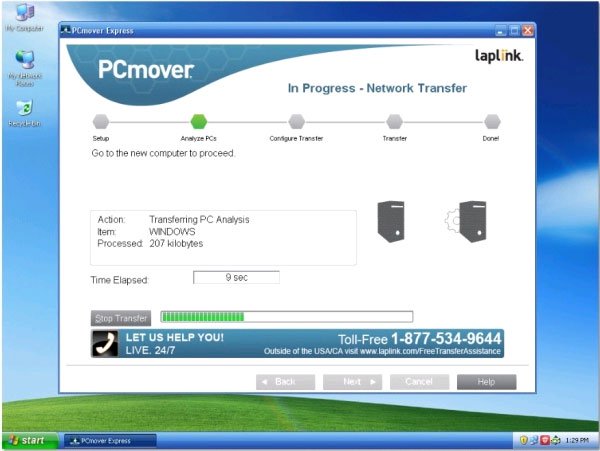
This is a product that Microsoft cooperates with Laplink, it will copy all files and settings from your Windows XP computer to a new computer running Windows 7, Windows 8 or Windows 8.1.
" This tool will copy files, music, videos, profiles and user settings from your old computer to a new computer, over the Internet, and even allow major customized Windows XP users. determine what they want to bring to their new device , "Microsoft's marketing and communications director, Brandon LeBlanc , shared on its blog.
The English version of this tool will allow this weekend download on WindowsXP. com . French, German, Italian, Japanese, and Spanish versions will be available by the end of March. The Korean, Chinese, Russian and Portuguese versions will be released eventually. It is unclear whether this tool has a Vietnamese version.
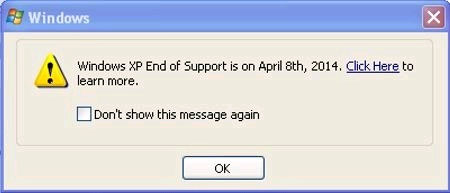
Meanwhile, to ensure all users receive messages, Microsoft is planning to send an official notice to Windows XP Users that the operating system they are using will be Stopped support on April 8. . The notifications window appears on your screen and it includes a link to the Windows XP support notification site, where you can find more information. This message appears on the 8th day of the month until you turn it off.
If you are not sure which version of Windows you are using, visit AmlRunningXP. com . If this site finds out that you are using Windows XP it will give you a way to upgrade before April 8.
Laplink Also provides users who want to copy applications from Windows XP to Windows 7, Windows 8, or Windows 8.1 with PCmover Professional Version . Unfortunately this professional version is chargeable.
FAQ
What is the main benefit of Microsoft supports transferring data from Windows xp to Windows 7, 8?
The main benefit is a clearer understanding of the topic and a practical way to apply the information covered in this guide.
What should I check before using Microsoft supports transferring data from Windows xp to Windows 7, 8?
Confirm compatibility, review the required settings, protect important data, and use the latest supported version whenever possible.
What should I do if the result is different?
Repeat the steps carefully, verify permissions and version differences, and consult the product's official support documentation for changes not shown in the article.
Related Articles
 Dell Mobile Connect Supports Transferring Data from iPhone3 minutes read
 Ways to Transfer Data from an Old iPhone to a New iPhone10 minutes read
 How to Transfer Data from Android to Mac Computer8 minutes read
 Microsoft Releases Windows ML: A Unified AI Platform for Windows 11: Key Facts3 minutes read
 How to Prevent Microsoft from Automatically Downloading Windows5 minutes read
 Implement These Tasks First When Transferring Data to Windows5 minutes read
Reader Comments 0
Sign in with email or Google to join the discussion.