Table of Contents
Compare Lark, Google Docs, Zoho Writer, LibreOffice Writer, and WPS Writer for document editing, collaboration, offline use, and Word-format compatibility.
Before switching: Free tiers, offline access, storage, ads, collaboration features, and DOCX formatting support vary. Test complex documents before moving an important workflow.
Microsoft Word has long been a common choice for word processing. It's a powerful tool many are familiar with, from school essays to professional reports. But as work evolves, so do our needs. Finding free word-processing software isn't just about finding a free alternative to Microsoft Word; it's about finding a Microsoft Word equivalent that truly enhances productivity. Here are some suggestions worth trying.
Lark
Lark is more than just an alternative to Microsoft Word; it's a comprehensive digital workspace designed to unify your team's communication, creativity, and project management. It seamlessly integrates powerful document editing capabilities with chat, tasks, calendar, and cloud storage, eliminating the need to constantly switch between different applications. This all-in-one approach simplifies workflows and fosters a truly collaborative environment where work gets done faster.
Google Docs
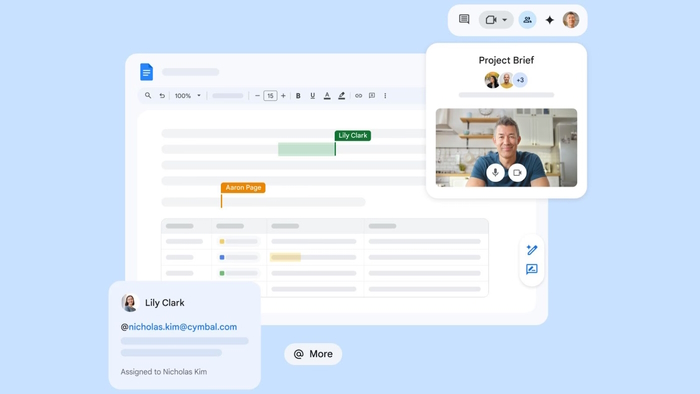
Google Docs allows you to create, collaborate on, and share documents, spreadsheets, presentations, drawings, and even forms. Google Docs is packed with features and can be further expanded with various add-ons. While it automatically saves files online and stores them there, you can also publish documents as web pages, download them, or email them as attachments in Word, ODT, PDF, plain text, or RTF formats. You can invite collaborators to work on the document or allow others to view it without editing capabilities.
If you're worried about relying on an internet connection to work with your documents, don't worry. You can enable offline access to Google Docs and continue editing your documents even when you don't have an internet connection. All you need is a free Google account.
Zoho Writer
Zoho Writer is a feature-rich, free word processor similar to Word, focused on creating a clean, distraction-free writing environment. Its highlight is its powerful AI-powered writing assistant, Zia.
Key features:
- The AI assistant helps with grammar, style, and reading comprehension.
- An extensive document formatting and automation tool.
- Strong integration with the Zoho suite of applications and other third-party applications.
LibreOffice Writer
LibreOffice is a free, open-source program developed from the popular Apache OpenOffice. It's designed as a free alternative to Word and replicates most of Word's features. This makes it a good alternative to Word.
LibreOffice's Writer application has all the necessary features for writing and designing most documents. There are numerous choices of fonts, colors, heading styles, and formatting options. It comes with a good collection of templates and can handle everything from a quick memo or note to a complex report with charts, graphs, and diagrams.
In addition to its real-time automatic spell check, LibreOffice also has an auto-completion feature. It suggests common words and phrases as you type to save time and avoid careless mistakes. It uses a built-in dictionary and scans documents to understand context and improve its suggestions. The most disappointing aspect is the rather basic grammar checker, which lacks advanced tools.
LibreOffice is compatible with Word and WPS documents, and you can save files in DOC, DOCX, WPS, and PDF formats, so you can easily share them with others.
WPS Office Writer
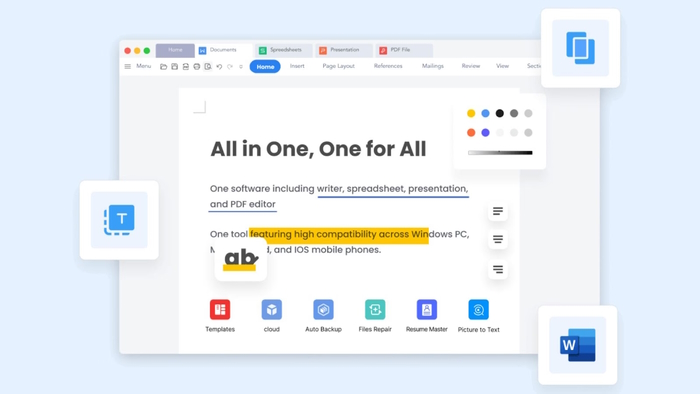
WPS Office Writer is a free, lightweight yet powerful text editor for Windows 11 and other platforms. It is highly regarded for its familiar user interface and excellent compatibility with Microsoft Office formats.
Key features:
- The tabbed interface makes managing multiple documents easy.
- Excellent compatibility with Microsoft Word files.
- Includes a PDF editor and multiple cloud storage options.
In summary, the free alternatives to Microsoft Word mentioned above have the following outstanding advantages:
| Software | Most suitable | Key features | Price |
| Lark | All-in-one team collaboration | Chat, text editing, and tasks | Free & Paid |
| Google Docs | Real-time cloud collaboration | Seamless integration of sharing and co-editing. | Free of charge |
| Zoho Writer | AI-powered writing support | Advanced formatting and grammar check | Free & Paid |
| LibreOffice Writer | A fully featured open-source office suite. | Offline editing and compatibility with popular formats. | Free of charge |
| WPS Office Writer | Familiar interface and high compatibility. | A lightweight and free alternative to Word software. | Free & Paid |
Related Articles
 4 Open Source Text Editors That Can Replace Microsoft Word7 minutes read
 Link Download Microsoft Word 20194 minutes read
 10 Advanced Techniques Using MS Word: Microsoft Word 201011 minutes read
 9 Best Free Design Tools for Photos, Vector, 3D and Video9 minutes read
 Use the Microsoft Word Replace Feature to Invert the Words in the4 minutes read
 MS Word - Lesson 3: Customize the Word Environment5 minutes read
Reader Comments 0
Sign in with email or Google to join the discussion.