Table of Contents
This updated guide examines Talk to Foreigners When They Do Not Know the Language via Talk && and organizes the essential facts, background, and practical takeaways in clear American English.
There are not many apps that can help you chat with foreigners who do not know their language. Here is an application that can help you converse with foreigners who do not know their language.
- Chat with foreigners using the Chat feature on Google Translate
- How to translate all copied text with DeepL
- How to translate languages right on the camera with Google Translate
Quickly translate foreign languages with Talk & Translate
Step 1: First, download the Talk & Translate application, then select your language and the language of the country you will travel to.
Talk & Translate iOS


Step 2: Next, click on the microphone icon in the middle, then ask a question.


Then touch the native speaker's language, give it to them and they will answer your question.
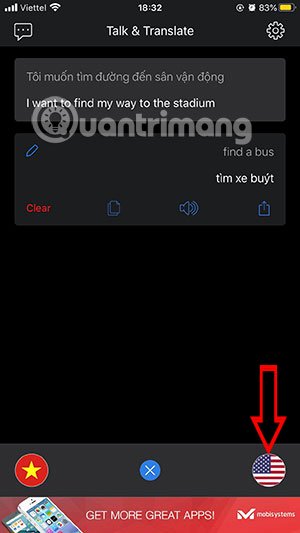
However, with the Talk & Translate app, you will get 5 sentences for free and only be translated into Vietnamese and English. If you want to break this limit, you only have to buy the Premium package.
FAQ
What is Talk to Foreigners When They Do Not Know the Language via Talk && about?
It provides a structured overview of language translation app, explains the main context, and highlights practical takeaways for readers.
Why does this topic matter?
Understanding the main concepts helps readers evaluate the issue, avoid common mistakes, and make better-informed decisions.
How should readers use this information?
Use the guidance as a practical starting point, confirm details that may have changed, and follow current product, safety, or security recommendations.
Related Articles
 Chat with Foreigners with the Chat Feature on Google Translate5 minutes read
 Translate Language on Viber5 minutes read
 How to Scan and Translate with Google Translate6 minutes read
 How to Translate Web Pages into Vietnamese, English or Any Language7 minutes read
 Google Translate May Have a 'Language Learning' Feature to Compete4 minutes read
 Google Translate Will Be Able to Automatically Identify the Language3 minutes read
Reader Comments 0
Sign in with email or Google to join the discussion.