Article on the subject of "file explorer crashes"
-

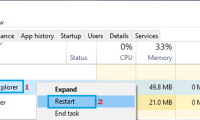
Fix File Explorer not responding error in Windows 11/10
if file explorer is not working, you will not be able to access files, folders, and drives on your computer. you can find below the steps to fix file explorer not responding issue in windows 10/11.
-
Fix File Explorer not responding error in Windows 11/10
if file explorer is not working, you will not be able to access files, folders, and drives on your computer. you can find below the steps to fix file explorer not responding issue in windows 10/11.
-
How to fix Working On It on File Explorer Windows 10
the quick access area is always opened first on file explorer. however, if quick access is slow, it will cause file explorer to crash.
-
How to fix File Explorer lag on Windows 11
fortunately, a simple registry edit can prevent file explorer from wasting time scanning files, resulting in significantly faster folder navigation.
-
Windows Explorer crashes, how to handle errors extremely quickly
windows explorer crashes on win 10+11 and you're 'tired' of this problem? don't worry because you can fix the error in some ways revealed by tipsmake in the following article.
-
Steps to fix slow Windows File Explorer
if you have to manage and work with files on a daily basis, file explorer performance issues can significantly hinder your productivity. fortunately, there are different ways to fix slow or unresponsive file explorer.
-
Files is a Windows File Explorer alternative that meets all user needs.
files, an open-source file manager, has completely replaced file explorer on many laptops. after using it for a while, many people claim they will never go back to using file explorer again.
-
Windows Explorer error repeatedly restarts and crashes, this is how to fix it
windows explorer is an important part of the windows operating system. however, recently, quite a lot of users reflect that in the process of using the computer windows explorer constantly restarted, making many users uncomfortable. in fact, there are many causes of errors. one of the common
-
7 Useful Changes Microsoft Should Make to File Explorer
file explorer is still an important part of windows, and with a few smart updates, microsoft could improve things even more for users.
-
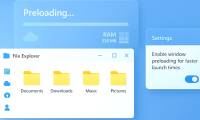
How to enable preloading File Explorer Windows 11
windows 11 insider preview build 26220.7271 will keep a file explorer window preloaded in the background, called preloading file explorer. this will reduce the latency of opening file explorer.
-
5 File Explorer search tips you need to know
imagine being able to find any file on your computer with just a few keystrokes! file explorer offers powerful search features that make locating files effortless.
-
6 Windows File Explorer add-ons that make life easier
windows file explorer does the job, but only just. no quick previews, clunky cloud access, and tedious batch operations make day-to-day file management more difficult than it needs to be.
-
6 Free Tools to Make Windows File Explorer Better
from instant file previews to automatic downloads, batch renaming, and faster file transfers, users can rely on a number of add-ons to fix any file explorer glitch.
-
Fix File Explorer error not working on Windows 10
here are a few solutions to help users overcome when file explorer errors do not work, each time opening the system data manager suddenly closed on windows 10.
-
5 best Windows File Explorer extensions to manage files on the system
if you use windows, it must be familiar, or rather, you have to work daily with file explorer. file explorer is the default file management tool for windows.
-
How to speed up File Explorer on Windows 11?
file explorer can be slow for a variety of reasons, making it difficult to use. here are some settings to speed up file explorer in windows.
-
7 notable changes in File Explorer Windows 11
windows file explorer is one of those areas where microsoft has made some interesting additions that older versions didn't have.
-
9 outstanding features of Solid Explorer you may not know
android has many different file managers. among all file managers, solid explorer is one of the best applications. solid explorer has a nice interface and users can optionally remove unnecessary features. and solid explorer can do more than that. here's what you probably don't know about solid
-
Why do many people prefer Windows File Explorer over macOS Finder?
if you're a user of both systems, many people still come back to file explorer because of its simplicity and more user-friendly features.
-
10 indispensable features of File Explorer
most windows users spend a lot of time in file explorer. however, there are specific features that people rely on to streamline their workflow and increase productivity.
-
Fix Windows Explorer crash on Windows 10
sometimes problems in windows 10 will cause windows explorer to fail. so how to restore windows explorer when it crashes? please see the details in this article!
 Home
Home Tech info
 Technology
 Science
 Life
Life Application
 Electric
 Program
 Mobile
 System