Table of Contents
Understanding smart assistant and 'talking' on Google chrome is easier when the main points are organized clearly. This guide brings together the essential details and practical considerations.
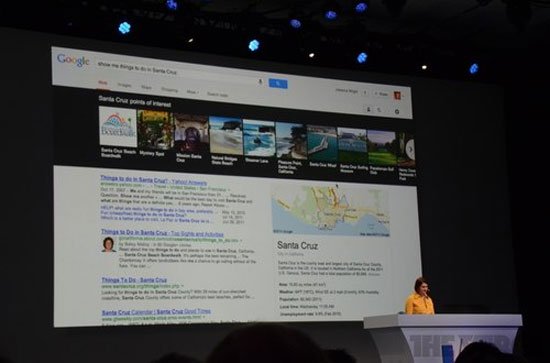
How Smart Assistant and 'Talking' on Google Chrome Works
Google today introduced a new voice search feature that it calls "unused interface " on the Chrome operating system and browser. With the latest version of Google Search , users just need to start by saying "Ok, Google" And Ask a question.
Like Siri or the previous voice search tool, questions can use natural language, Google data will be analyzed and output. Search can be personalized (users must enable this feature in Gmail). In live testing, a Google representative tried to send an email as well as view photos in a personal album when he arrived in New York, USA last year just by ordering.
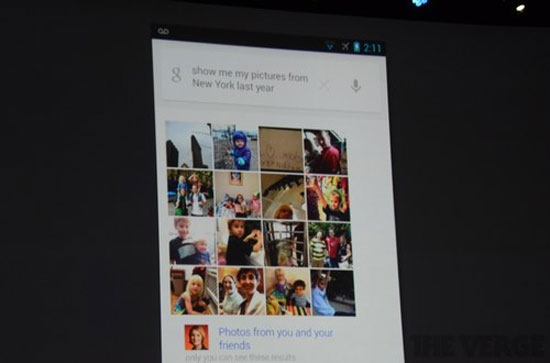 Searching on Chrome is more personalized and optimized with voice.
Basically, this is a transition from Google Now That allows users to personalize their device instead of just looking for general information. Owners can check appointments, create alarms, to-do notes, or even view newly booked flight information. Like other systems, to answer more accurately, users will have to provide more information.
Updates will soon be available for Chrome on IOS , Android .
FAQ
What is the main benefit of smart assistant and 'talking' on Google chrome?
The main benefit is a clearer understanding of the topic and a practical way to apply the information covered in this guide.
What should I check before using smart assistant and 'talking' on Google chrome?
Confirm compatibility, review the required settings, protect important data, and use the latest supported version whenever possible.
What should I do if the result is different?
Repeat the steps carefully, verify permissions and version differences, and consult the product's official support documentation for changes not shown in the article.
Related Articles
 The Words of 'Hegemony' of Google Assistant4 minutes read
 How to Set Up and Use Routines in Google Assistant7 minutes read
 Is Bixby or Google Assistant the Best Android Smart Assistant?8 minutes read
 This Is What People Ask Google Assistant13 minutes read
 Google I/O 2018: Google Introduces a Host of New Features Related to Android P, Assistant, Gmail9 minutes read
 Google Assistant Is Disappearing from Your Smartwatch4 minutes read
Reader Comments 0
Sign in with email or Google to join the discussion.