Table of Contents
Understanding siro - vietnamese virtual assistant exclusively for Android is easier when the main points are organized clearly. This guide brings together the essential details and practical considerations.
In this technological age, mentioning virtual assistants must be no stranger. Virtual assistant is a tool built on the basis of artificial intelligence (AI) and is integrated into the operating system by operating system developers, technology companies with the main purpose of supporting Assist users with devices more easily by the same habits that users often do on the device.
How Siro - Vietnamese Virtual Assistant Exclusively for Android Works
In order to help users to experience interesting features of virtual assistants, in this article Network Administrator will introduce you to Siro application, this is an application that is used completely in Vietnamese to help you easily Control your device with voice commands in Vietnamese. So what are you waiting for without downloading immediately to the device to experience.
Instructions for installing and using Siro virtual assistant
Step 1:
Visit the link below to download Siro virtual assistant to your device.
- Download Siro - Virtual Vietnamese assistant
Step 2:
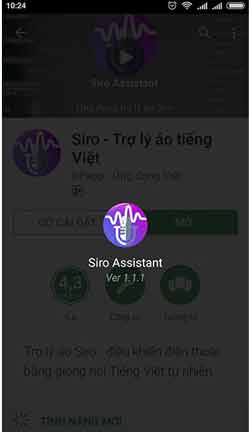
After the app installation is complete, you can launch the app to experience.
Note:
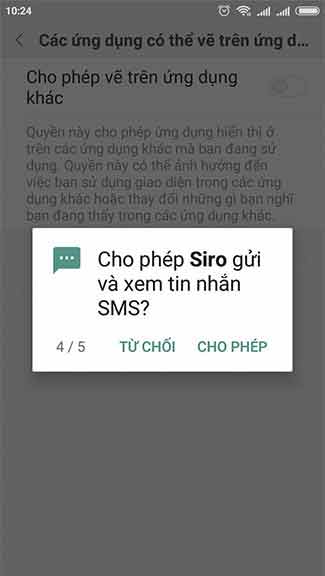
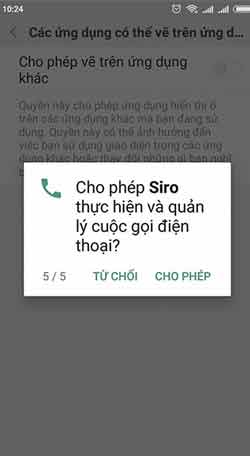
During the boot process, the system will ask users to accept some terms, please agree to grant access to help use the app better.
- Right to manage phone calls (To execute functions that call someone)
- Right to send and view messages (Execute message requests)
- Recording rights (To make voice requests)
- Access to contacts (To call and send messages correctly friends in contacts)
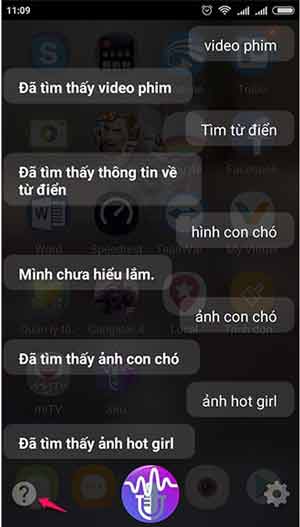
Another simple way to use it is to simply open the app, then click the Micro icon, then ask for the voice function.
Some features you can perform by voice
- Say: Find + certain keywords (Application will open Google to search for you)
- Say: video + certain keywords (Example: English pronunciation, Vietnamese language, playing. the app will open YouTube to search for you)
- Say: Photos + certain keywords (the app will open Google to search for you)
- Say: Check your primary or secondary account (the app will check your account)
- Say: Call + someone's name in the phone book (the app will use the phone call feature immediately without pressing the call)
- Say: Find the phone number + someone's name in the directory. (the app will display that person's number on the Siro screen).
- Send a message to [recipient name] as [message content].
- Set an alarm at [Read hours]
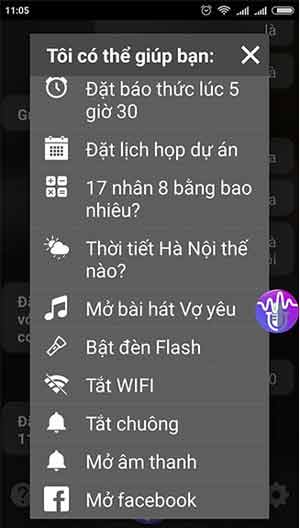
With interesting utilities from this virtual assistant, there's no reason not to download day use.
Hope you are succesful.
- How to use Bixby assistant on Galaxy Note 8
- How to install virtual assistant Google Assistant on Android 6.0 Marshmallow device and higher
- How to return to Google Now virtual assistant On Tap on Android
FAQ
What is the main benefit of siro - vietnamese virtual assistant exclusively for Android?
The main benefit is a clearer understanding of the topic and a practical way to apply the information covered in this guide.
What should I check before using siro - vietnamese virtual assistant exclusively for Android?
Confirm compatibility, review the required settings, protect important data, and use the latest supported version whenever possible.
What should I do if the result is different?
Repeat the steps carefully, verify permissions and version differences, and consult the product's official support documentation for changes not shown in the article.
Related Articles
 Instructions for Installing Google Vietnamese Virtual Assistant on5 minutes read
 Finally the Virtual Assistant Google Assistant Also Officially Launched on May 6, After the Release3 minutes read
 How to Use the Virtual Assistant Google Assistant Vietnamese on Android5 minutes read
 Google Assistant Vietnamese for iPhone Already on App Store, Please Download3 minutes read
 Virtual Assistant Google Assistant Will Support Vietnamese at the End of the Year3 minutes read
 Virtual Assistant Google Assistant Was Able to Directly Translate 27 Languages, Including Vietnamese3 minutes read
Reader Comments 0
Sign in with email or Google to join the discussion.